Tuesday, April 3, 2018

The Art of Trolling as a Marketing Strategy by the Bard of Bat Yam (#BardOfBatYam) , Poet LaureateOf Zion (#POetLaureateOfZion) and Stephen Darori


Spotify

We were once responsible for describing our own tastes, which meant we sometimes lied about them. At the very least, we had strategically selective memories. I could tell you which Pitchfork bands I’d been loving lately — conveniently omitting how many times I’d listened to the original recording of Jesus Christ Superstar in the past week. I might’ve talked up a sleeper indie film only playing in a handful of arthouse theaters, mentioning how the director had become a favorite of mine, without admitting that I’d seen Blade II twice. It used to be up to friends and family to call out our trashier interests.

But streaming services have put an end to that. Each year-end now brings massive number dumps from the likes of Spotify and Netflix, as if to remind us exactly how much personal information they can hoover up through users’ relationship to entertainment. Perversely enough — and to a strange acclaim in the world of creative marketing — these two digital giants have used their extensive findings to roast their outlying customers.


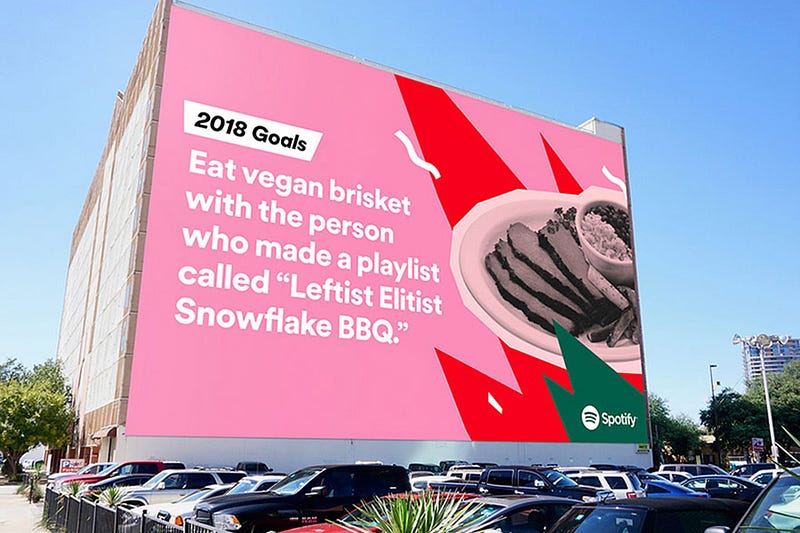
In 2016, Spotify made a splash with an ad campaign that drew on the inexplicable (or all-too-telling) activity of individuals who use the app. “Dear person who made a playlist called ‘One Night Stand With Jeb Bush Like He’s a Bond Girl in a European Casino’: We have so many questions,” read one billboard. Another, gracing the side of Manhattan’s Port Authority, where millions must have read it: “Dear person who played ‘Sorry’ 42 times on Valentine’s Day: What did you do?” Who knows if the anonymously burned parties ever saw the signs, but if so, they probably started investing in a vinyl collection.
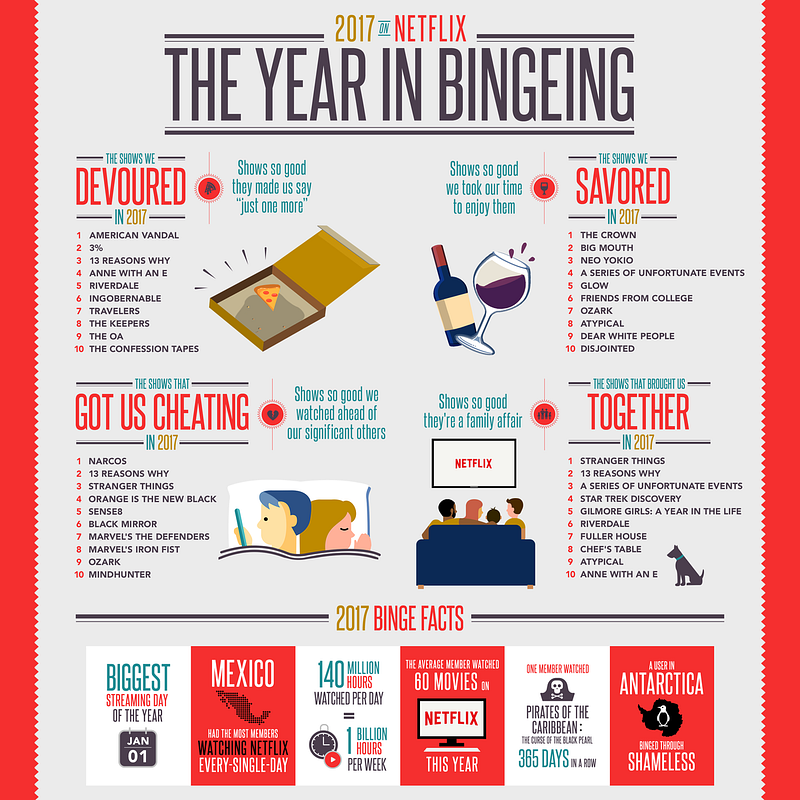


Netflix followed suit this week, shaming streamers for a host of embarrassing behaviors. The company reported that someone in the U.K. had watched Bee Movie — the 2007 animated film starring Jerry Seinfeld, which has aged into canonical meme status — a whopping 357 times this year. Someone else watched the first Pirates of the Caribbean movie every single day. Netflix even somehow came up with a list of TV shows that “got us cheating,” i.e., watching ahead of our significant others. And over on Twitter, they mocked a small demographic clearly obsessed with the rom-com A Christmas Prince.
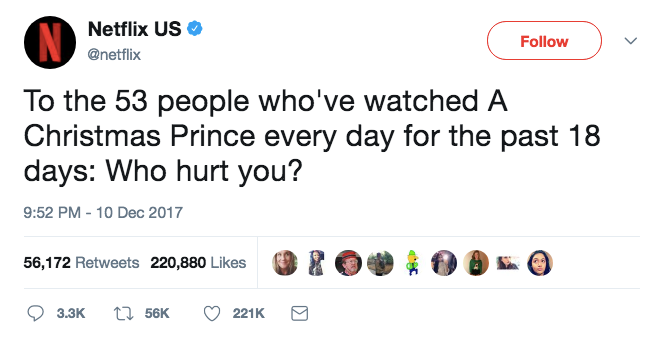


While the tweet appeared to have the intended effect — high engagement and people chuckling about the savage own — it also drew criticism from people creeped out by the close monitoring, as well as the implication that Netflix employees had made a sport of cherry-picking data.


While Spotify corporate has some creative distance from the musicians accessible on the platform, Netflix made and distributed this evidently shitty Christmas movie. Who are they to interrogate its fans? Shouldn’t they be happy to release a hit? And are we about to see McDonald’s put “a certain U.S. president” on blast for inhaling 600 Big Macs this year? It’s hard to think of a precedent for trolling-as-branding. True, the Twitter account for Wendy’s has gotten snarky now and then — but usually at rival restaurants or people who dissed them first. It’s totally different to slam the people who turn your profit. Then again, it squares perfectly with brands’ attempts to come off as just another witty social media friend. At this point, they’re even having conversations among themselves.
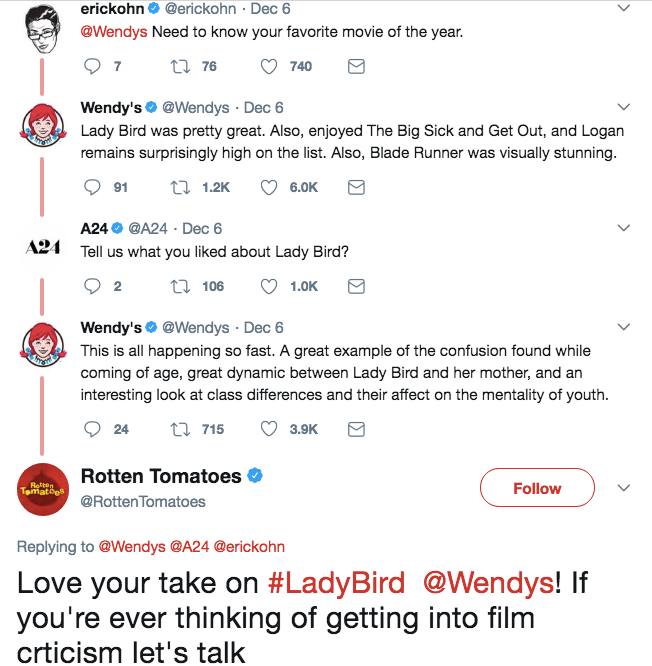


This tone reflects an understanding, in the social media departments of various media properties and food franchises, etc., that traditional promotional language is scorned by people who are online to goof around, get news, or share passions. Denny’s was one of the first to recognize this, amassing a following by adopting the surrealist style of Weird Twitter. But the flip side to this chill vibe is the casual put-down — the sort of ribbing that’s expected and fine between real friends but not altogether appropriate from Big Brother.

On balance, maybe we’d rather not have the receipts of our internet diet read back to us every December, and no website makes that clearer than Facebook. Whether it’s asking you to celebrate a “friendaversary” with someone you haven’t spoken to since a falling out or bumping a somber status on the death of a loved one via the “On This Day” feature, the social network can’t stop rehashing all the stuff we’d rather forget. (Facebook’s 2017 in review videos have been more depressing than usual, highlighting painful posts regarding sexual harassment, mass shootings and natural disasters.)


Aside from the idiocy of an app surfacing touchy old content it thinks will inspire nostalgia — or quirky stats that serve to humiliate unnamed losers — we’ve never needed tech to help us take stock of a year. The whole point of a memory is that the experiences with true impact will overshadow the granular noise of a daily routine. Things are supposed to slip through the cracks; we are not designed to retain it all, just as we are not meant to process the quantity and scale of human chaos that floods our brains when we log on in the morning. By guessing who we are through our patterns of consumption, Netflix and Spotify instead affirm that nobody is defined by what they binge or their guilty pleasures. It is no more truthful an assessment than the self-conscious one we offer when trying to impress a crush who asks what we’re into.

Given the choice, I’ll always prefer that slight dishonesty to the cruelty of an algorithm.

Saturday, March 31, 2018

The Rules of Brand Strategy by the Sage of Bat Yam(#SageOfBatYam) and Stephen Darori (@stephendarori, #stephendarori, #stephendrus)


A list of things that will scare you.

OK, well maybe not scare you, but definitely make you a little nervous. If you look at this list and think, “Oh yeah, my brand is totally on it,” then you’re not trying hard enough and your company is leaving money on the table.

Brand strategy is a moving target and no matter how many strategies I create for clients big or small, new or established, I always get nervous at the beginning of the process.
Finding the hidden truth — that one giant opportunity in the landscape —

These two things that perfectly connect consumer behaviors, beliefs, trends and time to your company’s core competencies while making competitors irrelevant feels like fitting a key into a lock. Finding that key is rarely an easy process.


Branded vs. Brand-Led
The difference matters.

Branded companies have an identity, but consumers truly identify them by their products. When a product supersedes the brand, a company is always at the mercy of the consumer and their needs.

American Apparel and Old Navy are branded companies. They have an identity, but if the market demands lower prices or generic styles, American Apparel and Old Navy are forced to follow.
This principle holds true in all spaces, from tech to food to consumer packaged goods.

Brand-led companies, in contrast, play the long game and require more investment. The identity of the brand supersedes the product and allows a company to resist certain market forces.

Nike and Shinola are brand-led companies that can release distinct new product categories and occupy different price levels. The brand vision, not mass consumer pressures, dictate growth.
Only One Wrong Choice
Know what you’re doing.

Brand-led may sound better than Branded, or the other way around, but there is no right or wrong option here.
Each has pros and cons.

Branded companies tend to grow quickly and extract a lot of market value early on. Brand-led companies create movements and have more market authority once they find their ideal positioning.

The only wrong option is to not make a conscious decision about which kind of company you are. I meet many founders who fail to ask themselves what kind of brand strategy they want to employ, and as a result default into the Branded category… when they want to be Brand-led.

The list below can work as a cheat sheet for anyone, but it’s focused for Brand-led startups that want to define a clear, defensible strategy.

If nothing else, remember that if you want your Brand-led company to attract more upmarket customers, it’s critical to maintain a specific point of view — a key differentiator between Branded and Brand-led.

While product is at the heart of any business, you’re building a strong, compelling narrative that lives outside of it.


16 Rules To Guide You


If you’re developing your strategy, use this list to guide you. If you already have one in place, use this list to test it.

Most importantly, read this through a brand lens. When I mention companies below, measure them by their brand identities, not their product offerings.
1. Don’t play in someone else’s backyard.

Strong brands are unique. They say and do something different than other brands. They take a unique tone, follow a controversial belief or see the future through a different lens.

Many spaces with two major players fall into a “better” trap. Box’s brand is abetter version of Dropbox, but that does nothing to differentiate them. Better is actually worse. Different is what matters.
2. Be specific.

This is truer than ever. In such fragmented and noisy markets, you can either speak loudest (a huge marketing budget) or be the most resonant (the right message for the right audience.) For 99% of companies, being the loudest is not a viable option.

Specific wins hearts and minds. [I get deeper into the matter of specificity here: Two Questions At The Heart Of Every Great Brand Strategy.]
3. Lead with the story, not the product.

Even when it’s about the product there needs to be an emotional narrative. Otherwise you’re just another branded company with a smart product, but no real brand vision.

Even tax software can give you the feels.

4. Answer the why.

Simon Sinek pioneered the concept of answering the ‘why’ and it’s worth your time to watch.

This will seem deceptively simple, but once you get it, you’ll see branding very differently.
I’ll admit even I brushed this off as overly obvious marketing jargon when I first watched it, but there’s a great deal of depth to this simple concept.

The why is not your vision, not your mission, and not your promise. It’s your reason for existing, and it answers the question, “Why should I care?”

5. Look for triggers. Speak to the subtext.

What your consumers say and what they mean are oftentimes two different things. Pay attention to what’s really being said. Margo Aaron captures this idea brilliantly in her discussion of how the best marketers read minds:
She says: “I try to cook 3x a week. I just don’t have time.”
Untrained ear hears: “She’s busy. She really wants to be healthier. We need to emphasize convenience and low-cal in our marketing!”
Trained ears hear: “She wants to cook because she thinks she should, but honestly she doesn’t give AF. It’s not a priority for her. She just feels guilty about how much she orders take out. She’d be happier if she allowed herself to not feel like shit about how much she orders out.”

6. Easing cognitive dissonance is good. Cheating cognitive dissonance is better.

Cognitive dissonance occurs “when your ideas, beliefs, or behaviors contradict each other.” If you think you’re financially responsible but then feel guilty spending $400 on a new pair of shoes, you’re experiencing the weight of cognitive dissonance.

If you can find ways to ease cognitive dissonance with your product, great. But if you can find ways to cheat it through your brand narrative, it can be incredibly powerful. P.S., that’s exactly the mechanism at play in the example for rule #5 above.

I dive into cheating cognitive dissonance here: The Cognitive Dissonance Hiding Behind Strong Brands.

7. Spotlight the customer, not the company.

This is an iteration of the age-old best practice, “benefits not features.” When looking at user experience, content, packaging, even homepage menus, you should position language not only to speak to the benefits, but benefits that spotlight the customer. Marie Forleo gives a quick overview of it here.

8. Don’t define against a competitor.

As long as you define yourself against a competitor, your identity is tethered to theirs and will always be limited. People make this mistake in a variety of different ways: creating nearly identical (but perhaps “better”) website experiences, referencing competitors in content or mimicking sales strategies.

If you’re truly a brand-led company, you need to send the signal that those other players don’t even register on your radar.

9. Speak your secret language.

Strong brands have their own secret language. One of my favorite examples is Milk Makeup, where I’ve had my own secret language experience as a consumer:
In a sea of gold black and red, you will always be able to spot the sterile white Milk Makeup kiosk in Sephora. In fact, you’ll be drawn to it. Models faces are captured at odd angles, whose looks range from androgynous to tomboyish to ultra feminine.
This isn’t just good point of sale marketing. This is a conversation. You’re immediately forced to identify or dis-identify with the brand and its subjects.


Milk’s visual language is so specific, that you either get it or you don’t. And when you get it, you fully realize that the 10 girls behind you didn’t. You speak a language that others aren’t privy to.

Another great example that I love is Atlassian’s outdoor billboards:


It’s clear their secret language creates a private moment between the brand and those who “get it.”

10. Make your future bet.

Have a hypothesis about where the world will be in 2, 5 or 10 years and place your bets on that vision. Solving a problem that exists today completely ignores the fact that your consumers are dynamic and always changing. Cultures, beliefs and behaviors are evolving faster than ever.

Your brand strategy needs to look into the future, and what you see there should be informing your approach today.

11. Take bold risks.

If you’re placing your bet on a specific future vision, then you’re taking a risk. Placing bets on the future should feel risky.

But risk cuts another way, too. Old brands demand authority among consumers… and they’re quickly losing marketshare because that’s an old model that simply doesn’t work today. Most founders already realize that.

What they don’t always get is that new and emerging brands must earnauthority by taking bold risks. This is especially evident in luxury (which is basically an exercise in pure brand strategy).

12. Force hard decisions.

A good brand strategy will force you to make difficult decisions. Having a point of view means you won’t please everyone. It also means you’ll be pushing your core consumers to continuously walk into the future before they’re 100% ready.

Snap’s Spectacles, Tesla’s pre-orders, 23andMe’s story of human connection — all of these brands had heavy narratives that pushed consumers to take a leap forward. They were hard decisions for both the company and the customer.

13. Create tension.

Tension earns attention. Being specific, taking bold risks, speaking your secret language… all of these things create tension. They captivate your core audience and keep secondary audiences on the sidelines.

No one explains this better than Seth Godin. Different brand narratives create different levels of tension and engagement:
The tension of how it might turn out.
The tension of possibility.
The tension of change.
[…]
Stories work because we’re not sure. We’re half there, half not.
This might work.
This might not work.
The tension of maybe.

Tension comes from juxtaposing what is, with what could be.

14. Empathize with your customer.

One of my favorite quotes is, “Everyone is a hero in their own story.” Your customer is trying to be the best version of themselves that they can. You must empathize with them if you expect to uncover the triggers, behaviors and beliefs that will underlie your brand strategy.
Sound obvious? Yeah, I think so too, but plenty of founders fail to do this.

15. Relief beats guilt. Reward beats fear.


You will always have the choice to go positive or negative in your strategy. Tell the scary, shame-based story or the positive, goal-oriented story. Neither is inherently wrong, but some do work better than others.

Charity, global warming, war — why do none of these narratives work to permanently move people? Because they’re shame based. They inspire guilt. They create a feeling that may motivate in the short term, but most people want to avoid and escape in the long term.

Brands like Do Something, Teach for America, and Habitat for Humanityreverse the negative story and move in a positive direction.

16. The opposite must also be a strategy.

Roger L. Martin’s simple strategy test asks, “Is the opposite of our strategy also a strategy?”
The point is this: If the opposite of your core strategy choices looks stupid, then every competitor is going to have more or less the exact same strategy as you.

If you’re a wealth management company looking to “target wealthy individuals who want and are willing to pay for comprehensive wealth management services […by] providing great customer service across the breadth of wealth management needs”, you’re not really saying anything.

The opposite would be to target poor individuals who don’t want to pay for your services, with crappy customer service across a narrow set of tools. No one would go for this opposite strategy… so it’s safe to say you’re basically going after the same thing everyone else is.
That means that you are likely to be indistinguishable from your competitors and the only way you will make a decent return is if the industry currently happens to be highly attractive structurally.

Don’t fall into the trap of being indistinguishable.


I often tell people brand strategy feels like an excavation. You dig and dig and dig until you arrive at what the core of the company is about, and then suddenly, a market path is revealed.

Challenge yourself to dig deeper. Go past the obvious and discover an approach that excites you just as much as it scares you.

That’s the feeling of good brand strategy.

Monday, March 26, 2018

Emotive Branding... A Branding Strategy That Challenges Convention by the Bard of Bat Yam (#BardOfBatYam) , Poet Laureate Of Zion (#PoetLaureateOfZion) and Stephen Darori:

 
Image result for emotive branding


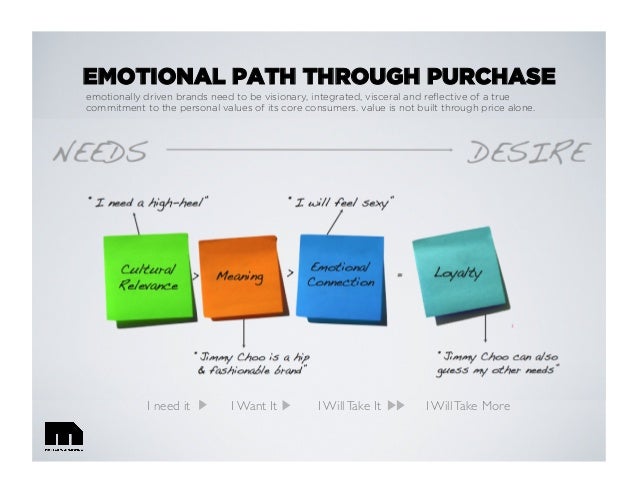
The idea of emotive branding — and the creation of our agency, Emotive Brand — flowed from our desire to make a positive difference in the way people and brands interacted with each other. These were our goals
  • Bridge the gap between commerce and civility.
  • Create brands that people appreciate, respect, and actively seek out.
  • Help employees of brands feel better about their jobs.
  • Make partners and suppliers vie for the opportunity to work with our clients.
  • See communities welcome our clients’ brands with open arms.

As a result of all of this goodwill, our clients’ brands would thrive and prosper.
Realizing the Value of Meaning Something More

We came to those goals through two major realizations:

First, as consumers ourselves, we noticed that only a handful of brands really went out of their way to mean anything to us. When they did make a connection — wow, it was love. We’d go out of our way to interact and engage these brands. We even felt disappointed when we had to settle for something less. We’d get excited when other people started talking about these brands and chime in with our most recent, “I can top that!” story. These brands had come to mean something to us because they had a clear reason for being and made us feel something good, time and time again.

On the other hand, zillions of brands never really hit our emotional radar. These brands meant almost nothing to us — even though we’d heard about them, or even bought and used dozens of the brands regularly. 

A Problem in the “Brand Decks”

Second, as brand experts, we saw first hand why so many brands fell flat — lackluster and bland — in the minds of customers. As designers, copywriters, and strategists, we work on virtually every aspect of communication from identity to websites to advertising to point-of-sale to employee recruitment and beyond. Behind each piece of work there’s always a brief — and often attached to the brief there’s a two-hundred some page PDF titled “About the Brand.”

Reading through many of these so-called “brand decks,” we quickly recognized a problem. In fact, the “brand decks” were the problem.

Traditional brand thinking results from business people from branding agencies talking to business people within client organizations. The language they use is full of industry jargon, client-speak, and solely rational thinking. Everything is expounded upon, nothing is simplified, and little is made human. And after several rounds of review, the final documents show the scars of compromise.

And what do these documents lack? The brand’s meaning as defined by its reason for being (why it does what it does) and how the brand wants people to feel (how the brand connects emotionally with customers). Brand decks, on the whole, left out what matters most to us as consumers and businesses and what we admire most in the great brands out there.

So we asked the question: What if meaning was the entry point into brand thinking rather than an appendage at the end? And that, folks, is how Emotive Brand was born.

Sunday, March 25, 2018

Stephen Darori (#Stephendarori) on Value-Added Marketing)

Image result for Value-Added Marketing
Value-Added Marketing 101: What? How? And Why?

The hyper-saturation of advertising and marketing we see today has many negative consequences. The following two, however, are chief among them.

First, people are becoming increasingly annoyed with brands trying to sell them just about everything — constantly. Overtime, this results in advertising blindness.

Ad blindness — the conscious and subconscious ignoring of advertising messages (Source: ManagementMania).

Second (but closely related to the first), it is becoming increasingly hard for brands to get noticed, heard, and remembered.

Long story short, the current state of marketing leaves much to be desired. I would even go as far as to say that it is going through a stage of severe crisis — “The Great Marketing Depression.”

The darkest hour, however, is just before the dawn. The good news is that we already see a slight yet significant shift toward better marketing.

Call it a customer-first approach, empathetic marketing, or marketing with meaning. The idea behind it remains the same: to delight customers by delivering more than they expect and pay for.

This is value-added marketing.

Value-added marketing brings marketing to an entirely new level by turning marketing content into a product of its own. As more and more brands adopt this attitude, we’re stepping into the next stage of marketing evolution — one that puts customers first, understands the importance of “going the extra mile,” and emphasizes perceived value to the customer over pure revenue.

Value-Added Marketing: From Theory to Practice

Although the term “value-added marketing” is rather self-explanatory, it still makes sense to quickly run through the concept.

Added value in marketing can be either financial or not. This could be anything from free shipping to referral rewards, even discounts on related materials. It doesn’t matter what exactly a company is offering as an added value as longs as it exceeds the expectation of customers and is considered valuable by them.

To master the art of value-added marketing, a company needs to understand its buyer persona (most typical customer) and what might be important to that persona. This step is crucial for deciding what of value a brand can give customers.

Once a potential value-add is defined, it should be well-integrated into the heart of a business concept. “Well-integrated” here means that the added value is perfectly aligned with the company’s mission, positioning, and long-term goals. What is offered as a value-add should never contradict with the major product or service a business provides.

For instance, a dental health center should not give its returning customers a free family package of chocolate candies, assuming the role of dental healthcare practitioners is to help people take care of their teeth. Neither would it be smart for a gym to sell cinnamon rolls and double-chocolate, king-size donuts in their cafeteria. Most of us go to the gym to lose weight and get in shape, not to fall for another portion of sugary, fast carbs!

Contradictions are confusing, confusion is not what drives sales. Consistency should be the foundation for any value-added marketing initiative.

The Best Value-Added Marketing Cases (So Far)

The world-renowned toy manufacturer LEGO does value-added marketing exceptionally well. LEGO created an online community for its customers where they can submit their ideas for new LEGO sets and vote for the ideas of others. Each submission that gets at least 10,000 votes is reviewed by the brand’s officials and could be turned into a real LEGO set, sold worldwide. Such interaction and gamification is an value-add in its own right, but LEGO has taken it one step further. The brand decided to grant idea-contributors a percentage of sale revenue as well as recognition on the packaging.

One more telling example of a company that knows how to leverage value-adds is Nike. Apart from being one of the top sportswear manufacturers on the market, the company has grown into an ambassador of active lifestyle. The Nike+ Training Club offers people a chance to attend group workouts (running sessions, yoga classes, and functional trainings) free of charge. They also have a free app with guided workouts, so customers can stay active and fit regardless of their schedule and ability to attend a gym. Nike’s approach is good, customer-centric marketing.

Virgin is yet another good example. The company has gone so far in terms of value-added marketing it can no longer be considered just a product or service. Today’s Virgin is not only a travel and media brand, but also a company promoting the spirit of entrepreneurship and helping to nurture talents (and small business). What an interesting way to create a positive brand image!

Reasons Why Value-Added Marketing is Gaining Momentum

Value-added marketing:
  • ensures brand loyalty.
  • turns customers into brand ambassadors.
  • helps retain existing customers and saves money. New User Acquisition is believed to be 7 times more expensive than retention.
  • results in a flow of positive reviews and mentions in social media, which helps with brand awareness.
  • makes customers more likely to take upsell offers.
  • is a foundation for long-term trusting relationships.

Value-Added Marketing Tips (For Any Business)

One of the best things about value-added marketing is its simplicity. In nearly all cases, a brand won’t need a huge budget or a genius marketing team to start taking advantage of value-adds.

Here are some ideas most marketing teams can consider implementing.
  • Provide expert advice; being an authoritative information source within the industry your operating in.
  • Prioritize high-speed and quality service, including — if applicable — delivery.
  • Reward loyalty with return customer discounts and special offers.
  • Teach workshops or other forms of educational events to build community around a brand.
  • Customize products or services on request.
  • Give free, supplemental hardware or software related to the main purchase.

The Wrap-Up

As numerous new brands emerge on the global market daily, the fight for customers’ attention becomes harder than ever.

Meanwhile, the cost (and quality) of advertising is going down, while the quantity of ads grows. This all results in people getting increasingly annoyed and tired of ads, which eventually forces brands to search for new approaches to marketing.

This is a crisis in traditional marketing, but it is a blessing in disguise. As the old tried-and-true approaches no longer work the way they used to, brands are left with few options but to try something new. Fortunately for everyone involved, it is the customer-first approach that seems to be taking over.

Monday, November 20, 2017

Benefits of Combining SEO & PPC to Beat Your Competition


E-commerce and online businesses have witnessed a phenomenal transformation in the area of online marketing. Every second of the day, all over the Internet, many commercial websites are springing up on the internet. These websites are making their best effort to be visible in the online world as well as in the offline. More importantly these online business owners are focused not only on their internet presence but want to offer consumers a convenient shopping experience in the privacy and comfort of their homes.

Commercials websites compete against each other by using the two most powerful advertising strategies: Search Engine Optimization (SEO) and Pay per Click (PPC) in trying to attract more traffic to their websites. When these two strategizes are coupled together ranking of the websites improve drastically and thereby has an opportunity to keep an edge over the competition.
Twin equalizers to outrank the competitors

The importance of combining SEO and PPC in a marketing strategy are formidable tools that act to form twin equalizers in the effort to counter act the strategies of the competition.
Benefits of combining SEO and PPC are:

The combination of both SEO and PPC will improve both organic and paid results. The keywords that are found to be profitable with PPC can then be used for SEO.
  • Enhances the Click Through Rates (CTR). Generating and testing content will be advantageous to both search engine ranking as well as the PPC click through rates.
  • High conversation rates: When using PPC along with the organic results the chances of conversion into paying clients drastically increases.
  • Best keywords identification: PPC is considered to be the best tool for measuring the results by which one can identify the best keyword and ad copy. These results can then be applied to the SEO strategy as well.
  • With the right combination, a company can outrank the competitors from the first page of Google and simultaneously increase the brand identity with overall increased exposure.
  • By dominating results a company can increase branding and protect online reputation as this combination guarantees a very strong online presence.
  • With well-planned integration of SEO and PPC online business owners can maximize the efficiency of their marketing efforts and at the same time optimize the spending for the campaigns that effectively increases the bottom line.

When managed properly and handled by the right experts, online business owners can achieve favourable results by combining these two great tools. This integrated approach will attract potential clients both from organic as well as paid channels. Statistics reveal that this combination increases conversion rates around forty percent. The combination enhances the online marketing strategies which deliver online business websites greater exposure with a much quicker ROI (Return on Investment).

In any business one cannot control the strategies adopted by the competitors. This is true in the online world as well. It is always suggested to follow proven techniques to attract more people to your website in order to retain existing customers and to turn the prospects into new customers. Smart online business owners will enhance their SEO strategies in integrating their organic SEO campaigns with a Pay per Click campaigns in order to outrank their immediate competitors. A combination of SEO and PPC will prove the best results in improving the bottom line. Through utilizing both SEO and PPC a well-planned home based online business can do better than the poorly designed websites of multimillion dollar global companies. The history of ‘Big companies eating the smaller ones’ has been changed to ‘Smart companies eating larger, slow to adapt companies’. When it comes to online businesses this is the new reality.

Tuesday, October 10, 2017

Essential Social Ads Tools to Help You Run Successful Campaigns


AdEspresso by Hootsuite allows us to do a number of important things with our ads. First off, we can run split test ad sets, which is key to running the most cost-effective campaign. Within a few days of the start of a campaign we know what ad copy and creative is performing best and why—allowing us to optimize the campaign.

In our ad dashboard, we get an overview of performance over time, top tracking metrics, total amount spent, conversions, and the best and worst performing ads. We can easily pinpoint ads that are not working for us.

AdEspresso also allows us to boost posts directly from the Hootsuite dashboard. This makes it easy to put money behind our best performing organic posts. Then we set up our ad campaign, select the ad account, run split tests, and manage the ad from Hootsuite.
Evernote

We use Evernote to share notes about ads among our team. Whenever we make a change to an ad or refresh our plan, we add notes so that we can time stamp our decisions and the reasons we made them.

Evernote is also great during the planning stage of an ad campaign because we can set out a timeline, roles and responsibilities, and outline a draft workback schedule. It’s also easy for us to link to other docs like strategy decks or calendars.

Hootsuite Enhance

When we’re creating ads, we often need access to images that we can we can quickly customize and resize for social. Using Hootsuite Enhance, we can use effects, filters, and fonts to create images for social.

All images for ads on social need to have less than 20 percent of the image covered by text, so we test our ad images using Facebook’s Image Text Check toolbeforehand to make sure they’re going to work.

UTM codes

Every ad campaign we run includes UTM parameters. That way we know exactly how much traffic and how many conversions are coming from specific ads. It also helps us identify the source of social traffic, i.e. which social network the ads sent traffic from.

UTM codes also help us group ads by type. We set up different tags by broad themes like brand awareness or campaign type like social ROI. This allows us to group ad performance and make observations. If we see that a certain ad group is performing best on a certain channel, we’ll shift our budget accordingly.
Slack

Messaging software Slack is awesome for cross-team collaboration. When we’re working on a big campaign, we can create a group, upload documents and resources, and get instant feedback. It’s an easy way for us to keep in touch with everyone who needs to know about our ad efforts.

We like the search box because we can go through our archives if we need to retrieve anything for reference, such as plans and notes from past campaign.

Facebook Blueprint

We run a lot of ads on Facebook, so having a learning resource like Facebook Blueprint is essential. It offers courses, guides, and training modules on the latest in social advertising.

It’s a one-stop-shop for all things Facebook advertising—whether you’re looking to try new ad formats, better optimize your ads, or refine your KPIs.

Unsplash

Searching for social media images can be time-consuming and expensive. That’s why having a handy list of free stock photo image sites can help speed up the process.

Our favorites are Unsplash and Kaboompics, because we can search by keyword for thousands of images in their database. This helps us narrow down our selection a lot faster.

Hootsuite Impact

Hootsuite Impact is a powerful measurement tool that allows us to report on all of our paid and organic performance. It helps us see the overall health of our channels and our return on investment (ROI).

It also offers recommendations on things like daily ad spend, geographic targeting, and approximate cost per action. This is especially useful when we’re running multiple campaigns and need to make sure that we’re consistent across all channels when looking at results.

When you’re running next ad campaign, get your toolkit in order before building out your plan. It will help you stay organized and properly track all of your campaigns.

Friday, September 29, 2017

Productivity Apps for Social Media Marketers


Imagine your life without coffee. Even if you aren’t a caffeine enthusiast, imagine never smelling that stimulating aroma, or seeing the words “coffee lover” in every social media manager’s Twitter bio. This delicious elixir was discovered in the 10th century, when beans that had fallen into a fire and roasted were dissolved in water.

We then saw the birth of percolators (1818), the espresso machine (1822), and what became the household standard—the electrical drip coffee brewer (1954). However, the coffee world was turned upside down when the first single-serve coffee pod system was introduced by Nestle in 1976. Efficiency became the name of the game.

There may already be acceptable systems in place, but sometimes you just need to get things done faster. When it comes to social media, the introduction of new tools and apps mean that you can take your productivity levels up a notch. Continue reading for a guide to some of our favorites.
8 productivity apps for social media marketers
1. Evernote

Evernote is the classic note-taking tool. It lets you create project to-do lists, save image notes, set reminders for yourself, and much more. Evernote’s cross-platform capabilities add another level of efficiency to your note-taking, allowing you to take your ideas wherever you go. Take notes from a content brainstorm and easily share them with your social media team, or save images that you want to incorporate into future social posts.

For Android

For iOS
2. Todoist

If you’re a social media manager who lives by your to-do lists, Todoist is an app you’ll want to add to your phone ASAP. One Hootsuite team member swears by Todoist thanks to the gamification aspect it includes when you finish a task (or not). You can also assign tasks to other individuals and group them by project, as well as add notes, files, and track tasks over time. Get ready to start crossing tasks off of some lists.

For Android

For iOS
3. Pomodoro Time

As a social media marketer, you know that every second of your workday counts. Enter: the Pomodoro Technique. It’s a time-management system that involves working in 25-minute intervals divided by short breaks. The idea is these small breaks can improve productivity. To work according to the Pomodoro Technique, use an app such as Pomodoro Time, which lets you manage your time, set goals, and maximize productivity.

For iOS

For Android (Comparable)
4. Canva

Visuals are a huge part of any social media marketer’s strategy, and anything that can make the image creation process more productive should be added to your mobile toolbox. Canva is used by over 10 million people around the world, and for good reason. Use the app to create social media images on the go with Canva’s countless templates and designs. You can add text, graphics, effects, and other engaging additions to your images (or one of Canva’s own).

For Android

For iOS
5. Dropbox

Once you’ve created or sourced images, you don’t want your productivity to be derailed while you try to find these images to add to your social media posts. Instead, use Dropbox to keep all of your files in one place that you can access from any device. You can also share large files quickly with your teammates so that you can get that video up on your Facebook page without waiting for a huge file transfer.

For Android

For iOS
6. Hootsuite

When it comes to productivity apps for social media marketers, we can’t help but toot our own horn. The Hootsuite dashboard and mobile app allows you to easily view, share, and schedule social media posts with Twitter, Facebook, Instagram, and LinkedIn so that you dedicate more time to actually creating content that gets you results.

For Android

For iOS
7. Noisli

Noise can have a huge impact on productivity—just ask those trying to meet a deadline in an open office. Noisli provides background noise that will “help you improve focus and boost your productivity” because as The Wall Street Journalexplains: “A moderate level of noise the equivalent of the background buzz of conversation prompts more creative thought.”

For Android

For iOS
8. Hemingway App

Hemingway App is a tool that will help you improve your writing skills so that you can create clear and quality posts for your social media audience. The tool will highlight any unclear or long-winded sentences, grammatical errors, or the use of passive voice in your writing. Simply copy and paste your text into the Hemingway App and find the areas of your writing that need work.

The right tools can make all the difference for a busy social media marketer. Whether you need help creating an image, sharing files, or writing the best Facebook post, the apps above will equip you to craft the most engaging content for your business.

Saturday, September 23, 2017

Ignoring a Social Media Network Can Damage Your Social Media Presence


How many social media network accounts does your business have? Every week, we recommend businesses to hop on the latest trending social network bandwagon, whether it’s to promote brand culture on Instagram or engage your audience with Vine videos. According to the eBizMBA Guide, there are currently 15 social networking sites with over 30 million unique monthly visitors; depending on the size of your business, your company may be required to join at least half of these to maintain a steady social media presence.

It’s not a surprise that sometimes, the pressure to maintain all accounts results in neglecting your brand’s social media presence on at least one social media network. And it doesn’t have to be completely abandoned in order to be considered neglected—a decreased frequency in posts and lack of replies to your audience’s comments is enough to tarnish your brand’s online reputation. To make sure your time is evenly distributed among all your social media accounts, we’ve come up with a list of reasons why neglecting a social network hurts your social media presence—and how to address these issues.
3 ways ignoring a social media network can damage your social media presence
1. Ignoring a social media network betrays your audience’s expectations

Remember what lead to your brand to joining the social network in the first place—it’s a great way to interact with current customers and educate potential customers about your company. But if your Twitter followers are greeted by the default egg display picture, and witness sporadic updates, they receive the opposite message: you don’t have time for your social media audience, and you don’t finish what you started. My guess is that’s not how your brand wants to be perceived.
2. Ignoring a social media network can cost you online followers—and potential customers

People sometimes find it more convenient to tweet a comment or a concern using the brand’s official Twitter handle, instead of putting in a phone call or submitting a comment card. By ignoring your online audience’s feedback you risk not only losing those customers, but also failing to address the potential hurdles in your services or product development. Not paying attention to your online audience can cause you to lose followers on your social networks, and even potential customers.
3. Neglecting a social media network can tarnish your brand’s online reputation

Your brand’s online reputation management isn’t so hard if you don’t neglect the social media networks you’re on. Decreased attention means a higher chance of committing one of many social media faux pas that could seriously threaten your brand’s reputation. To make matters worse, if you don’t regularly monitor your accounts, you miss the opportunity for timely correction or removal of the culprit post, thus risking an even bigger backlash.
How to avoid neglecting a social media network
1. Create social profiles on the same networks as your audience

The most prominent reason why people neglect their social media presence is because they chose a social media network that’s not the top choice for their audience. The best way to avoid this situation is by creating a social media profile that aligns with your company’s objectives. Most importantly, follow your target audience to the social media network of their choice: for example, if your goal is to talk to professionals in the marketing industry, then you should definitely be on LinkedIn. If you don’t think you can spare more time or effort on another social media network, it’s better to avoid making an account altogether. Absence from a social network is better than neglected social media presence.
2. Create a social media content schedule

Once you’ve created your social media profiles that you have committed to maintaining, the next step is to create an effective way to manage your social media content. One way to do this is by creating a schedule for engaging content to publish on your social networks. This will help you keep track of planned posts across all of your brand’s social media networks. Once you’ve created your social media content plan, you can start scheduling Twitter messages and other social media posts to ensure your social media profile doesn’t lay dormant.
3. Use a social media management tool

An easy way to ensure no social media network gets left behind is to use a social media management tool. The Hootsuite dashboard allows you to manage social networks like Twitter, Facebook, LinkedIn, Google+, and much more, all in one place. You can monitor, engage, and converse with your audience in one place. Additionally, it can complement your social media content planning by scheduling posts in advance.

Common Social Media Strategy Mistakes: What Not to Do:


We often write about things you should include in your social media strategy: tips, tricks, hacks, trends, and other topics that anyone working in social media should know. But what about the things you shouldn’t do? Many common tactics are ineffective at best, and can be damaging to your brand at their worst.

We’re going to touch on those things—the darker side of social media strategy. When it comes to social media blunders, there’s certainly no shortage of examples. Here are some of the more common ones.

Like-Baiting

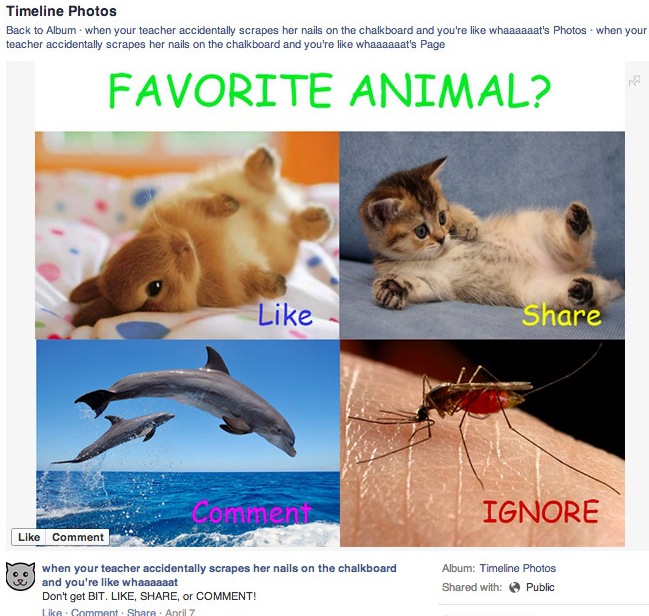
Like-baiting, much like click-baiting, is the practice of using provocative or controversial headlines to stir up social attention for likes and clicks. More often than not, the content rarely provides the reader with any new or insightful information, and has nothing to do with your business objectives. Sure, it’ll get you a few likes, shares, and retweets here and there. It borders on spam, does very little for engagement, and most of your audience will see right through it. Recently, Facebook adjusted their algorithm to curb this kind of behavior, too. Avoid it on all your social networks.Image courtesy of Facebook

Buying Likes And Followers

Did you know that you can buy followers and likes for certain social networks? Yep! Is it a good idea? Nope! Yet it’s still a widely followed practice. Acquiring followers in the triple and quadruple digits with little-to-no work on your end is tempting, but it’s an empty number. They don’t care about what you’re saying or what you’re doing. The quality of your audience diminishes, as does the real impact of your social media posts. A lose-lose practice, through and through.

Posting Too Much

People follow you because they like you, what you do, or what you make. That’s a great thing because it means that they’re engaged with and receptive to your brand. But their loyalty does not make them immune to post fatigue. Use restraint when posting to your social channels. You might have a lot to share with your audience, but before posting something, ask yourself, ‘Do they even care?’ If they don’t, there’s no quicker way to lose them than spamming their feeds. What defines ‘spamming feeds’ is difficult to quantify. But you can use HootSuite’s analytics toolsto determine which posts resonate with your audience, and which don’t.

Ignoring Social Media ROI

Sure, social media is a relatively inexpensive marketing channel. But if you consider how many hours go into planning, engaging, and executing, the dollars add up. Measuring your ROI is crucial to ensure that not only is your social media strategy working, but that you’re not actually losing money on it. HootSuite Pro includes very powerful analytical tools that can help you measure just about every facet of your social media campaigns.


Only Using Social Media To Advertise

Along the same vein as posting too much is using your social networks only to advertise your products and services. It’s a practice that can quickly dull engagement and customer trust. Having a big sale? Launching a new product? Go ahead and mention it. But avoid reminding your followers over and over again. Trust us, they know. More than promoting, social is a channel for engagement. That means sharing great curated content, interacting with followers, and simply helping your business or brand stay at the front of the consumers mind.

Deleting Negative Comments

One of the biggest mistakes those new to social media make is deleting negative comments. It seems counterintuitive to let these damning testimonials be seen by all. But it also represents a great opportunity to 1) make a customer happy in a very public place, and 2) publicly address a problem within your business that perhaps you didn’t know about. You won’t always be able to make every customer or client happy, but you can certainly use social media to soften the blow and look good while doing it. By responding publicly, you can even sometimes turn the conversation to your favour. (Note that when we say ‘negative comments’, we’re excluding abusive, threatening and otherwise hateful comments. Delete those.)

Not Keeping Up To Speed

Social media is a constantly changing world. What was true yesterday may not be true tomorrow. It’s up to you to not only get up to speed, but to stay there. At first, this will seem like a daunting task. But there are endless resources available to help you along the way (like, for example, HootSuite University, or following blogs through the HootSuite Syndicator). All you have to do is put in the time.


Not Having A Social Media Strategy At All

Social media is no longer optional. It’s the first—and in many cases, only—point of contact for consumers. As such, it should be treated with the same level of care and thought as every other mission-critical part of your strategy. Take the time required to consider what you want to accomplish with social media and how you’re going to get there, rather than going in blind.

There’s no silver bullet approach to building your social media strategy. There are endless ways to build one that depend on variables like your business size, business type, brand, location, and demographics. Organic growth and engagement are the core of any successful social strategy. The above points will help you avoid some of the pitfalls of those newer to the social game.

How to respond effectively and social media engagement


Engage with your audience efficiently


Manage your social media accounts across more than 35 global networks


Reply with a single click


Anyone on your team—in any region or department—can quickly respond to messages, mentions, and comments through a single dashboard.

Identify influencers and leads


Listen closely to the people that matter to your business. Create, import, and share lists of social influencers and important clients.

Save time with pre-written responses


Quickly respond to common questions or customer requests by saving pre-approved and on-brand responses for future use.

Engage consistently—across any sized organization


Manage engagement workflows


Mirror your existing workflows so people see the posts that matter to them—ensuring responsive engagement and avoiding missed messages.


Track interaction history


See all interactions with a contact—across your organization—so conversations are in context and consistent, no matter who engages with them.


Search by location or language


Monitor social conversations across the globe or around your neighbourhood—in multiple languages—and be exactly where your audience is.


As we launched our social media program, we knew we needed a platform that would be able to handle and scale with our increasingly complex needs. Hootsuite absolutely accomplished this for us.

How to Respond Not-So-Nice Comment or Online Review?


Your online reputation can make or break your business, as the internet is often the first and last place potential customers go to find out more about you. Even the most reputable organizations deal with bad online reviews, posts on social networks, as well as blogs and other online forums. The one thing you can learn from these organizations is that it’s not so much the complaint or poor review that defines your reputation, but rather the way it’s handled. Here are 6 things you should do when confronted with a scathing comment.
Step 1: Stop. Breathe.

When someone attacks your small business— the thing you pour endless hours of blood, sweat, and tears into— it feels personal. It’s not. Take some time to think it about the situation. It’s impossible to be pragmatic or genuinely apologetic when you’re emotionally charged. But if you give yourself some time to mull it over, you’ll be able to see the situation with more clarity.Perhaps the finest example of someone reacting to criticism in the worst way possible.

Step 2: Look into it.

Some online reviews or complaints aren’t valid. Some of them are. You’ll never figure out where you stand unless you investigate. And knowing what really happened will help dictate your course of action. Did your customer have a bad experience with the product or staff? Who was in the wrong? Find out anything and everything you can about the situation before making any decisions.
Step 3: Is the complaint legit? Apologize. Is it bogus? Apologize anyway.

Apologize directly and publicly to those affected, whether it’s in a Tweet or a reply comment on the site where you found the bad review. Let them know what you’ve done about it (you have done something about it, right?). In the event the complaint isn’t a valid one, tell your side of the story and see what you can do to resolve the situation. Sincerity goes a long way here. You may not be able to correct something for one particular customer, but reaching out publicly shows you care and that you’re being proactive.An example of a good apology from Delta Airlines

One thing to keep in mind about online reviews and complaints: whether they’re legitimate or otherwise makes little difference to the masses. It’s all about perception. A quick apology will do more for you than a denial of wrong-doing.
Step 4: If possible, continue the conversation privately.

At this point, you should have acknowledged the complaint and made any necessary corrections. Someone might attempt to further engage you publically. Ask them to take the conversation to email or a direct/private message. For example “We’d like to know more about what happened, would you mind sending us a quick email? We’re looking forward to resolving this issue for you.” You’ve just made yourself look good while resolving a situation quickly. Social media engagement is important to your social presence, but not when it’s back and forth, he-said-she-said banter with a single online entity.
Step 5: Look for patterns.

If you’re seeing a string of bad online reviews coming in from all over the place, there’s a good chance there’s something wrong on your end. You need to put the brakes on, stat. Though it seems like bad news at first, it’s great opportunity to identify a fundamental problem with your business and stop the trainwreck before it happens.
Step 6: Avoid the non-apology apology.

You’ve seen these a hundred times before. “Our company has been supplying our product to our customers for 100 years. We’re sorry that your experience did not match your expectations.” See what they did there? Reinforce their leading market position while telling the customer they were wrong for expecting more in a roundabout way. There was no real apology and the lack of sincerity was as transparent as a freshly-cleaned window.

Every business is different. Every customer is different. And every reason for a bad review is different. These 6 steps combined with a bit of common sense, courtesy, and a genuine desire to help your customers can turn a conflict into a positive experience for everyone involved, and look good while doing it.

Social Media Advice That You Shouldn’t Follow

Image result for Social Media Advice That You Shouldn’t Follow


There are many occasions in life where you will hear or be given the same advice over and over again. Often, this advice is conflicting and you feel as if you’d have been better off not hearing anything at all. The moment you get engaged, you’ll hear all of the reasons for having a large wedding, as well as why a small, more intimate gathering is best. Announce your pregnancy, and you’ll hear unsolicited advice on everything from whether you should find out your baby’s sex to whether you should use pain medication during the birth. As a social media manager or content marketer—yes, I’m comparing marketing to giving birth—you can probably relate to the feeling of trying to sift through an overwhelming amount of advice.

As someone who stays up to date on social media news and best practices, you have probably heard some form of the following pieces of advice. With a focus on staying critical of all popular opinion, I challenge these commonly shared tips.
Success is measured by followers

One of the most popular topics in the social media marketing world (and the actual world) surrounds the number of followers one has. While there is a grain of truth to perceptions around an official social media account having enough followers to support their authority, if all you are concentrating on is the number of followers your brand’s account has, you are most likely missing huge opportunities for growth.

The success of your organization’s social media strategy should not be focused on the quantity of followers you have, but rather the quality of these followers. If you approach your plan with the aims of increasing engagement amongst your followers however, you will naturally see this community grow. I have too often heard people get worked up and obsessed with how many followers they have, or companies using this number as an indication of whether their social media strategies are successful. This is misguided, and can lead to not only missed opportunities for community growth as mentioned above, but to questionable practices such as purchasing followers. What’s more embarrassing for your brand—Having under a certain number of followers, or getting caught buying followers? The answer here is clear.
Keep your accounts clean

When I was on the job hunt, one of the top pieces of advice I heard was to scrub my social media accounts clean. Keep everything super professional and conventional, unless you never want to find that dream job. As someone who was using my Twitter account to post ridiculous quotes from my dad, feminist and social justice articles, and countless photos of cute animals, my account wasn’t exactly working as a purely professional resume.

However, I was told shortly after being hired that my Twitter presence actually helped rather than hurt my chances of getting the job. In having an online presence that wasn’t super sterile, my future employer was able to recognize that I had a personality and a (debatable) sense of humor.

It’s also a widespread belief that when you actually have the job, your social media accounts should act as a reflection of your most professional self. Many imply the belief that one should not post anything that even remotely suggests you have a life outside of work. All that you do is think of marketing plans, KPIs, and content strategies, right? Obviously, wrong. Your followers know that your life is not 24/7 work, and to suggest anything otherwise comes across as inauthentic. Our own Ryan Holmes even wrote a comprehensive piece on the subject, Why employees shouldn’t have to sanitize their social media accounts, where he explains “People have private lives outside the office—lives full of family, friends, goofy selfies, bar nights, and all the rest. Why, then, do we insist employees’ social media accounts reflect some buttoned-down ideal of an office drone? Honesty in the workplace means moving beyond that and understanding that employees are people first.” Of course, I trust it’s understood this doesn’t mean posting a racist rant, sharing prejudiced beliefs, or inappropriate content on your accounts. As Holmes states, “There’s no reason a company or organization should tolerate racist or insensitive content shared by its employees.” Use your judgment, but let your personality and interests show.
Delete negativity

While this advice is usually presented as common sense, it’s truthfully more of a knee-jerk reaction. Although it’s understandable that you may naturally feel that it is best to immediately delete or hide any kind of negativity aimed at your brand on social media, complaints or insults (when respectful and without offensive language or content) can act as a great source of information. If, for example, a customer complains that the flowers they had delivered arrived looking less than perfect, your company has a wonderful opportunity to showcase your stellar customer service skills. As we explain in our post about what not to do on social media, a negative comment enables you to:
Make a customer happy in a very public place.
Publicly address a problem within your business that perhaps you didn’t know about.

Here, when you reply to the negative comment and offer a remedy that goes above and beyond, you are publicly highlighting your organization’s dedication to their customers, as well as allowing transparency. If you saw a branded social media account or page that had only 100 percent positive and gushing comments or interactions, you’d start to get suspicious and probably not fully trust the sources. Through responding to legitimate complaints and fair negativity in a respectful and helpful way, you are adding value and authenticity to your organization.
Be present on every platform

Fear of missing out, or FOMO, is a real thing and can be hard to ignore when you keep hearing about the newest and greatest social media networks. The truth is that if you’re looking to grow and nurture your social media presence, you don’t need to immediately jump on every social media network bandwagon. The quality over quantity principle rings truer than ever here, as it’s much better to have a consistent, reliable, and engaging presence on a select number of key social media networks rather than trying to do the same on too many and failing. As our previous post on how to manage your social media presence explains, there are three key ways that trying to be present on every platform can do more harm than good.
Ignoring a social media network betrays your audience’s expectations

If someone follows you on Instagram or Twitter, they expect that you will be posting regularly and with valuable content. If your last Instagram post was 58 weeks ago, your followers will notice this and question the legitimacy of your accounts and the trustworthiness of your business.
Ignoring a social media network can cost you online followers—and potential customers

With social media customer service becoming more common and expected by the day, if you aren’t keeping up to date and active on any of your channels, you are inviting the possibility of missing and seemingly ignoring customer inquiries. As we previously explained, “By ignoring your online audience’s feedback you risk not only losing those customers, but also failing to address the potential hurdles in your services or product development. Not paying attention to your online audience can cause you to lose followers on your social networks, and even potential customers.”
Neglecting a social media network can tarnish your brand’s online reputation

As a result of these factors, you risk your brand’s online reputation being damaged. As we explain, “Decreased attention means a higher chance of committing one of many social media faux pas that could seriously threaten your brand’s reputation.” With the aim of an organization’s social media being to enhance a reputation and engage with customers, if you can’t satisfy these two key areas it might be time to rethink your current strategy.

With all of this said, my main piece of advice would be to question everything. I don’t mean this in a tinfoil hat-wearing way, but as a suggestion to always think critically about information you see, read, and hear and use your own judgment. All businesses are different, so test out various pieces of advice and find what works best for your specific industry and brand.

Sunday, September 17, 2017

1001 The Social Media Glossary: Essential Definitions


A lot can change in a year, especially in the world of social media. It can be difficult to keep up with all of the terms and slang used with the introduction of new technologies and platforms, so we decided it was time to update our Social Media Glossary. Like previous editions of the glossary, this is a living document that will continue to grow as we add more terms and expand our definitions.


The percentage of social customer service issues that are abandoned by customers without a resolution.
A-

Artificial intelligence, or AI, refers to intelligence exhibited by machines. For viable use cases of AI, check out our post 5 Practical (and ) Ways AI Will Change Marketing by 2020.
Algorithm

A rules-based procedure for making calculations or solving problems. Algorithms are everywhere in computer science and are crucial to the software that runs the world. In social media, the most important algorithms are those that determine which content we see. For example, your Facebook News Feed doesn’t show every status update and every photo from every one of your friends. Instead, it displays an algorithmically curated set of content that Facebook thinks is most worth seeing. Similarly, Twitter, Facebook, and Google Plus use algorithms to define which topics and hashtags are currently trending.

Like the algorithms that power search engines, social media algorithms have a massive effect on your brand’s online visibility. One sure-fire way to increase your ranking in an algorithm is to pay for it with paid social media.
AMA

In reference to Reddit, an acronym for “Ask me anything.” In an AMA post, a user will answer questions posed by the Reddit community. To-date, the most popular AMA of all time took place in 2012 with President Barack Obama.
Analytics

Analytics tells you what happened. In general, it involves using technology to gather data which analysts can study.The goal of analysts is to examine this data, looking for patterns in behavior. The most common way of gathering data is using a tracking tag on a website or software application. The tag registers a “session” when a user visits and then stores data about what pages they visited, what actions they completed, and how they interacted with different elements such as clicking on buttons or performing a search.
Archiving

The practice of retaining an organization’s social media messages and associated metadata, often for the purpose of regulatory compliance. Archiving has become increasingly important as more and more business communications occur on social media. Organizations can save records of social conversations in their own secure databases, much like they already store email and other documents. This data can later be retrieved and analyzed to track the effectiveness of social media activities. It can also be gathered as part of a legal e-discovery process.
Audience selector

A tool that allows you to choose which audience you want to share something with on Facebook. To learn more about Facebook’s privacy settings for sharing content, see this Facebook Help article.
Authenticity

Some people cover up their identity and don’t really express themselves on social media. Being open and authentic on social media means a great deal to your audience who wants to genuinely engage with you or your business. It’s important to find your own voice and be personal on social media. We wouldn’t be following you if we didn’t think you were awesome, so just be yourself!
Avatar

A visual representation of a user online, though not necessarily an actual photo of the user. Social media profile pics are an example of an avatar. Fun trivia fact: “avatar” is Sanskrit for “incarnation”. Makes sense, right?
Average handling time

The average time required for a company, team, or individual to resolve customer issues on social media, from beginning to end.
Average response time

How long it takes on average for a company, team, or individual to reply to a customer’s messages while resolving an issue.
—B—


Big data

In short, big data is large sets of unstructured data. Traditionally, the data that we analyze has already been formatted into nice rows and columns. Think of a spreadsheet with a list of customer names and email addresses. The reason why big data is hard to analyze is that the data sets are massive and complex. They might contain the messy natural language we find in Tweets and Facebook updates, so the challenge involves sorting, analyzing, and processing. But as the data sets are so large and layered with information, good analysis can reveal surprising insights.

Learn more: Social Media, Big Data and Visualization
Bio

A ‘Bio’, short for biography, is the small portion of your online profile that explains to new or potential followers who you are. All social platforms have some version of a Bio as they are valuable in attracting new followers with similar interests. When it comes to your Twitter strategy, your Bio is the first thing users see when they discover your profile and a good Bio can greatly improve how often you show up in keyword searches.

Learn more: How to Set up Facebook, Twitter and Every Other Major Social Media Profile
Bitmoji

A customized emoji or avatar that can be added to Gmail, Messenger, Slack, and virtually any online network. With Bitmoji, you can create your personal avatar and access a sticker library featuring the avatar in various scenes.
Block

A Twitter feature that enables you to prevent another user from:
following you
adding you to their Twitter lists
having their mentions and replies appear in your notifications or mentions tab
tagging you in a photo

Blocking is a useful way to keep a troublesome user out of your mentions and sends them an explicit signal that you want nothing to do with them. However, Twitter cannot prevent anybody from seeing your public Tweets. If you want to keep your Tweets private, then use a protected account.
Board

See: Pinboard
Brand advocate

In the marketing world, a brand advocate is a customer that is so satisfied with your product that they go out of their way to help you market it. They do work on their own, but often become an even more valuable resource (for spreading news, good will, and product insight) when you connect with them, engage them and empower them. Social media is filled with brand advocates. Take the time to find yours.
Brandjacking

The hijacking of a brand to promote an agenda or damage a reputation. Brandjackers don’t hack the social media accounts of target individuals and organizations. Instead, they assume a target’s online identity through indirect means such as fake accounts, promoted hashtags, and satirical marketing campaigns.
—C—
Canoe Tweet

See: Twitter canoe
Caption

A brief description that appears underneath an Instagram photo. For more on mastering the Instagram caption, see here.
Center of Excellence

A steering committee or dedicated team of social media leaders that establishes policies and processes and supports an organization with best practices, education, and training. A Center of Excellence may also serve as an operational hub for the organization’s day-to-day social media activities.

Learn more: Scaling Social: Establishing Your Center of Excellence
Chatbots

Chatbots are a type of bot that live in messaging apps (like Facebook Messenger) and use artificial intelligence to perform tasks via simulated conversation. They can be used for customer service, data collection, and more. Facebook is one of the leaders in chatbot integration. Read more in our post Messenger Bots Are Your New Best Friends on Facebook.
Check-In

A Foursquare and Facebook term, to check-in is to declare when a user has physically visited a geographical location or event. Checking-in allows the user to let their friends know where they are, and the ability to earn badges and points.


Circles

Google+ Circles are a method for sorting your Google+ contacts by social context, location, shared interest, or any other criteria. They allow you to organize people on Google+ to match the way you actually know them in real life. With Circles, you can easily share different content with different categories of people. You can also filter what other people are sharing that you never miss an important update from your closest friends and family.
Clickbait

Web content with a misleading or sensationalist headline that entices readers to click through to the full story, usually with the goal of generating page views and advertising revenue. This One Weird Trick works by piquing your curiosity. You click the link, but You Won’t Believe What Happens Next: the article stinks. Clickbait has infested social media so thoroughly that Facebook has actually taken steps to exterminate it.

Clickbait headlines are also a prime target for parody and satire. We recommend Clickhole, an entire site dedicated to satirizing clickbait. And our own team had to ask, What if Classic Books Were Given Click-Baity Titles?
Clickthrough rate (CTR)

This is a common metric for reporting on the number of people who viewed a message or piece of content and then actually performed the action required such as clicking on the ad or link in an email marketing campaign. The actual metric is calculated by comparing the number of clicks to impressions. For example, if 100 people saw your ad in Google and one person clicked on the ad, you would have a click-through-rate of 1.0%. Clickthrough rate (CTR) is most commonly used for search engine marketing and other performance-driven channels as the general philosophy is that the higher your CTR, the more effective your marketing is.
Community management

The practice of developing relationships around a common interest. This is done by monitoring and engaging with those who engage with the common interest. The goal is to nurture relationships so that the community acts as advocates on behalf of the common interest.


Competitor sentiment

To provide context, it can be useful to measure your sentiment alongside that of your competitors through social media monitoring. This kind of intel—whether positive or negative—will allow you to make strategic business decisions to stay ahead of your competition.

Related: Sentiment analysis


Compliance

Conformance with rules, regulations, or laws. Social media compliance is particularly relevant to organizations in regulated industries, such as healthcare, banking, and insurance. These businesses face strict rules governing what they can communicate to the public, and numerous regulatory agencies have confirmed that these rules extend to social media. Among other requirements, regulated organizations must be able to demonstrate that they are archiving social communications and supervising the use of social media by their employees.

Learn more: New Technology for Regulated Industries to Deal with the Complexity of Social Media Compliance
Connection

On LinkedIn, there are several types of connections you can make. The basic type of connection is a 1st degree connection—a contact that you know personally or professionally and that has accepted your invitation to connect. Other degrees of connections are dependant on your extended network and how closely they are connected to other individuals you know.
Content curation

Content curation is the process of sifting through the web to find the best and most relevant content for an audience and then presenting it to them in a meaningful way. Unlike content marketing, content curation doesn’t involve publishing new content. Instead, it’s about creating value for your audience by saving them time and effort. There’s no shortage of content out there, but not all of it is worth reading. Plus, there’s no guarantee that the best articles, videos, and infographics will show up on the first page of a Google search. Organizing related content into pinboards, newsletters, or weekly blog posts can help you build a regular audience and also demonstrate your subject expertise.

Learn more: A Beginner’s Guide to Content Curation
Content discovery

A process used by marketers to uncover valuable content and trends relevant to their audience. Content discovery helps shape a successful content marketing strategy and can be executed in numerous ways.

Learn more: 5 Ways to Find Trending Topics (Other than Twitter).
Content management system (CMS)

Whether you’re running a blog, marketing website, or a social media presence, a content management system (CMS) is the backbone of your content marketing strategy. A web CMS is an online application that allows you to draft, share, edit, schedule, and index your content. Popular web content management systems make use of simple editors that allow you to create publish content without demanding a knowledge of code.


Content marketing

A marketing strategy based on attracting and retaining customers through the creation and distribution of valuable content, such as videos, white papers, guides, and infographics. Content marketers look to earn customer loyalty and influence decisions by providing useful, entertaining, or educational media. A famous example of content marketing is the Michelin Guide, first published by the tire company Michelin in 1900. Rather than telling people to buy their tires, Michelin provided maps, advice on car repairs, lists of hotels, and other valuable information that would encourage car ownership. Over time the Michelin Guide evolved into the world’s most influential guide to restaurants—driving massive brand awareness and loyalty for Michelin. With the rise of social media and search engines, content marketing is now a vital technique for businesses of all sizes.

Learn more: What Not to Do, Part 2: Social Media Content Marketing Mistakes

Related: Social media marketing
Content rate

The amount of content produced in a designated time period.


Conversions

In social media marketing, a conversion is a positive action that is taken on a website by a visitor from social media. The action demonstrates that the visitor is “converting” into a customer. Sales aren’t the only type of conversion; many websites measure webinar registrations, newsletter signups, content downloads, and other important outcomes that ultimately lead to a sale. Tracking conversions is crucial to properly attributing revenue to social media.

Learn more: How To Convert Traffic From Social Media Into Sales; The Unbounce Conversion Glossary

Related: Social media ROI , attribution
Conversation map

A visualization of the terms that are most commonly associated with a chosen keyword on social media. Usually delivered as a percentage of total mentions, a Conversation Map is a feature in Hootsuite Analytics that collects data from over 25 sources across the web.

Learn more: Map It Out! What You Can Learn From Your Conversation Map
Cover photo

The large, horizontal image at the top of your Facebook profile or page. Similar to a profile photo, a cover photo is public and can be seen by anyone. This is a great place for individuals, brands and organizations to use an unique image to represent who they are, what their business is or what they care about.

Learn more: How to Set up Facebook, Twitter and Every Other Major Social Media Profile
Creative Commons

Creative Commons is a public copyright license that gives you the ability to use and share otherwise copyrighted material. For social media users, Creative Commons often comes into play when we are looking for images and photos to accompany a social media message or blog post. In both of these cases, unless you are using your own images or have express permission, you can only share Creative Commons images. Sites like Google Image Search and Flickr have filters so you can easily search for Creative Commons photos. Just be careful, as there are different level of Creative Commons which could restrict whether an image could be used commercially, whether it can be modified, and what kind of attribution is required.
Creep

To creep is to spend an extended period of time looking through someone’s profiles, photos, and videos on social media. The term is generally used in the context of dating, where social networks such as Facebook give users the ability to check out potential dates or ex-partners. At least, that’s what people tell us. We’ve never, ever done it. Ever.
Crisis management

The social media governance measures a company has in place to manage social media risk and react in the event of a crisis. A crisis can include a wide range of possibilities, from security hacks to mis-Tweets and even external events that result in an influx in social mentions (ex. a natural disaster’s impact on the Red Cross). Crisis management is vital to large organizations that seek to manage social media risk and respond effectively.

Learn more: Mapping Organizational Roles & responsibilities for Social Media Risk
Crowdsourcing

Crowdsourcing refers to the process of leveraging your online community to assist in services, content and ideas for your business. Business examples include getting your audience to volunteer in helping translate your product or by asking your community to contribute content for your blog.
—D—
Dark Social

Any social media content that is shared outside of what can be measured by analytics—it has no known source For example, if you copy and pasted this blog post’s URL and shared it via email or text message, that would be dark social. To learn more about this area of the social media landscape, read our guide on Everything You Need to Know About Dark Social.
Deflection rate

The percentage of social customer service issues which are transferred to another communications channel, such as email, the phone, or live chat.
Direct Message

A direct message (DM) is a private Twitter message sent to one of your followers. Direct messages can only be sent to a Twitter user who is already following you, and you can only receive direct messages from users you follow.
Disappearing Content

Content such as Snaps and Instagram Stories that vanish after a set amount of time.
Discover

A feature on the Twitter platform that has 5 functions: Tweets, Activity, Who to Follow, Find Friends and Popular accounts.
The Tweets option shows the most popular Tweets across Twitter; some are tailored to you individually and some are globally trending.
The Activity tab shows notable engagements of the people you follow, including the latest Retweets, replies and favorites of your friends.
Who to Follow helps you find new and interesting accounts.
Find Friends allows you to import contacts from your contact book and find them on Twitter.
Popular Accounts provides a list of some engaging and well-liked accounts on Twitter and is delivered to you based on your interests.
Discover (Snapchat)

A feature on Snapchat that consists of a collection of hand-picked videos provided by partners and regions.
Display Ad

Display ads are typically small visual banners that are shown on websites. Common formats include images, flash, video, and audio. They can also be text-based (for example, Google AdWords lets you build text-based display ads). In general, display ads are used for large audience-based media buys or retargeting.
—E—
Electronic discovery (e-discovery)

The gathering an exchange of relevant electronic records (such as social media communications) during a legal case or government investigation. Many organizations are required to securely and consistently archive all digital communications so that they can be produced in e-discovery.

Related: Compliance
Embedded media

Digital media that is displayed within another piece of content, outside of its native setting.
Employee advocate

An employee that is willing to promote and defend a company both online and off. Like other brand advocates, passionate employees can influence the purchasing decisions of their friends, family, and other social contacts.
Employee amplification

The re-sharing of a company’s social content by its employees. Organized and coordinated amplification programs leverage employee advocates at scale to greatly increase the social reach of a brand.
Empowerment model

An organizational approach to social media which emphasizes participation and initiative from all departments, teams, and employees.
Engagement

Social media engagement refers to the acts of talking to, messaging or otherwise interacting with other people on social networks. This broad term encompasses a several different types of actions on social media, from commenting on Facebook posts to participating in Twitter chats. At its simplest, social media engagement is any interaction you have with other users. For that reason, it’s a core part of every social media strategy. Your followers expect your to interact with them. Being social is core to social media, after all.

Learn more: Social Media Engagement: Are You Doing It Right?
Engagement rate

Engagement rate is the percentage of people who saw your social media post and actively engaged with it (clicked the link, expanded the image attached, replied, liked, favorited, shared, Retweeted, etc). Engagement rate is a valuable metric to help determine the quality and success of your social media messaging, as it provides an indicator as to how interesting or useful the message was to your audience. Twitter Analytics provides in-depth engagement rate data for every Tweet you send.

Learn more: How to Use the New Twitter Analytics for Business
Extended circles

On Google+, your extended circles include all the people in your circles, plus all the people in your circles’ circles. In other words, everyone within two degrees of separation.

When you share something on Google+, you can choose to share it with your extended circles. That post could then appear on the Home page of somebody in one of your circles, where it would be visible to people in their circles.

Related: circles
—F—
F4F

Meaning “Follow for follow”, this is an invitation to follow a user on Twitter or Instagram with the assurance that they will follow back.
Facebook Fans

The people who like your Facebook Page.
Facebook Group

A space on Facebook where you can communicate and share content within a select group of people. There are three types of groups: public, closed, and secret. Make sure you understand the privacy settings of any group that you’re a member of (here’s a useful table for reference). You can join a maximum of 6000 Facebook groups. If that ever becomes a problem for you, we’d love to hear your story.
Facebook Live

A Facebook feature that allows you to stream live video to your family, friends, and followers. You can interact with viewers in real-time, and get live reactions to your broadcast.
Facebook Network

Your Facebook Network is the web of people whom you are friends with on Facebook. The term expresses the inherent sense of connectivity users experience on the Facebook platform, where a web of updates and information are delivered to you from all the people in your life.
Facebook Notes

A Facebook feature that enables users to publish longer content in a blog format. A 2015 update brought Notes back into the social media lexicon, and allows users to add a large header image, resize pictures, and add links and hashtags within a post.
Facebook Offers

A feature that allows brands to share special offers with their audience and customers. Businesses can create online or offline (in-store) offers, and can share these in an Offers ad or a post on their Page.
Facebook Reach

The number of unique people who have seen content from your Facebook Page. Reach is not the same as impressions, which is the total number of times your content is viewed (including multiple views from the same user). Facebook provides two different reach metrics: total reach and post reach.
Total reach is the number of unique people who have seen any content associated with your Page during the last 7 days. This includes people who view your Page posts, people who visit your Page after searching for it, and people who see ads that are associated with your Page.
Post reach is the number of unique people who have seen a particular Facebook Page post in their News Feed.

If you have ever added up the post reach from of all your posts and wondered why the sum didn’t match your total reach, you’re not alone. The main reason for this apparent discrepancy is that total reach only counts people once, no matter how many posts they have viewed in the past 7 days. Total reach also includes people who have seen your ads and those who have visited your Page directly from search or an external link.

The two primary categories of Facebook reach can be broken down further into organic and paid reach.
Organic reach is free reach. It refers to the number of unique people who saw your content without your having to pay for it. The vast majority of organic reach occurs when Facebook’s algorithm places your posts in the News Feeds of your fans.
Paid reach is not free reach. It refers to the number of unique people who saw your content because you paid for promoted posts or display ads.
Facebook Reactions

Facebook Reactions, introduced in February 2015, allow Facebook users to react to posts beyond a simple “Like.”. Reactions currently include: “love,” “haha,” “wow,” “sad,” and “angry.”

Favorite

An indication that someone likes your Tweet, given by clicking the star icon.
Feed

The social media data format that provides users with a steady stream of updates and information.
Filter

A photographic effect that can be applied to enhance images on social media, such as offering a vintage look, black and white, sepia, altering saturation levels, or countless other visual modifications. The most popular use is on Instagram, where users can currently choose from over 20 different filters. The popularity of filters has resulted in the hashtag #nofilter being applied to photos where no photographic affect has been applied. Snapchat users can also apply filters to their Snaps, to add colored effects, the current time, weather, speed, or Geofilters, when available.
First response time

A measurement how long it takes a company to give its first response to a customer’s comment or inquiry on social media. This can be a key performance indicator for social customer service, because even if the issue is not resolved immediately, a quick first response demonstrates that the company is listening and willing to help.
Follower

A Twitter user who has subscribed to your Twitter account so they can receive your Tweets in their Home feed. If you want to send them a direct message, you need to follow them back.
Followers to following ratio

The ratio of your social media followers to those you are following. In an ideal world, you have more followers than users you are following.
Following

The number of accounts that a Twitter handle is following.
Follows

The number of accounts that are following a Twitter handle.
Forum

An online site, also known as a message board, where people can hold discussions

Check out this resource: http://www.makeuseof.com/tag/how-we-talk-online-a-history-of-online-forums-from-cavemen-days-to-the-present/
Foursquare

A location-based discovery service that helps people find local places and experiences that are relevant to their interests and tastes. Foursquare pioneered the “check-in” back in 2009, putting the idea of real-time location sharing on the map. The company has since launched a separate app called Swarm that is exclusively dedicated to checking in and keeping up with your friends’ locations.

Learn more: Foursquare vs. the Swarm app: What’s the Difference?
Friend

A person that you connect with on Facebook or another social network. Unlike a fan or follower, a friend is a two-way connection; both you and your friend have to endorse the relationship.
Friend Emojis

On Snapchat, the “Friend Emojis” reflect a user’s relationship with another user. For example, the sunglass-wearing cool guy emoji means that the Snapchatters share a best friend on the app.


Friendship page

Facebook Friendship pages show the story of a friendship between two people connected on Facebook. They display a variety of content, including photos that both people are tagged in, public messages that they have exchanged, and their their mutual friends and interests.
—G—
Geofilter

Special overlays for Snapchat users that reflect the geographic location they are in. Geofilters have also been created by branded partners as well as Snapchat users themselves. For more information on submitting your own Geofilter for Snapchat’s consideration, see here.
Geolocation, geotagging

The practice of tagging a photo, video, or message with a specific location. The ubiquity of GPS-enabled smartphones has made geotagging a core aspect of social media.
Geostickers

Geostickers are location-specific Snapchat Stickers. You will need to have location services enabled to take advantage of this feature.
Geotargetting

A feature on many social media platforms that allows users to share their content with geographically defined audiences. Instead of sending a generic message for the whole world to see, you can refine the messaging and language of your content to better connect with people in specific cities, countries, and regions. You can also filter your audience by language.
GIF

Gif (pronounced jif, apparently) is the acronym for Graphics Interchange Format, which refers to a file format that supports both static and animated images. Gifs rose to popularity as they allow you to essentially present a short video clip in a far more condensed image format, leading to such joyous gifs as the following.

Only certain social networks support gifs, including Google+ and Twitter. For all your gif needs, we suggest giphy.com.
—H—


Handle

Handle is another way of saying your account name. Hootsuite’s Twitter handle is @Hootsuite, for example. It’s important that you try and maintain consistent handles on all of your social network profiles, since people who follow you on Twitter might want to find you on Instagram or Pinterest. A consistent handle helps with discoverability.

Hashtag

The hashtag is a word or phrase preceded by the “#” sign. #Hashtags are a simple way to mark the topic (or topics) of social media messages and make them discoverable to people with shared interests. On most social networks, clicking a hashtag will reveal all the public and recently published messages that also contain that hashtag. Hashtags first emerged on Twitter as a user-created phenomenon and are now used on almost every other social media platform, including Facebook, Google+, Instagram, Vine and Pinterest.

Learn more: The Do’s and Don’ts of How to Use Hashtags
Header image

A header image, not to be confused with a profile photo, is the banner image at the top of a user’s Twitter profile.
Hearts

A feature of the Periscope app that measure popularity and act as virtual thumbs up and appreciation of the broadcaster.


Home

Often the first page you see when you sign into your social media account, it contains a constantly updating timeline or feed of the user activity and news stories in your network.
—I—
Impressions

The number of times an ad, sponsored update, or promoted post is displayed.

Related: Reach, engagement
Inbound marketing

Related: content marketing
Inbound volume

The total number of incoming messages addressed to an organization or a specific social media account within a given time span.
Influencer

A social media user who can reach a significant audience and drive awareness about a trend, topic, company, or product. From a marketer’s perspective, the ideal influencer is also a passionate brand advocate. However, influencers often try to remain impartial toward brands in order to maintain credibility with their hard-earned audiences. Successful influencer strategies usually involve the coordination of Marketing, Customer Service, and Public Relations teams.

Learn more: How To Engage And Create A Lasting Relationship With Social Media Influencers

Related: Klout Score
Instagram

A free online photo sharing app that allows for the addition of several filters, editing, and sharing options. For more information on Instagram and staggering statistics that prove its importance, see here.
Instagram Direct

Allows for the sending of threaded messages with one or more other Instagram users. Instagram Direct can also be used to send images or video viewed in the Feed privately between users.
Instagram Home Page

The feed where a user will see an accumulation of the content posted by users they are following.
Instagram Stories

Photos and videos shared to your Instagram feed that disappear after 24 hours. To share an Instagram Story, simply tap the top left of your screen or swipe left from anywhere in your Instagram Feed. Click the bottom of the screen to take a photo, or click and hold to record a video.
—J—
—K—


Kik

A mobile messaging app. Kik allows users to connect with others using a username rather than a cell phone number, to send text, video, images, sketches, and more through their Wifi or data connection. It also boasts an in-app web browser, so users can check out links and other social media accounts all without leaving the app, making it especially appealing for users as well as the companies trying to reach them.
Klout Score

A numerical rating of online social influence, ranging from 1 to 100. Klout rates a social media user based on the size of their social networks and how other users interact with their content. The company defines influence as “the ability to drive action” and measures hundreds of signals from Twitter, Facebook, Google+, LinkedIn, Instagram, Wikipedia, and its own network. You can increase your Klout score by connecting multiple platforms to your Klout profile.

Learn more: How Klout calculates your score (official Klout website)
—L—
Like

Derived from the dictionary-approved meaning (children like ice cream, duh), to like something on social media is a Facebook invention that’s evolved into an understood expression of support for content. Along with shares, comments, and favorites, likes can be tracked as proof of engagement. Facebook’s algorithm adjusts individual content feeds based on like patterns, making for interesting results when consciously meddled with.

Check out Wired.com’s bit on experimenting with likes: I Liked Everything I Saw on Facebook for Two Days
Like-baiting

The practice of explicitly requesting likes (or shares and comments) to increase engagement on Facebook. Facebook has adjusted its algorithm to reduce the visibility of like-baiting posts in users’ news feeds.

Learn more: The End of ‘Like-Baiting’ on Facebook?
LinkedIn endorsement

A LinkedIn member’s recognition of another person’s skill, such as Content Marketing, Web Programming, or Rocket Science (we’re still waiting on Endorsements for that last one). Endorsements boost your credibility on LinkedIn by indicating that you actually have the skills you say you have. You can only endorse the skills of your first-degree connections.
LinkedIn Influencer

A top industry leader or other high profile professional who has been invited to publish on LinkedIn. LinkedIn Influencers include Bill Gates, Richard Branson, and Hootsuite CEO Ryan Holmes. Although every LinkedIn user can use the social network as a publishing platform, the LinkedIn Influencer program is invitation-only.
LinkedIn recommendation

A written compliment from one of your connections that you can display on your LinkedIn profile to impress hiring managers, potential customers, and that really interesting person you met at TEDxToledo. There’s no limit to how many recommendations you can give or request, but remember that the most authentic recommendations come from people that you’ve actually worked with. If you receive a lackluster recommendation that you would rather not display, then you can easily hide it from your profile. You’re also able to edit, remove, or hide your recommendation from another LinkedIn member’s profile at any time, like when a co-worker steals your sandwich from the office fridge.

Learn more: How do recommendations work? (official LinkedIn page)
List

A curated set of Twitter accounts that that you can group together in their own timeline. Lists are a convenient way to organize other Twitter users, whether you follow them or not. When you create a Twitter list, you can choose to make it public or private. Private lists are good for cataloguing sales prospects and sworn enemies, while public lists are available for anyone to subscribe to. They’re an effective method of content curation and a great way to show that you know who’s who in a particular field or cultural niche.

Learn more: Twitter Lists are the New “Follow”
Live Stories

Live Stories are a curated stream of user submitted Snaps from various locations and events. Users who have their location services on at the same event location will be given the option to contribute Snaps to the Live Story. The end result is a Story told from a community perspective with lots of different points view.
Live Tweet

To post comments and participate in Twitter conversations while an event or situation is happening.
—M—
Marketing automation

A combination of tactics and technology platforms which enable businesses to automatically deliver personalized content to prospects and customers through a variety of online channels, such as social media, email, and websites. Basically, it’s giving people the information that they need, when they need it, and doing it consistently at scale. That’s why the “automation” part is so important. In an ideal system, marketers set up some clever logic for categorizing and “scoring” potential customers, as well as the processes for nurturing them with timely content. Then they put their feet up and relax as the technology takes over, moving leads down the marketing funnel towards a purchase.

Of course, it’s much more complicated in practice, but let’s focus on how social media fits into the equation. A marketing automation system always needs new leads at the top of the funnel—otherwise there’s nobody to nurture. Social media marketing and content marketing strategies can attract new inbound leads, providing essential fuel for the marketing automation engine. Marketers can also make that engine more efficient by using social media data to score their leads more accurately.

Related: content marketing, marketing funnel
Meerkat

A live-streaming video app connected to Twitter that allows users to broadcast live video from their smartphone. Meerkat will tweet out links to the user’s content automatically to their followers.
Meerkatted/Meerkatting

The process of sending a broadcast through Meerkat.
Meme

An idea, fashion, or behavior that is transmitted from person to person through media, speech, gestures, and other forms of communication. The term was conceived by evolutionary biologist Richard Dawkins in the 1970s, but it has exploded into greater relevance in the past decade with the rise of online culture. If you’ve spent more than five seconds on the internet, you’ve probably encountered a meme; whether it was a classic like All Your Base or Dancing Baby, or a modern masterpiece like Doge or Grumpy Cat, you likely felt compelled to share it, upvote it, or remix it.

In Dawkins’ theory, memes are ideas (or fragments of ideas) that are copied and combined as they move from person to person, much like genes are passed down from generation to generation. Dawkins surmised that we could use the concept of evolution by natural selection to understand how ideas spread and change over time. Some memes spread far and wide, some die out, and others mutate. Social media has made it possible to visualize and measure this phenomenon like never before. For example, we can see hashtags rise and fall in popularity and track how quickly they spread throughout a network.

Ready to get meta? The word meme is itself a meme. The theory isn’t perfect, and it has its share of critics, but it’s an alluringly simple way to think about the spread of ideas. Therefore, people use the word and pass it on. Its meaning has also evolved over time as it has become increasingly used to describe viral social media content.
Mention

The act of tagging another user’s handle or account name in a social media message. Mentions typically trigger a notification for that user and are a key part of what makes social media “social”. When properly formatted (for example, as an @mention on Twitter or +mention on Google+), a mention also allows your audience to click through to the mentioned users’ bio or profile.
Messenger

The app that allows Facebook users to message one another instantly through a smartphone. Updates to the app allowed for the ability to find their friends more easily, the possibility of reaching additional users, and increased privacy settings.
Microblogging

Publishing smaller, frequent quantities of content to a microblog platform such as Twitter or Tumblr.


Multi-channel attribution

When people buy products, they rarely complete a purchase in one step. For example, they might hear about a brand from a Tweet, later see a banner ad for the product, and then perform a Google search, and then, many days later, finally visit the website to purchase. Multi-channel attribution attempts to give relative value to each of these channels, treating each channel as contributing and moving the customer towards purchase. This is practically done by using a web analytics program (such as Google Analytics). The goal is to better understand how your customer discovers, evaluates, and purchases your products or services and to develop a holistic understanding of the different influence of marketing channels such as social media, organic search, paid media, and email marketing.
Mute

There are always a handful of people on Twitter that you feel obligated to follow because you know that if you unfollowed them, they’d take it completely the wrong way. Perhaps it’s your boss, your overly-dramatic friend, or your #mom who #loves #talking (it’s not you mom, it’s your 25 Tweets per day). Mute is a feature available on Twitter that allows you to remove select people from your feed without them ever knowing. They still see that you follow them, and they can still favorite, retweet, and reply to you—you just don’t see any of their activity in your timeline. Muting a user is not the same as blocking them.
Mutual

Any social media user that you follow, who also follows you back.
My Eyes Only

My Eyes Only is a Snapchat feature that lets you save Snaps from Memories to a private, passcode-protected area. For more information on using My Eyes Only, check out Snapchat’s guide.
—N—
Net Promoter Score

A customer loyalty metric that is based on the following question: “On a scale of 0 to 10, how likely is it that you would recommend our company, product, or service to a friend or colleague?” People who respond with a 9 or 10 are designated as “promoters”; a 7 or 8 as “passives”; and a 6 or lower as “detractors”. The percentage of customers that are detractors is then subtracted from the percentage that are promoters to arrive at the company’s NPS (passives are ignored, because that’s their lot in life). Scores range from +100 to -100, but an actual NPS at either of those extremes would cause heart attacks in the board room of a real-world business.
Newsjacking

The act of referencing or involving yourself in a news story or event in order to connect with the audience following or discussing that story. Injecting your own story into a news story has become much easier with social media, as users can simply use hashtags or search terms to attach their content to breaking news. That being said, newsjacking should only be done if there is a very close tie between your product or idea and the story. Simply attaching a news hashtag to content that is completely unrelated is not a best practice, and will likely draw the ire of your followers.
Notification

A message or update sharing new social media activity. For example, if somebody Likes one of your Instagram photos you can receive a notification on your phone that lets you know.
—O—
Organic Reach

Describes the number of unique people who view your content without paid promotion. The distinction between organic and paid reach is, of course, that the former is free. People come across this content through the feeds, streams, posts, pages of their contacts—usually friends, family, colleagues, trusted brands, and cats/dogs.
ow.ly

Ow.ly is a URL shortener that converts a regular URL into a more condensed format. More specifically ow.ly is Hootsuite’s built in URL shortener that you can access via your Hootsuite dashboard or on the ow.ly site. This link shortener allows you to upload images, track real-time clicks that don’t include clicks from bots, post links to various social networks such as Facebook, LinkedIn, Twitter, and Google+. You can also use the shortened URL in emails or on your website and use Hootsuite’s URL click stats to track how many clicks those links receive.
—P—
Paid Reach

Similar to organic reach, this refers to the number of individuals viewing your published paid content—ads, sponsored stories, promotional material. For example, paid Facebook ads are labeled as Sponsored content, while Twitter’s are identified as Promoted Tweets. Paid reach generally has a much larger network than organic reach so messages are potentially read by people outside of a specific contact list. You can also target specific messaging to groups based on commonalities like location and shared interests.
Paid Replay

Introduced to Snapchat in September 2015, paid replays allow users the option to pay 99 cents to replay three Snaps of their choosing. This feature marked Snapchat’s first in-app purchasing option.
Paid social media

Paid social media refers to the use of social media for ad placement. The most common types of paid social media are native advertisements such as Facebook Ads, Twitter Promoted Tweets, LinkedIn Sponsored Updates, and YouTube sponsored videos. Other forms of paid social media include traditional display ads on social networks and Twitter Promoted Accounts.
Permalink

The URL address of an individual piece of content. Permalinks are useful because they allow you to reference a specific Tweet, update, or blog post instead of the feed or timeline in which you found it. You can quickly find an item’s permalink by clicking on its timestamp.
Phishing

An attempt to fraudulently acquire sensitive information such as usernames, passwords, and credit card information (and often, indirectly, money) by authentic-looking electronic communication, usually email. Also a method of spreading electronic viruses by exploiting security weaknesses. To learn more, please enter your Gmail password.
Pinned Tweet

A Tweet that has been pinned to the top a Twitter profile page. Pinning a Tweet is a great way to feature an important announcement or one of your greatest hits. Everyone who views your profile page will see the Tweet; however, pinning a Tweet will not have an effect on its visibility in anyone else’s timeline. To increase your reach and impressions, consider Promoted Tweets.
Pins

Favourite links stored on Pinterest are called Pins. Each Pin is made up of a picture and a description given by the user; when clicked, Pins direct users to the image source page. Pins can be liked or repinned by other users. Users can also organize Pins by theme or event into visual collections called Pinboards.
Pinterest

Pinterest is a visual organizer for saving and sharing links to webpages and other media that you like—otherwise known as Pins. Pins are represented by a picture and a description of your choosing. They can be organized into collections called Pinboards. Pinterest users can share their Pins with others, or Repin pictures they liked from other users. Think of Pinterest as a virtual scrapbook, or a bookmarks page with pictures. Common uses include event planning, food blogging, and fashion blogging. You can also use Pinterest for business. Learn from these brands how to do it well.
Pinboard

A collection of Pins on Pinterest. A Pinboard can be organized by any theme of your choosing, and it can either be private or public. Some examples of Pinboards: 50 Alternative Uses for Mason Jars, Short Hairstyles, My Dream Wedding, Easy Appetizers. As you can see, it’s easy to get creative with ways to use Pinterest.
Podcast

A type of audio file available through the Internet, typically produced as a series that listeners subscribe to.
Post

A Facebook status update, or an item on a blog or forum.
Private

The state of a social media account such as Instagram or Twitter that protects content from the public. Users must request to follow private accounts to see the content.
Promoted Accounts

Announced in 2010, Promoted Accounts are a Twitter Ads feature that invites targeted users to follow a Twitter Handle. This function is used to quickly grow a Twitter handle’s following. Promoted accounts appear in the Home timeline, the Discover tab and profile pages.
Promoted Trends

Promoted Trends are a Twitter Ads feature that allows an advertiser to promote time-, context- and event-sensitive trends to the top of the Trends list on Twitter. They are clearly marked as “Promoted.”
Promoted Tweets

Promoted Tweets are native advertisements targeted to a specific audience available through Twitter Ads. They look almost identical to organic Tweets in users’ timelines but include a small “Promoted” marker. Promoted Tweets are used by advertisers to reach an expanded audience.
Protected account

A private Twitter account. Only approved followers can view Tweets and photos from a protected account or access its complete profile. Tweets from protected accounts cannot be retweeted, even by approved followers.
Publishing approval process

A business procedure for ensuring that outbound social media messages are error-free, on-time, and on-brand. Many organizations now protect their social media accounts by managing them through a social relationship platform (SRP), which provide a safe environment for teams to collaborate on content before publishing. Messages are typically drafted by lower level employees, interns, or contractors before receiving approvals from managers, supervisors, and/or compliance officers.
—Q—
QQ

Tencent QQ is a 829-million user instant messaging platform developed by Chinese company, Tencent Holdings Limited. Users of QQ can use the platform to play online social games, discover music, shop ,microblog, watch movies, and group and voice chat.
Quote Tweet

A way to retweet where a user can include their own comments along with the tweet.
—R—
Reach

Reach is a data metric that determines the potential size of audience any given message could reach. It does not mean that that entire audience will see your social media post, but rather tells you the maximum amount of people your post could potentially reach. Reach is determined by a fairly complex calculation, that includes # of followers, shares and impressions as well as net follower increase over time. Reach should not be confused with Impressions or Engagement.

See: Impressions

See: Engagement
Real-time marketing

The practice of connecting with an online community around current events, trends, and customer feedback.
Reddit

reddit is a popular website and social networking site on which content submitted or shared by users is then voted on by other visitors. Each piece of content, from videos to text posts, can be either upvoted (positive) or downvoted (negative) by users. The most upvoted and commented on posts appear higher up on the website’s main page, as well as on its many topic-focused sections called subreddits.

See: subreddits
Regram

The act of reposting another Instagram users image or video.
Retargeting

Retargeting is an online advertising technique that involves targeting web visitors who expressed an interest in your products or services. This is accomplished by placing a small tracking tag on your website. Once visitors come to your website, you can then target them as they visit other websites including Facebook, news sites, blogs, or other online media. The rationale is that these visitors are your best chance to make a sale so instead of advertising to strangers, you spend your budget on prospects who have already visited your website. Other advanced uses include targeting custom audience segments (using data you’ve collected from other sources such as a CRM system or Facebook), offering shoppers who abandoned your check-out a special deal to come back, and building lists of valuable prospects to target (such as visitors who viewed 25+ blog posts and visited specific product pages).
Repin

On Pinterest, if you find a Pin on another user’s Pinboard that you like, you can save it to your board by Repinning it. To do that, hover your cursor over the image, and select ‘Repin.’ Then, you can either add the pin to an existing Pinboard collection, or start a new one. You have the option of using the existing description for the Pin, or come up with your own. If you like the Pin, but don’t want it to appear on your Pinterest page, you can Like it instead of Repinning it.
Reply

A response to someone’s Tweet that begins with their @username. Unlike Direct Messages, replies are public. When you click the reply button next to a Tweet, your ensuing conversation will be viewable in the public area of your profile.

Note: on Twitter, any Tweet that begins with a @username will be treated as a reply, whether you’re responding to a specific Tweet or not. Therefore, opening a Tweet with someone’s username is a surefire way to limit the visibility of the message. It will not appear in your followers’ timelines unless they also follow the Twitter handle that you’re addressing. If you want to start your Tweet with someone’s @username, add another character before the @ symbol (like “.”) so that Twitter treats the message as a mention, not a reply.
Response rate

A engagement metric to assess how much you are interacting with your social audience. To calculate your response rate, take the number of mentions that you have replied to in a given time period and divide it by the total number of mentions you have received (excluding retweets). You can also try out our helpful tool, Grade Your Social, to find out what your response rate is on Twitter.
Response volume

The total number of outbound messages that an organization, team, or specific social media account delivers in response to customer service issues within a given time period.
Return on investment (ROI)

See: Social media ROI
Return on relationship (ROR)

A measurement of the value gained by a person or business from developing a relationship. Measuring ROR isn’t easy; it involves not only analyzing connection growth, but also understanding the impact your customers’ voices have on your brand and reputation. This includes sentiment analysis, as well as engagement metrics for your content, like organic sharing rates. ROR is an alternative (or complementary) metric to social media ROI.


Retweet

A Tweet that is re-shared to the followers of another user’s Twitter account. There are two kinds of Retweet: the classic “manual” Retweet and the now-standard “web Retweet”. In a manual Retweet, you simply type “RT” before the @username and content of somebody else’s Tweet. This used to be the only way you could retweet, and it’s the still only way to add your own comment to a Tweet when you pass it along. A “web Retweet” is what happens when you click the official Retweet button: the full Tweet appears in your timeline in its original form, complete with the author’s name and avatar. Since a web Retweet allows your followers to easily retweet or favorite the original Tweet, it’s generally considered good etiquette to use this method unless you have something valuable to add through a manual RT.
Rich Pin

A Pinterest Pin (or post) that contains more information than a regular Pin. The six categories of Rich Pins include app, movie, recipe, article, product, and place. For example, a Product Rich Pin would include information about where to buy the product, pricing, and store availability.
RSS

RSS (Rich Site Summary) is a format for syndicating web content. Bloggers, news publishers, and other content creators use RSS feeds to effectively broadcast content (or content summaries) to audiences. Readers can subscribe to RSS feeds without providing personal information, and then automatically receive updates through a news reader or aggregator.

Learn more: HootSuite Syndicator: Power your Social Media with Content from RSS
RT

See: retweet
—S—
Scale

The degree to which an organization can effectively use social media across multiple departments and geographies. “Scaling up social media” is an effort to coordinate social listening, engagement, and analytics among multiple groups while eliminating redundancy, confusion, and waste.

Related: triage, Social Relationship Platform
Scheduling

Planning social media updates and content ahead of time, using a social relationship platform (SRP) or another publishing tool. Scheduling allows social media practitioners to save time in their daily workflow by drafting several messages at once, often as part of a publishing approval process. It also enables them to reach audiences in different time zones and organize extended marketing campaigns.

Learn more: How to Schedule Tweets and Save Time

Scope

A live broadcast session created through Periscope.
Scoper

A nickname for a Periscope user.
Screenshot

When a photo is taken of phone screen activity. For Snapchat users, since the app highlights the temporary nature of messages sent, the ability to take a screenshot by either party has proven controversial. While Snapchat notifies the user whose photo or video was screenshotted, there is currently no proactive way to prevent this from happening.
Selfie

A self-portrait photograph, usually taken with a smartphone and shared on social media sites.
Sentiment analysis

An attempt to understand how an audience feels about a brand, company, or product based on data collected from social media. It typically involves the use of natural language processing or another computational method to identify the attitude contained in a social media message. Different analytics platforms classify sentiment in a variety of ways; for example, some use “polar” classification (positive or negative sentiment), while others sort messages by emotion or tone (Contentment/Gratitude, Fear/Uneasiness, etc).

Related: big data, competitor sentiment, influencer sentiment
SEO

Search engine optimization is the practice of increasing the “organic” visibility of a web page in a search engine, such as Google. Although businesses can pay to promote their websites on search engine results pages (Search Engine Marketing, or SEM), SEO refers to “free” tactics that enhance the search ranking of a page.

Learn more: Why Content Marketing And Social Media Are Your Most Powerful SEO Weapons
Share

When content is reposted on a social media site through another user’s channel.
Share of Voice

Share of voice is a metric for understanding how many social media mentions a particular brand is receiving in relation to its competition. Usually measured as a percentage of total mentions within an industry or among a defined group of competitors.
Short link

See: URL shortener
SlideShare

A popular social platform for sharing presentations and other business-oriented content. SlideShare makes it easy to embed content on websites and share it to other social networks, such as Facebook, Twitter, and LinkedIn, which has owned the platform since 2012.
SMS

SMS is the text messaging service component of phone, web, or mobile communication systems. For marketing purposes, it is often used by brands to promote text-based offers to consumers, remind about bills (common for telecommunication companies), or send location-based notifications (such as a promo code when a consumer walks by a restaurant).
Snapcash

Snapcash, created in partnership with Square, is a fast and easy way for Snapchatters to exchange money within the Chat feature. Once Snapchat users have linked their debit card in the app, they can send Snapcash to anyone in their contact list who is eligible to receive Snapcash.
Snapchat

Photo and video messaging app created in September 2011 that allows users to take photos and videos and add text, drawings, or emojis before sending to recipients. One of the distinguishing features is that the individual messages only last up to 10 seconds before they disappear forever and are erased from the company’s servers. In 2013, the Story feature was added, which allows users to post a replayable Snap for up to 24 hours in the “Our Story” section.
Snapchat Lenses

Introduced in September 2015, Lenses allow users to add animated masks to their Snapchat selfies. To use Lenses, the user must have the camera in selfie mode and then press on their own face in the screen.
Snapchat Trophies

Introduced in September 2015, a feature that rewards users with emoji trophies after completing Snapchat challenges and activities.
Snapcode

A unique scannable QR code provided to each Snapchat user. Users can point their phone’s camera at a friend’s Snapcode, whether on a phone or a vector version of the code, to automatically add the other person as a Snapchat contact.
SnapKidz

A version of Snapchat for those 13 years of age and under that includes an interface for taking snaps, drawing and editing them, but restricts the addition of friends or sending messages.
Snapstreak

What happens when two Snapchat users send Snaps to each other for a consecutive number of days. This will be reflected next to the users’ names with a fire emoji and a number representing how many days the Snapstreak has lasted.
Snap Stories

Stories string Snaps together to create a narrative that lasts for 24 hours. To create a Story, a user chooses to add their Snaps to their Story. Depending on their privacy settings, the photos and videos added to a Story can be viewed by either all Snapchatters, just the user’s friends, or a customized group.
Snapchat Filter

A Snapchat Filter is an aesthetic overlay that can be applied to a photo or video Snap. Filters include those that indicate the time, temperature, speed, and location of a given Snap.

Geofilters are another type of Snapchat Filter specific to a certain location, and are often also associated with special occasions like an event. Learn how to create your own custom geofilter with our post How to Create a Custom Geofilter on Snapchat.
Snapchat Memories

Snapchat Memories allow you to save Snaps and Stories for later viewing and sharing. You can find old Snaps by searching keywords and Snapchat will source them for you. For more information on using Snapchat Memories for your business, check out our post How to Use Snapchat Memories for Business.
Snapchat Stickers

Snapchat Stickers are icons and images that you can add to a Snap. To add a Sticker to your Snap, simply tap the page icon in the top right corner of the Snap.
Social Commerce

An area of electronic commerce where the buying process is assisted by social media and online networks.
Social customer service

The practice of identifying and resolving customer service issues on social media. Social customer service should be coordinated internally across departments so that an organization can respond rapidly to any customer inquiry on any channel. The most effective social customer service is proactive: in addition to fielding inbound messages, the organization monitors social media for keywords that could indicate customer service issues. The organization then reaches out to resolve potential issues before they escalate, creating greater customer satisfaction and loyalty.

Learn more: How to Deliver Great Social Customer Service
Social media listening

The process of finding and assessing what is being said about a company, topic, brand, or person on social media channels.
Social media management

Technology and business processes for securely managing social media accounts, engaging audiences, and measuring the business results of social media activities. Effective social media management is absolutely vital to conducting business on social media. It enables an organization to keep track of all of its social media accounts and provide various teams and individuals with the appropriate levels of access to these assets. When implemented at scale across departments and regions, coordinated social media management practices allow everyone within the organization to collaborate and achieve measurable outcomes on social media.

Learn more: Social Media Management is a Team Effort

Social media marketing

The use of social media by marketers to increase brand awareness, identify key audiences, generate leads, and build meaningful relationships with customers. Social media marketing should be well coordinated with social customer service, community management, and social selling activities to create seamless relationships with customers across their life cycle. Of course, social media is just one channel in the overall marketing mix; the most effective social media marketing programs are also integrated into multi-channel strategies.

Learn more: Social Media Marketing Tips From The Pros
Social media monitoring

Listening and responding to brand and keyword mentions on social media. Social media monitoring is crucial to social customer service, social selling, social media marketing, and community management.


Bonus: Download a free guide to discover how to get more sales and conversions with social media monitoring on Hootsuite—no tricks or boring tips.


Social media ROI

A measurement of the effectiveness of an organization’s investment in social media. Like any metric for “return on investment”, social media ROI is calculated by dividing the total benefits of an investment by the sum of its costs. Therefore, it is completely dependent on which costs and benefits are factored into the calculation. To get meaningful value from an ROI calculation, the metric should be fully aligned with the business objectives behind a social media activity. Social media should also be properly integrated with web analytics in order to assess its value within a multi-channel attribution model.

Learn more: How To Measure Social Media ROI For Your Business

Social Relationship Platform (SRP)

Social relationship platforms are secure and scalable technologies that allow businesses to manage social media communications of any kind across departments and devices. That’s a mouthful, but, put simply, these tools put everything you need for social media into one place, making it easier to manage. Social relationship platforms are used for monitoring, posting and tracking social media, and help manage everything from customer service to lead generation. Hootsuite is a social relationship platform.
Social selling

The use of social media by sales professionals to increase productivity and generate revenue. Sellers can effectively leverage social media to enhance their reputations, expand their interpersonal networks, and attract new prospects. They can also identify buyers by listening and engaging in the online spaces where potentials customers are conducting research and asking for advice.

Learn more: Social Selling: What Sales Leaders Need to Know
SoLoMo

SoLoMo is the combination of three of biggest trends among consumers: using social media (So); location-based relevance in both search intent and the use of the internet to find local products and services (Lo); and mobile adoption in which consumers tend to prefer to access apps and the internet through smartphones rather than desktops or tablets (Mo). The best way to understand it is to envision the following dialogue:

Venture Capitalist: Why should we give 50 million dollars in funding to your startup with no customers and not a line of code written?

Guy in Hoodie: “SoLoMo!”
Spam

Unnecessary and repetitive social media content that clogs up the feeds of social media users. In other words, the bane of your existence. The term has been used to refer to junk messages since the earliest days of the Internet. Its meaning originates from a 1970 Monty Python skit in which the word “spam” is spoken repeatedly to the point of ludicrousness. The skit culminates in a group of Vikings singing a timeless paean to everyone’s favorite canned meat product. Seriously, check it out.


Subreddit

A subreddit is a smaller forum within the social website reddit that is dedicated to a specific topic or theme. These are defined by the symbol “/r/” which precedes the unique reddit url of that particular subreddit. There are large subreddits like /r/politics or /r/videos, but they can be as specific as /r/learnuselesstalents ore /r/contagiouslaughter. There are thousands upon thousands of subreddits, and the reddit homepage is composed of the most popular content from every subreddit combined. You can also customize your own reddit homepage by subscribing to your favorite subreddits.
Subtweet

The stealthy art of disparaging someone in a Tweet without @mentioning their Twitter handle. You’re talking about them behind their back, but doing it publicly. A paradox, really.
—T—
Tag

A keyword added to a social media post with the original purpose of categorizing related content. A tag can also refer to the act of tagging someone in a post, which creates a link to their social media profile and associates them with the content.
Thread

A strand of messages which represent a conversation or part of a conversation. Threads are essential to most forms of online communication, including social media, web forums, and email. Without them, it is incredibly difficult to put messages into context or keep track of ongoing conversations. Anyone who used email before Gmail revolutionized the medium with threaded conversations can attest to that. Threads begin with an initial message and then continue as a series of replies or comments.
Throwback Thursday (#tbt)

A weekly social media tradition in which people make Instagram a little less instant. Although Throwback Thursday wasn’t invented on Instagram, the term has been widely popularized by the platform. Essentially, every Thursday users post either a really old photograph of themselves (as a child, in high school, etc) or a saved photo they took more recently but want to share because it’s just that good. The next time you go camping and take lots of amazing photos, hold off on spamming your followers with all of them at once. Just save them for later and #tbt every Thursday to your heart’s content.
Timestamp

The date and time that a message is posted to a social network, usually visible below the headline or username. Clicking on a timestamp will usually bring you to the content’s permalink.
Top Tweets

The most popular and engaging Tweets for a given search query, as determined by a Twitter algorithm. Searches on Twitter.com return Top Tweets by default, but you can toggle to “All” results to see the full list of Tweets that mach your search.


Trend

A topic or hashtag that is popular on social media at a given moment. Trends are highlighted by social networks such as Twitter and Facebook to encourage discussion and engagement among their users. The “trending” concept was first popularized by Twitter and has since been adopted by Facebook, Google+, and other networks. The trends that you see on Twitter and Facebook are personalized for you, based on your location as well as who you follow or what pages you like.
Trending

See: trend
Trendjacking

When a brand or individual tries to benefit from a social media trend by injecting their own irrelevant content into the conversation. Attempts to take over the conversation with


Triage

The process of prioritizing, assigning, and responding to inbound social media messages. The term is borrowed from emergency medicine, where it is crucial to assess the relative urgency of various cases in order to prioritize care. In a social media triage process, incoming messages are filtered, assigned to the right people, evaluated for urgency, and possibly escalated so that the organization can provide the appropriate response (either online, offline, or both).
Troll

A social media user who makes a deliberately offensive or annoying postings with the sole aim of provoking another user or group of users.
Tweet

A Twitter message. Tweets can contain up to 140 characters of text, as well as photos, videos, and other forms of media. They are public by default and will show up in Twitter timelines and searches unless they are sent from Protected Accounts or as Direct Messages. Tweets can also be embedded in webpages.
Twitter

A social network and media platform that enables users to publish 140-character messages along with photos, videos, and other content. Twitter is famous for its real-time and emergent discussions on breaking news stories and trends.

Twitterati

Keen and frequent users of Twitter who have high numbers of followers and actively participate on daily basis.
Twitter canoe

A Twitter conversation that has picked up too many usernames for an actual conversation to take place. The thread might begin as a dialogue between two people before spiraling out of control as more and more Twitter users insinuate themselves into the conversation with “Reply all” messages. Like an overloaded canoe, the thread sinks once too many people have hopped in.
Twitter Card

A media-rich Tweet that includes an embedded video, photo gallery, page summary, or other interactive element beyond the text of the message. Twitter Cards help your Tweets stand out and encourage your followers to engage with your content directly from their timelines. They are automatically attached to a Tweet whenever you (or any other user) tweets a link to a webpage that is marked up with some simple HTML code. To find out how to enable Twitter Cards, check out Twitter’s guide for developers.
Twitter Moment

According to Twitter, Moments are “the best of what’s happening on Twitter in an instant.” By tapping on the lightning bolt symbol, you can see a list of events, news stories, and announcements that are updated throughout the day.
—U—
Unfollow

The action of unsubscribing from another Twitter user’s account.
Unfriending

Removing someone from a list of social media contacts.
URL

The location of a page or other resource on the World Wide Web. The acronym stands for Uniform Resource Locator, but you will soon forget that.


URL shortener

A tool that condenses a URL into a shorter (and more social media friendly) format, known as a short link. Users who click on a short link are redirected to the original URL. URL shorteners can also provide link tracking capabilities, which allow businesses to measure click-throughs from social media and attribute website conversions to individual social messages. Popular URL shorteners include bit.ly and Hootsuite’s ow.ly.

Learn more: URL Shorteners: The Unsung Hero Of Social Media Marketing
User-generated content (UGC)

Media that has been created and published online by the users of a social or collaboration platform, typically for non-commercial purposes. User-generated content is one of the defining characteristics of social media. It is often produced collaboratively and in real-time by multiple users (for example, the Twitch plays Pokemon project). Many companies have enthusiastically embraced and encouraged user-generated content as a means of increasing brand awareness and customer loyalty. Instagram contests, Vine video contests, and other UGC-based social campaigns allow businesses to tap into the creative energies of their customers and use their contributions to fuel marketing strategies.
—V—
Vanity URL

A vanity URL is a web address that is branded for marketing purposes. They are a custom branded URL that replaces common URL shortener formats with something that has your branding or is related to the content. Instead of showing up as ow.ly or a bit.ly, it could show up looking like Time Inc.’s vanity URL “ti.me”.

Hootsuite users have the ability to employ vanity URLs. Learn more here.
Verified

cial media account is verified authentic, at the discretion of the social media provider. This is usually reserved for brands and public figures as a way of preventing fraud and protecting the integrity of the person or company behind the account.
Views

In reference to Snapchat, these are users who have looked at your Snap Story. To see who has viewed their story, users simply need to click the eye symbol next to their Story.
Vlogger

Someone who creates and broadcasts video blogs.
—W—
Who to Follow

Who to Follow is a feature in the left hand sidebar of your Twitter homepage that helps users find relevant accounts to follow. The accounts that populate in the Who to Follow section are suggested because they have similar interests, professions or geographic proximity to you. You can click follow them immediately or view their profile for more information.
Word cloud

Word clouds, also known as tag clouds or weighted lists, are a visual representation of text, where the frequency of a word determines its size in the word cloud. This is a great tool for identifying words that are repeated or most common.


Filed Under:
Resources