Showing posts with label @socialmediamarketingfromZion. Show all posts

Tuesday, April 3, 2018

The Art of Trolling as a Marketing Strategy by the Bard of Bat Yam (#BardOfBatYam) , Poet LaureateOf Zion (#POetLaureateOfZion) and Stephen Darori


Spotify

We were once responsible for describing our own tastes, which meant we sometimes lied about them. At the very least, we had strategically selective memories. I could tell you which Pitchfork bands I’d been loving lately — conveniently omitting how many times I’d listened to the original recording of Jesus Christ Superstar in the past week. I might’ve talked up a sleeper indie film only playing in a handful of arthouse theaters, mentioning how the director had become a favorite of mine, without admitting that I’d seen Blade II twice. It used to be up to friends and family to call out our trashier interests.

But streaming services have put an end to that. Each year-end now brings massive number dumps from the likes of Spotify and Netflix, as if to remind us exactly how much personal information they can hoover up through users’ relationship to entertainment. Perversely enough — and to a strange acclaim in the world of creative marketing — these two digital giants have used their extensive findings to roast their outlying customers.


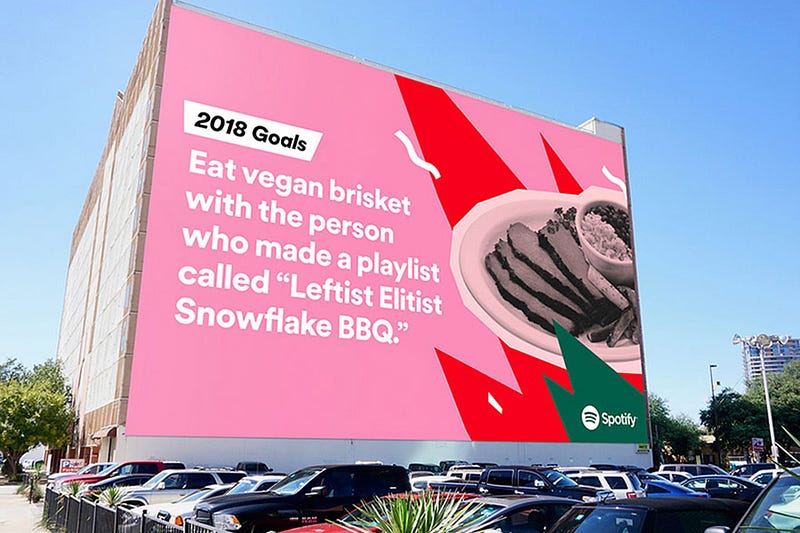
In 2016, Spotify made a splash with an ad campaign that drew on the inexplicable (or all-too-telling) activity of individuals who use the app. “Dear person who made a playlist called ‘One Night Stand With Jeb Bush Like He’s a Bond Girl in a European Casino’: We have so many questions,” read one billboard. Another, gracing the side of Manhattan’s Port Authority, where millions must have read it: “Dear person who played ‘Sorry’ 42 times on Valentine’s Day: What did you do?” Who knows if the anonymously burned parties ever saw the signs, but if so, they probably started investing in a vinyl collection.
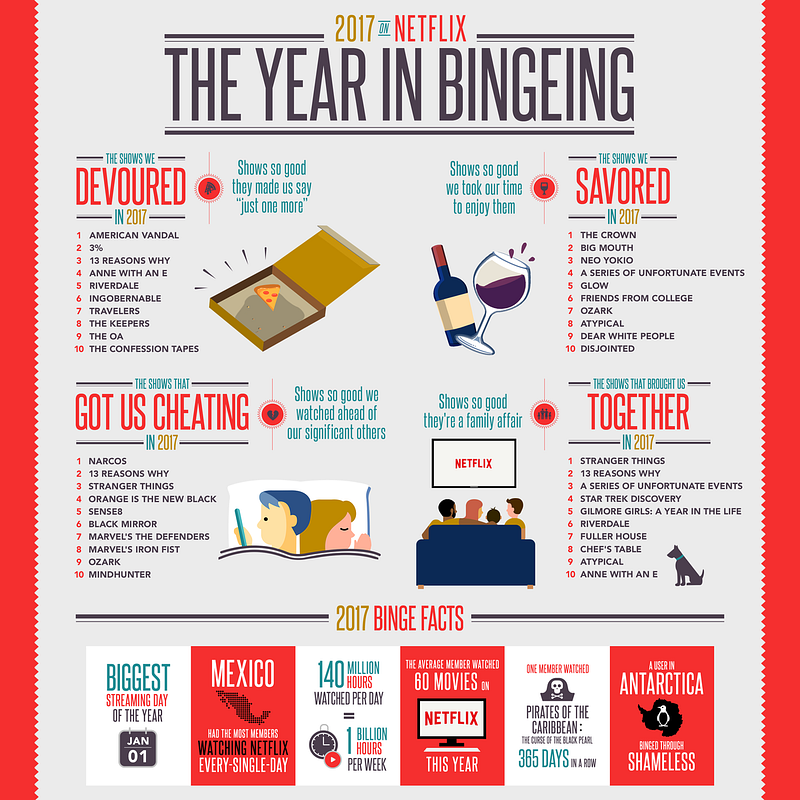


Netflix followed suit this week, shaming streamers for a host of embarrassing behaviors. The company reported that someone in the U.K. had watched Bee Movie — the 2007 animated film starring Jerry Seinfeld, which has aged into canonical meme status — a whopping 357 times this year. Someone else watched the first Pirates of the Caribbean movie every single day. Netflix even somehow came up with a list of TV shows that “got us cheating,” i.e., watching ahead of our significant others. And over on Twitter, they mocked a small demographic clearly obsessed with the rom-com A Christmas Prince.



While the tweet appeared to have the intended effect — high engagement and people chuckling about the savage own — it also drew criticism from people creeped out by the close monitoring, as well as the implication that Netflix employees had made a sport of cherry-picking data.


While Spotify corporate has some creative distance from the musicians accessible on the platform, Netflix made and distributed this evidently shitty Christmas movie. Who are they to interrogate its fans? Shouldn’t they be happy to release a hit? And are we about to see McDonald’s put “a certain U.S. president” on blast for inhaling 600 Big Macs this year? It’s hard to think of a precedent for trolling-as-branding. True, the Twitter account for Wendy’s has gotten snarky now and then — but usually at rival restaurants or people who dissed them first. It’s totally different to slam the people who turn your profit. Then again, it squares perfectly with brands’ attempts to come off as just another witty social media friend. At this point, they’re even having conversations among themselves.



This tone reflects an understanding, in the social media departments of various media properties and food franchises, etc., that traditional promotional language is scorned by people who are online to goof around, get news, or share passions. Denny’s was one of the first to recognize this, amassing a following by adopting the surrealist style of Weird Twitter. But the flip side to this chill vibe is the casual put-down — the sort of ribbing that’s expected and fine between real friends but not altogether appropriate from Big Brother.

On balance, maybe we’d rather not have the receipts of our internet diet read back to us every December, and no website makes that clearer than Facebook. Whether it’s asking you to celebrate a “friendaversary” with someone you haven’t spoken to since a falling out or bumping a somber status on the death of a loved one via the “On This Day” feature, the social network can’t stop rehashing all the stuff we’d rather forget. (Facebook’s 2017 in review videos have been more depressing than usual, highlighting painful posts regarding sexual harassment, mass shootings and natural disasters.)


Aside from the idiocy of an app surfacing touchy old content it thinks will inspire nostalgia — or quirky stats that serve to humiliate unnamed losers — we’ve never needed tech to help us take stock of a year. The whole point of a memory is that the experiences with true impact will overshadow the granular noise of a daily routine. Things are supposed to slip through the cracks; we are not designed to retain it all, just as we are not meant to process the quantity and scale of human chaos that floods our brains when we log on in the morning. By guessing who we are through our patterns of consumption, Netflix and Spotify instead affirm that nobody is defined by what they binge or their guilty pleasures. It is no more truthful an assessment than the self-conscious one we offer when trying to impress a crush who asks what we’re into.

Given the choice, I’ll always prefer that slight dishonesty to the cruelty of an algorithm.

Monday, November 20, 2017

Benefits of Combining SEO & PPC to Beat Your Competition


E-commerce and online businesses have witnessed a phenomenal transformation in the area of online marketing. Every second of the day, all over the Internet, many commercial websites are springing up on the internet. These websites are making their best effort to be visible in the online world as well as in the offline. More importantly these online business owners are focused not only on their internet presence but want to offer consumers a convenient shopping experience in the privacy and comfort of their homes.

Commercials websites compete against each other by using the two most powerful advertising strategies: Search Engine Optimization (SEO) and Pay per Click (PPC) in trying to attract more traffic to their websites. When these two strategizes are coupled together ranking of the websites improve drastically and thereby has an opportunity to keep an edge over the competition.
Twin equalizers to outrank the competitors

The importance of combining SEO and PPC in a marketing strategy are formidable tools that act to form twin equalizers in the effort to counter act the strategies of the competition.
Benefits of combining SEO and PPC are:

The combination of both SEO and PPC will improve both organic and paid results. The keywords that are found to be profitable with PPC can then be used for SEO.
  • Enhances the Click Through Rates (CTR). Generating and testing content will be advantageous to both search engine ranking as well as the PPC click through rates.
  • High conversation rates: When using PPC along with the organic results the chances of conversion into paying clients drastically increases.
  • Best keywords identification: PPC is considered to be the best tool for measuring the results by which one can identify the best keyword and ad copy. These results can then be applied to the SEO strategy as well.
  • With the right combination, a company can outrank the competitors from the first page of Google and simultaneously increase the brand identity with overall increased exposure.
  • By dominating results a company can increase branding and protect online reputation as this combination guarantees a very strong online presence.
  • With well-planned integration of SEO and PPC online business owners can maximize the efficiency of their marketing efforts and at the same time optimize the spending for the campaigns that effectively increases the bottom line.

When managed properly and handled by the right experts, online business owners can achieve favourable results by combining these two great tools. This integrated approach will attract potential clients both from organic as well as paid channels. Statistics reveal that this combination increases conversion rates around forty percent. The combination enhances the online marketing strategies which deliver online business websites greater exposure with a much quicker ROI (Return on Investment).

In any business one cannot control the strategies adopted by the competitors. This is true in the online world as well. It is always suggested to follow proven techniques to attract more people to your website in order to retain existing customers and to turn the prospects into new customers. Smart online business owners will enhance their SEO strategies in integrating their organic SEO campaigns with a Pay per Click campaigns in order to outrank their immediate competitors. A combination of SEO and PPC will prove the best results in improving the bottom line. Through utilizing both SEO and PPC a well-planned home based online business can do better than the poorly designed websites of multimillion dollar global companies. The history of ‘Big companies eating the smaller ones’ has been changed to ‘Smart companies eating larger, slow to adapt companies’. When it comes to online businesses this is the new reality.

Friday, September 8, 2017

Dream Job in Social Media: Resume Template, Tips, Resources


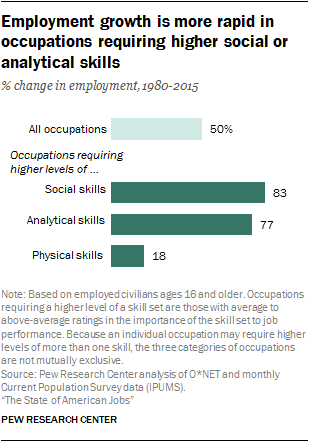
The nature of work is changing. As jobs in traditional sectors are lost to automation, entirely new careers paths are emerging in the social sphere. Data analysis from Pew Research Center shows that job categories requiring social, technical, and analytical skills are growing significantly faster than the average for all job categories.
The Definitive Guide to Content Curation: Strategies, Tips, and Tools | Hootsuite Blog
Image via Pew Research Center.
Perhaps it’s no surprise, then, that LinkedIn currently lists more than 90,000 social media job openings worldwide.
So, you want to know how to find a job in social media? Here are some key ways to connect with recruiters, develop and highlight your social media expertise, and craft a winning application package—including a resume template—to help you land a social media job.

Table of contents

A step-by-step guide to landing a job in social media

Social media resume tips

Social media resume templates

Bonus: Get the step-by-step social media strategy guide with pro tips on how to grow your social media presence with Hootsuite.

A step-by-step guide to landing a job in social media

1. Understand what role is right for you

While social media professionals can have many different job titles, their work tends to break down into six main types of role:
  1. Social media management
  2. Analytics and strategy
  3. Content creation
  4. Community management
  5. Campaigns and promotion
  6. Social media advertising and paid promotion
In smaller companies, these roles may all be bundled into one position. That means when applying to a small team, you’ll likely want to present yourself as a social media generalist, with broad skills across all of these areas, whereas for larger social teams you’ll want to highlight your specific expertise in one key role.
It’s never too early to start thinking about which type of role you’re best suited for so you can focus your job search, education, and skill-building using the right framework.

2. Establish a presence on social media

Your social media accounts reveal a lot about you—and prospective employers are likely to seek that information out, looking for clues about your qualifications for the job or your fit with the corporate culture based on what you post online.
Still, according to a national Harris Poll survey on behalf of CareerBuilder, nearly half of hiring managers who use social media to screen candidates have found something that caused them to take someone out of the running for a job. The worst social media offenses? Provocative or inappropriate photos, videos, or information (46 percent) and information about drinking or using drugs (43 percent).
So, should you just lock down your social media profile? No. The CareerBuilder survey also found that a third of hiring managers who screen using social media found something on social that actually caused them to hire a candidate.
When thinking about how to get a job in social media, take a close look at your social profiles to make sure they show you at your best. Look for any less-than-ideal posts or photos you may have shared back in your carefree college or high-school days, and ensure your most recent posts showcase your current skills and relevant expertise.
Here are some key strategies to keep in mind when developing your professional social media presence.
  • Craft a professional bio that showcases your personality, maintaining consistency in your key points but tailoring the length and tone for each social network. Check out our posts about how to write an effective bio for Twitter and Instagram.
  • Keep your profile image professional and consistent across networks, but resize it to the optimal dimensions for each network using these image specifications.
  • Post to your social channels regularly and with interesting insights, whether by creating your own content or sharing your thoughts on content created by others.
  • Follow relevant accounts, influencers, hashtags, and brands to keep abreast of what’s happening in the industry and keep an eye out for job postings.
  • Connect with people in your industry through Twitter chats, LinkedIn Groups, and other social spaces where you can foster relationships that provide mutual value and extend your network. Keep in mind that 70 percent of people who were hired in 2016 had an existing connection at the company, and referred applicants are 15 times more likely to be hired than those who apply through a job board.
If you’d like an inside look at how these strategies worked for a real person, Hootsuite copywriter Sarah Dawley shares how she used social (especially Twitter) to kick start her own social media career in her blog post How to Land Your First Job Using Social Media.

3. Know your stuff

Social media professionals wear a lot of hats, with responsibilities ranging from writing to revenue tracking, often all wrapped up into one position. They also need to have their finger on the pulse of the industry, knowing about the latest developments in social that can have a big impact on social media strategy.
Hootsuite Academy offers free online social media courses on key topics like social marketing, content marketing, and social advertising. More than 200,000 social media professionals have benefitted from this online learning program developed by Hootsuite’s social media experts.
More advanced users can pursue official Hootsuite Academy certifications. Completing these will get you listed in the Hootsuite Academy Directory alongside other certified social media pros.
Many social networks also have their own training and certification programs to help social media professionals learn the best ways to use each network’s specific tools—and highlight that proficiency to potential employers on your resume. You can learn about Facebook BlueprintGoogle AdWords certificationTwitter Flight SchoolPinterest Propel, and more in our post on brand certifications to make you a better social media marketer.
Keep in mind that training is an ongoing process. Pew Research Center data shows that more than half of American adults across all job sectors say it will be essential to engage in ongoing training and skills development throughout their working life in order to remain employable—and 35 percent of working adults say they need more education or training now to get ahead in the job they already have. This is especially true for social media professionals, who work in a landscape that is constantly changing.

4. Get hands-on experience

It may be frustrating to browse social media job postings, only to find that they all require at least some level of experience. So, how do you get that experience if you’re seeking out your first social media job?
Whether you’re a new graduate, a marketing generalist who wants to specialize, or a veteran marketer who wants more hands-on social experience, here are some options to help beef up your resume and gain the experience you need to bring value to future employers:
Volunteer to create or manage the social media accounts for a charity or community organization you’re involved with or that speaks to your personal values. If you don’t have the time to take on an ongoing commitment, look for opportunities to get involved with the social media for an event, which will have a set end date.
Look for a social media internship to develop real-world on-the-job skills. Make sure the internship aligns closely with your desired career path so that you gain the most relevant experience.
If you already have a marketing job but no social media experience, talk to your employer about ways you could help contribute to the company’s social media presence.
Develop, implement, and track the results of a social media strategy for your own blog, business, or personal brand.

5. Use social media to find positions

Job seekers in all fields are turning to social media to connect with companies and look for work. In fact, watching for posts about employment opportunities is the most common reason for internet users in Spain to follow brands on social, while the amount of time U.K. internet users spent on LinkedIn jumped 87 percent between December 2016 and March of this year.
LinkedIn is the obvious choice when it comes to searching out jobs using social media—the network currently has more than 10 million job listings. But beyond its job search functionality, LinkedIn offers important networking opportunities for social media professionals, especially through LinkedIn Groups.
Social channels also provide an important way to research prospective employers and learn about company culture. Facebook and LinkedIn are the most common channels for researching prospective employers, except among 18- to 29-year-olds, who favor Instagram for this purpose. Company hashtags (for example, #hootsuitelife and #hootjobs) can give you a peek inside a company’s office life and highlight current job postings.

6. Create a standout resume

Here’s the simple truth: A hiring manager is unlikely to read through your entire application before making an initial yes-or-no decision about you.
They might not even see all the resumes submitted, as an HR person, recruiter, or even software might conduct an initial screen to match applicants against the job requirements.
In fact, a recent study found that recruiters spend on average only six seconds screening each resume.
Now let’s look at some key ways to get your resume into the “in” pile and avoid the “out” pile on that critical first sort.

Social media resume tips

Address the job requirements

Read the job posting carefully and make sure your resume addresses all of the points required. You may even want to mirror the language from the ad to make it easy to match your experience to the requirements—especially in case the first sort is done by software.
Also, be sure to address the requirements stated for the application package itself. For example, while only 26 percent of recruiters view cover letters as important, you’ll be setting yourself up for failure if you don’t include a cover letter when the job posting requests one.

Quantify your results

Many organizations are focused on proving the ROI of social, so highlight experience that demonstrates you can get results—including numbers from real-world wins whenever possible.
For example, you could highlight the growth of social channels during your tenure, the success of campaigns you ran, and so on. Keep this tight and to the point, using active language.

Highlight your knowledge of the company

Tailor your application to each company, and be sure to include a sentence that shows you know what the company is all about. Then, highlight how you can contribute to the company’s goals or what you can contribute to the specific role or the corporate culture.
For example, if you regularly participate in a company’s Twitter chat (like #hootchat), be sure to say so and highlight something you’ve learned.

Focus on the details

Be sure to proofread your application. Reading it out loud is a great way to slow yourself down and catch mistakes. It’s also worth asking a friend or colleague you trust to take a look with a fresh set of eyes.

Social media resume template

Since a standout resume is critical, we’ve created a a few resume templates for social media marketing professionals to ensure you cover all the bases.
To use the templates simply click File in the upper left-hand corner, then select Make a copy from the drop-down menu.

Social Media Resume Template (version no. 1)

Social Media Resume Template (version no. 2)

Social Media Resume Template (version no. 3)

Happy job hunting.

Thursday, August 31, 2017

Twitter Tools You Can Use in Your Marketing Strategy


When you’re packing for a hiking trip, you know the contents in your pack can make or break the experience. If you’re prepared, you can weather any storm that comes your way. But if you’re ill prepared, you won’t fare so well. You’ll end up wet, cold, and wishing you had never left the house to begin with.

Having a good Twitter toolkit is no different. In order to make sure that your marketing strategy is as effective and efficient as possible, it’s important to have the right tools for your business. They will save you a lot of headaches.

Here are 33 tools, broken down by function, that will make your Twitter marketing strategy run smoother.


Bonus: Download the free strategy guide that reveals how Hootsuite grew our Twitter following to over 7 million users and learn how you can put the tactics to work for your business.


Twitter tools for analytics
Twitter Analytics Dashboard

Every Twitter account has free access to Twitter’s Analytics Dashboard. It’s a quick and easy way to get basic stats on your Twitter activity. You can find out what Tweets are the most successful, get the demographic information of your followers, and track the performance of your Twitter cards.
Twitter Engage

Twitter Engage is a companion app for Twitter that provides real time data and insights to help you understand, engage with, and grow your audience. Twitter Engage tells you who your most important followers are and highlights important mentions, such as those from influencers or advocates. It also outlines account performance and audience (through key stats like Retweets) and tracks post-by-post performance.
Tweetreach

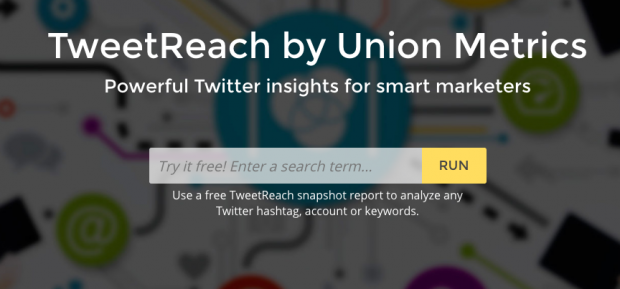
If you’re wondering how far your Tweets have traveled, then Tweetreach is the right tool for you. You can input any Twitter hashtag, account, or keyword and Tweetreach will run a report. With a paid subscription, you can monitor Twitter reach, performance, and engagement in real time.Image via Tweetreach.
Hootsuite Analytics

With Hootsuite Analytics, you can measure the effectiveness of your social media outreach and easily share the results. You can gain new insights, identify social influencers, and see what content resonates best with your audience.
Twitter tools for competitive analysis
Twitonomy

Twitonomy gives you detailed analytics on anyone’s Tweets, Retweets, replies, mentions, or hashtags. You’ll also get valuable insights on your followers and accounts that you follow.
Foller.me

Foller.me is a quick and easy way to scope out information on a competitor. All you need to do is enter the Twitter handle of your competitor, and you’ll get analytics on their Tweets, along with other information like timezone and follower ratio.
Twitter tools for identifying leads
Audiense

Audiense allows you to find and build segmented audiences so that you can deliver more targeted, impactful campaigns. You can monitor your campaigns and measure their success in Hootsuite. Audiense is available in Hootsuite. Download it from the App Directory and you can use it to monitor Twitter campaigns and measure success.
Mentionmapp

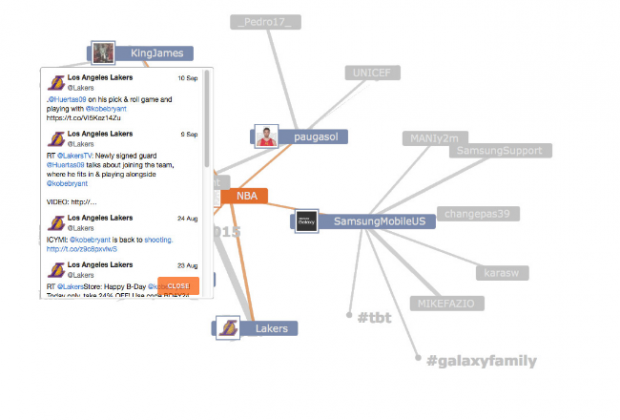
If you’re looking for people, places, events, or conversations happening around your customers, then mentionmapp is a great tool. Mentionmapp makes customer discovery on Twitter easier. You can drill down who your customers are talking to (and who their customers are talking to), allowing you to target your messages and content accordingly.Image via Mentionmapp.
Demographics Pro

Demographics Pro lets you do a deep dive on your customer. It offers instant access to Twitter profiles, giving you important information on gender, age, income, location, occupation, interests, brand affiliations, and audience correlations. The Demographics Pro app is free with a Hootsuite account.
LeadSift

LeadSift is a super useful tool that identifies leads from Twitter and classifies their intent. In Hootsuite, LeadSift automatically organizes direct and indirect leads by scanning millions of conversations, letting you know who potential customers are. You can quickly scan results and find the conversations you’re looking for. The LeadSift app is free with a Hootsuite Enterprise account.
Resonance

Resonance allows you to discover potential customers on Twitter. It tells you who is engaging with your brand and why they’re sharing your content. You can tailor your content to your audience, turning leads into customers and customers into advocates. Resonance is free with Pro, Business, and Enterprise Hootsuite accounts.
Twitter tools for mentions and monitoring
Mention.net

Mention has the ability to monitor billions of sources in over 40 languages, so you won’t miss another brand mention or customer conversation. This tool gives you information in real-time, so you can quickly reply and engage with customers.
Keyhole

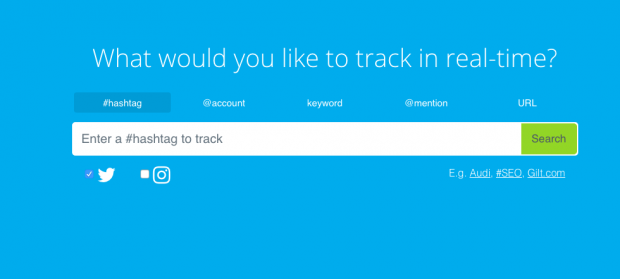
Keyhole lets you track conversations in real time. Your dashboard shows how many posted hashtags, Retweets, likes and impressions your content generates. Their downloadable data reports show the success of your social strategy or campaign over a period of time.Image via Keyhole.
Twitter Dashboard

Twitter Dashboard is a free tool that lets you create custom feeds to find out what’s being said about your business, beyond the Tweets that actually mention your brand.
Twitter tools for social listening
Hootsuite Insights

Hootsuite Insights helps you understand the conversations happening around your brand. It allows you to gauge social sentiment, respond to comments in real time, and follow key trends. You can set up automatic reporting that will save you time and allow you to share results across your entire organization.
Brandwatch

Brandwatch allows you to strengthen your social media monitoring capabilities with the power of deep listening. You can monitor brand mentions, sentiment, and trends to stay ahead of the competition. With Brandwatch for Hootsuite, you can assign and respond to mentions found within Brandwatch from your Hootsuite dashboard.
Synthesio

Synthesio lets you measure sentiment and reputation to know how consumers perceive your brand. You can use those insights to better engage with customers and make smarter business decisions. Synthesio is available in our App Directory.
Twitter lists

Twitter lists are a feature built right into Twitter that allow you to segment your timeline and create mini-news feeds. Lists can be public or private and you can add any Twitter account to a list, whether you follow that account or not. Twitter lists are a great tool for monitoring influencers, industry trends, or even competitors.


Twitter tools for timing
Tweriod

Tweriod tells you the best times to Tweet. It analyzes both your Tweets and your followers’ Tweets, so you can send messages when it will have the biggest impact.
Twitter tools for Twitter chats
Commun.it

Commun.it is a useful tool that organizes your conversations on Twitter and builds you a priority list of what you should respond to. It groups your followers according to various categories to help you better engage with your audience.

TweetChat

TweetChat lets you follow the chats of a specific hashtag. When you reply to the conversation, the hashtag automatically gets added to your Tweet.
Chat Salad

Chat Salad offers a handy calendar list of upcoming Twitter chats organized by hashtag. When you log in you will get chat times converted to your timezone and receive SMS reminders about your favourite chats.
Twitter tools for Images
Twitshot

Twitshot is a simple tool that helps you extract images from links and attach them to your Tweets. To get started, insert your link with your message and select the image you want to use for your Tweet.
Canva

Canva makes it easy to add visuals to your social media posts. Whether you want to work within pre-made templates or upload your own photos, Canva has tons of different options to suit your content or campaign.Image via Canva.
PicMonkey

PicMonkey is a photo editing tool that helps you create beautiful photos for social media. You can upload your own photos or use the sample photos provided.
Social Image Resizer Tool

This tool helps you quickly resize your images for social media. If you’re constantly wasting time resizing images manually, give this tool a try.
Twitter tools to find influencers
Klear

Klear has one of the most sophisticated search engines for finding influencers. It boasts over 500 million profiles, 60,000 categories, and five years of historical data. It will give you all the right information to make sure you’re focusing on the right people.
FollowerWonk

This app by Moz lets you search influencers by keywords in their social media bios, making it easier to find and connect with influencers. This tool will also give you useful demographic info on who your followers are, along with helpful data visualizations of your social activity that you can compare to other accounts.
Buzzsumo

Buzzsumo shows you the most popular content being shared in your industry and identifies influential people who will be able to share it. You can filter influencers according to different categories (blogger, journalist, etc.) that will help you find the most relevant influencers to chat with.
Twitter tools for trending topics
Trendspottr

The Trendspottr app for Hootsuite allows you to search for topics by content, hashtags, and sources. It allows you to engage with, and share, trending stories with your Twitter network. The Trendspottr app is free with a Hootsuite account.
Nexalogy

Nexalogy helps you identify key conversations happening on Twitter by analyzing the people you follow, hashtags, and search terms. It displays concepts people are talking about, the most shared links, and key influencers. The Nexalogy app is free with a Hootsuite account.
Twitter tools for following/unfollowing
ManageFlitter

ManageFlitter is a great Twitter tool for managing who you follow. It will let you quickly sort through your accounts and find people you might like to unfollow, whether they’re inactive accounts, people that have unfollowed you, or spammy accounts.
DoesFollow

Find out who follows whom on Twitter. Does Warren Buffett follow Ralph Lauren? This is also a great tool if you’re building a network of contacts or customers.
Refollow

Refollow lets you automatically follow people that are relevant to your brand. It helps you manage your followers and filter unwanted users.
Get the right tools for your business

Now that you have all these tools to step up your Twitter game, save even more time by using Hootsuite to manage Twitter alongside all your other social networks.

Tuesday, August 8, 2017

Social Media Advertising: The Complete Guide


It’s no secret that digital advertising has become a key part of most marketing campaigns. Internet advertising spend overtook newspaper ad spending way back in 2013, and eMarketer predicts that it will overtake TV ad spending for the first time by the end of this year. The numbers are huge: an anticipated $72.09 billion spent on digital ads in the United States alone in 2016, a number expected to rise to more than $82 billion next year and more than $113 billion by 2020.

It probably comes as no surprise that Facebook is one of the biggest players in digital advertising, indicating that social media advertising is front and center in the digital ad world. In fact, Facebook blows all other digital properties out of the water when it comes to display ad spending, capturing 35.4 percent of total display advertising spending in the U.S.—a whopping $11.93 billion (second-place Google, by comparison, will take in just $4.79 billion).

And that’s just display ads. Facebook’s total social ads revenue was more than $6.8 billion in Q3 2016 alone. But the other social networks are nothing to sneeze at, with Twitter bringing in $545 million in social media advertising revenue in the same period. Snapchat will sell $367 million in social ads in 2016, after launching its ad platform just over a year ago. Total social ad spending in 2016 is expected to reach $32.97 billion. By 2018, Facebook alone will top that number.

Based on the social media advertising statistics, it’s clear your competitors are investing in social advertising platforms. In terms of ROI, more than 95 percent of social media managers say Facebook offers the best return, followed by Twitter and Instagram.Image via eMarketer

With so many choices, it can be a challenge to develop a social media advertising strategy that works for your unique business. In this beginner’s social media advertising guide, we dig into everything you need to know about launching a social ad campaign, then give you the nitty-gritty details on how (and why) to create ads on six of the most popular social networks.


Bonus: Download a free guide that teaches you how to turn Facebook traffic into sales in four simple steps using Hootsuite.


Table of contents
What is social media advertising?
Social media advertising tips
Facebook advertising
Twitter advertising
Instagram advertising
Pinterest advertising
LinkedIn advertising
Snapchat advertising
Social media advertising with Hootsuite


What is social media advertising?

Before you start developing your social media advertising strategy, it’s important to understand exactly what social media ads are. Quite simply, a social media ad is any kind of paid content on a social media network. The options run from a one-off promoted Tweet or Facebook post to a full-scale campaign with major budgets attached. Each social network offers different options, and we’ll explore them in detail below.
Social media advertising tips

Hootsuite has been using social ads since 2012—a lifetime in the digital world. While the social ads tools and networks available are constantly evolving, the key principles of effective social media advertising are much more stable. After a couple of years of refining Hootsuite’s own social ad strategy, CEO Ryan Holmes laid out six ways to use social media ads to grow your business in an article that stands the test of time. Here are his tips.
1. Use free social media to beta-test your paid social ads

You’re likely already posting content on Twitter, Facebook, and Instagram every day—and maybe LinkedIn and SnapChat, too. Some of these posts will resonate with followers; others won’t. Track which ones are being clicked, liked, shared, and commented on. These high-performing messages make the best candidates for social ads.
2. Take advantage of targeting features

Traditional ads are inefficient. One of many social media advertising benefits is that social platforms offer very effective targeting capabilities to address that problem. From targeting social media managers on LinkedIn to Stranger Things fans on Facebook, take advantage of this very useful targeting for more efficiency in advertising.
3. Rotate ads frequently

Though it’s annoying to see the same TV ad in every commercial break, repetition is an effective way of hammering home the message using one-way communication. But on advertising channels where engagement is key, and ads appear directly in users’ feeds, fresh content is the name of the game. Overly repetitive messaging may end up losing you more business than you gain. Hootsuite has found the best practice is to rotate ads every three to five days.
4. Use small samples to test the text and images used in your ads

One of the great virtues of social ads is instant feedback. You can gauge the effectiveness of a sponsored post in minutes and follow up with advanced analytics reports. The best practice is to test several ads with small audiences to determine what works best, then use the winning ad in the primary campaign.
5. Understand how ads are sold on different networks

You’ll learn the details below, but keep in mind that keeping your social media advertising budget under control means thinking about whether you’re designing an ad campaign based on impressions or engagements. If you’re paying every time someone sees your ad (impressions), your message can cast a wide net. But if you’re paying for engagement, you only want people who are really interested in doing business with you to engage. The wording of your ad should help people self-qualify.
6. Design ads with mobile in mind

More than 80 percent of social network users are accessing social media on a mobile device in 2016. This means most social media ads are being viewed on mobile devices as well. Your mobile ads should be specifically designed for the small screen, incorporating images that are easy to view on a pocket-sized device. You can also take advantage of “geofencing” to target mobile users when they are in a specific zip code, so they only see your ads when they are close enough to walk in your front door.

Now that you understand some basic social media advertising guidelines, let’s dive into the specifics of advertising with each of the main social networks.
Facebook advertising


Ad types

Facebook offers several different ad formats.
Photo ads

The technical specifications for photo ads vary depending on the ad objectives, so you should check the details on Facebook Business. For clicks to your website, for example, photo ads offer a headline of 25 characters, 90 characters of test, and a link description of up to 30 characters. Depending on the ad objective, you may also be able to add a call to action button with actions like Shop Now, Learn More, and See Menu.
Video ads

Video ads generally have the same call to action options and character counts as photo ads. The aspect ratio required depends on the campaign objective, but 16:9 or 1:1 will usually work.
Carousel

A carousel ad lets you include up to 10 images and links in one ad. You get 90 characters of text, a 40 character headline, and a 20 character link description. Images should be have a 1:1 image ratio.
Slideshow

A slideshow is an ad that creates a video from several static images. All images should have the same size and aspect ratio.
Canvas

Canvas is a full-screen mobile ad type that combines videos, photos, and call to action buttons. It allows users to tilt and zoom to interact with the imagery.
Audience and targeting

Facebook offers extensive targeting options, and choosing the best target audience will maximize the value of your ad spend.

Start by targeting your ad based on location, age, gender, and language. Then, you can dive into Facebook’s detailed targeting options:
Demographics allows you to filter for nine demographic categories: education, ethnic affinity, generation, household composition, life events, parenting, politics (U.S. only), relationship, and work.
Interests breaks the many interests Facebook users indicate through their social media activity down into nine broad categories: business and industry, entertainment, family and relationships, fitness and wellness, food and drink, hobbies and activities, shopping and fashion, sports and outdoors, and technology. Each of these has multiple subcategories, so you can drill down quite deep in your targeting.
Behaviors allow you to filter users based on their behaviors on Facebook and information Facebook gathers from partners.

You can also choose to target or exclude people who already have a connection with you on Facebook, as well as those people’s friends.

Facebook also lets you create a custom audience by uploading a list of email addresses, phone numbers, Facebook user IDs, or app user IDs. You can then use lookalike audiences to find other people on Facebook that are similar to that audience.

Once you’ve created your target audience, you can narrow your focus even further based on type of device, and even whether the Facebook user is connected via data or Wi-Fi.
Pricing

Facebook ad pricing varies based on quite a few factors, including the time of year, the country you’re targeting, and even the quality of your ad. For link clicks and conversions, on average the cost per click in the United States in Q3 2016 was 27.29 cents, and the CPM was $7.19. But the average CPC in Australia was nearly 80 cents—a huge difference.Image via AdEspresso

The cost per click varies by placement, with ads in the desktop news feed costing $0.29 per click compared to $0.18 for mobile in Q3 2016.
How to buy

Before you buy your first Facebook ad, you’ll need to set up a Facebook business page. Once your page is ready to go, you can head over to the Facebook Ads managerto create your first ad.
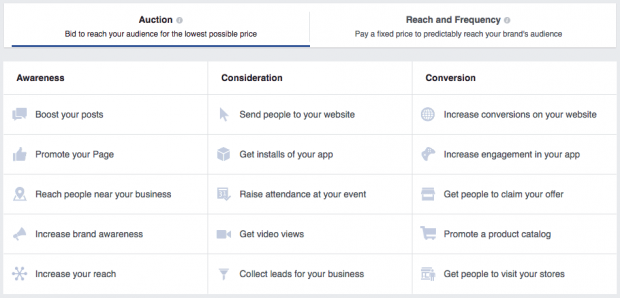
Step 1: Choose your campaign objective

Facebook offers 15 different campaign objectives, broken down into the three broad categories of awareness (boost posts, increase brand awareness), consideration (app installs, lead collection), and conversion (website conversions, visits to your offline store).


Choose the objective that best aligns with your goals for this particular Facebook ad. For some help narrowing down the best goal for your ad, check out our guide to Facebook advertising strategies.
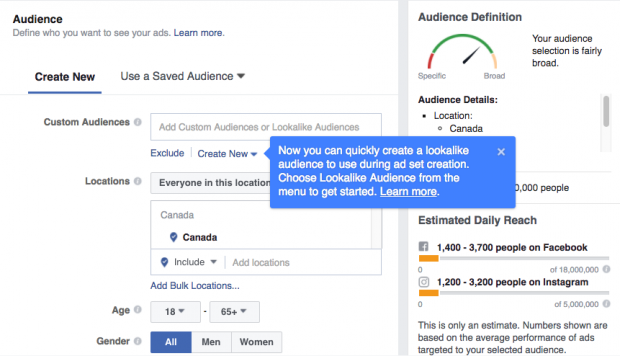
Step 2: Choose your target audience and placement

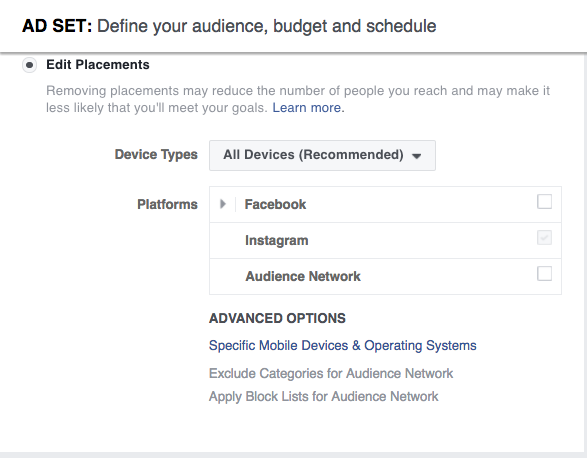
Keep an eye on the meter on the right side of the page that indicates the breadth of your audience selection, along with the estimated daily reach chart on the bottom right. Notice that Instagram is among the placement options. (We’ll delve further into advertising on Instagram below.)


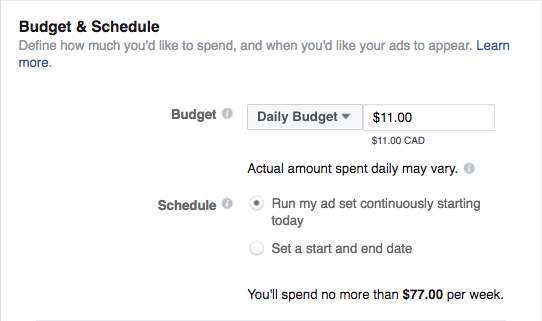
Step 3: Set your budget and schedule

You can choose a daily or lifetime budget, then set start and end dates for your ad or set it to start running right away.


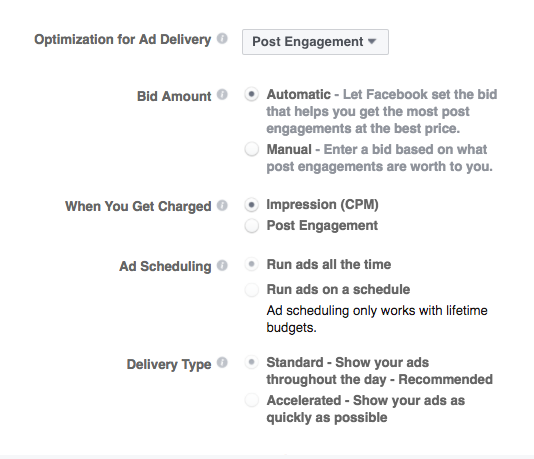
The advanced budget options allow you to really control what you spend by choosing whether to optimize your ad delivery for engagement, impressions, or unique daily reach, and whether you pay by impression or engagement (for engagement ads only).


Step 4: Create your ad

You can choose to create a new ad or use an existing post. If creating a new ad, you first choose whether to use a single image, a single video, or a slideshow, then enter the text of your ad. On the right side of the page, you can preview what the ad will look like in various formats.


Once you’re happy with how your ad looks, click the Place Order button, then wait to get an email from Facebook telling you that your ad has been approved. To learn more about Facebook ad best practices, check out our complete guide to advertising on Facebook.
Twitter advertising


Ad types

There are three different kinds of Twitter Ads: Promoted Accounts, Promoted Trends, and Promoted Tweets.
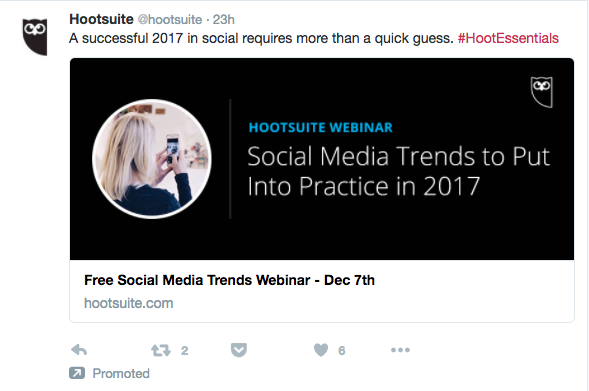
Promoted Tweets are messages that will appear directly in the timelines of the Twitter users you target at a specific time.
A Promoted Account is an ad that invites targeted Twitter users to follow your brand.
Trending topics on Twitter are the most talked about subjects on the social network, appearing on the left side of the page. Promoted Trends allow you to put your story at the top of that list.

Twitter ads are also categorized by your campaign objective:
For website clicks or conversions campaigns, you promote Tweets to people who you want to visit and take action on your website. You’re charged per click.
For Tweet engagements campaigns, you promote Tweets with the goal of starting conversations about your brand. You pay for the initial engagement.
For followers campaigns, you promote your Twitter account and pay per follower gained.
For awareness campaigns, you promote your Tweets to a broad audience and pay for impressions (CPM).
For video views campaigns, you promote your videos to a targeted audience and pay per video view.
For app installs or re-engagement campaigns, you promote your Tweets and pay per app install.
For lead generation campaigns, you promote Tweets and pay per lead collected.
Audience and targeting

Twitter allows high-level targeting based on location (country, state, region, metro area, or postal code), gender, languages, device, platform, and even carrier.

More detailed targeting options allow you to target your audience by the keywords they Tweet, their interests (by category or based on usernames of Twitter users who embody the interests of your desired audience), the specific TV shows they Tweet about, behaviors, and their interest in specific events.

You can also upload specific lists of people (your email list, for example) to target with ads, or target people who are similar to your follower base.
Pricing

The cost of Twitter ads depends on the ad type. Promoted Tweets and accounts might cost you anywhere from 50 cents to $10 or more per engagement (video view, link click, follow, etc.) based on how targeted your ad is. Promoted Trends, on the other hand, have been reported to cost $200,000 a day.

The key here is testing your ads. Run a few short campaigns with a small budget to find out which objective is right for your audience and your budget. For engagement campaigns, Twitter only charges you when a user completes the action set out in your campaign objective, so all of these campaigns will provide some value. It’s always a good idea to look at what other advertisers are bidding for similar ads, which is information Twitter provides.
How to buy

Once you sign into the Twitter ads platform (and add your payment information), buying Twitter ads is a simple four-step process.
Step 1: Set up your campaign

Choose your objective and click Create Campaign to reach the ad campaign screen. Once there, name your campaign, choose whether to start the campaign right away or schedule start and end dates, and decide whether to add third-party tracking with DoubleClick.


Step 2: Choose your audience

Choose from among Twitter’s targeting options. They provide an estimated audience size to help guide you.


Step 3: Set your budget

You can set daily maximum and total campaign budgets. Twitter stops showing your ads once your budget has been reached, so you don’t have to manually end campaigns to avoid being charged.


Step 4: Choose your creative

Twitter will show you an existing list of eligible Tweets to promote, or you can create new ones. You’ll see a preview on the right side of the page.


Click Publish Tweet to launch your ad.

Learn more about managing your Twitter ads on Hootsuite.
Instagram advertisingImage via Instagram.
Ad types

Since Facebook owns Instagram, it’s not surprising that Instagram ad types mirror three of the Facebook ads types: photo, video, and carousel. Also like Facebook, the ads support a number of different objectives.

For Instagram, the available objectives are: website clicks, website conversions, mobile app installs, mobile app engagement, video views, reach and frequency, page post engagement, mass awareness, and local awareness.
Audience and targeting

Instagram ads offer the same audience targeting option as Facebook ads, described earlier in this post. Keep in mind, though, that the demographics of Instagram users in general differ from those of Facebook users. The largest demographic of Instagram users is young urban women (aged 18 to 29).
Pricing

Like Facebook ads, Instagram ads offer options to pay per engagement or by impression (CPM). The average cost per click for an Instagram ad in Q3 2016 was $0.72.
How to buy

Follow the steps outlined in the Facebook section above. In step 2, make sure to choose Instagram as your placement of choice.


Learn more about managing your Instagram ads on Hootsuite.
Pinterest advertisingImage via Pinterest.
Ad types

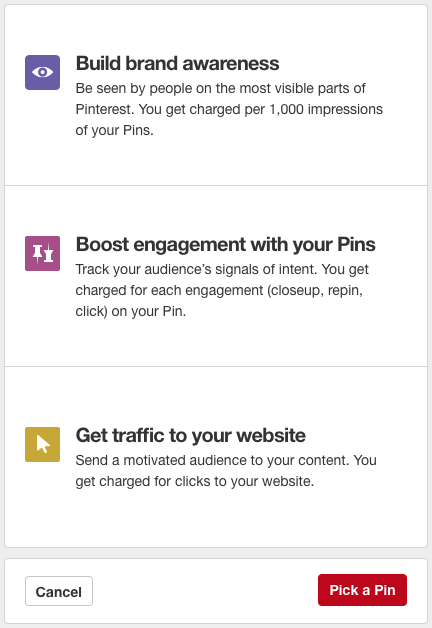
Ads on Pinterest are called Promoted Pins. They are essentially the same as regular Pins, except that you pay to promote them to a wider audience. There are three main types of campaigns:
Awareness campaigns aim to get your Pins in front of people who have not heard of your business before or are not already interacting with your brand.
Engagement campaigns encourage Pinners to engage with your content by repining or clicking your Promoted Pins.
Traffic campaigns funnel visitors from your Promoted Pins directly to your website.
Audience and targeting

Pinterest allows you to target your audience in a few different ways:
Interest targeting allows you to target Pinners based on 420 different interestsincluding, for example, street style and sustainable architecture.
Keyword targeting targets Pinners based on search terms.
Business data targeting lets you target existing customers, Pinners who have visited your site, or a “lookalike” audience that looks and acts similar to your existing audience.

You can also target by location, language, type of device, and gender.
Pricing

How you’re charged for Pinterest ads depends on the type of campaign you run. Awareness campaigns are charged by CPM, engagement campaigns by engagement, and traffic campaigns by click.

Pinterest uses a “second-price auction model” for ad bids. That means you set a maximum bid you’re willing to pay, but you are only charged the amount needed to top the next-highest bidder. You might be charged your maximum bid, but you could pay less. Pinterest’s ad interface provides bid guidance that will let you know if your bid is too low. The minimum CPM bid is $5.
How to buy

Before you can create a Pinterest ad, you’ll need to set up a Pinterest business account. And since you can only promote Pins you’ve already posted, you’ll actually need to post the Pin you want to promote before you start the process of buying your ad. Confused? You can get more details in our Complete Pinterest Ads Guide for Business.

Once you have a business account with some Pins posted, you’re ready to buy your first ad.
Step 1: Choose your goal

From your Pinterest profile, click on the + button and select Create ad—or just go straight to ads.pinterest.com. Select what type of campaign you want to create: awareness, engagement, or traffic, then name your campaign, select the start and (optional) end dates, and set your daily budget.Image via Pinterest.
Step 2: Pick your Promoted Pin

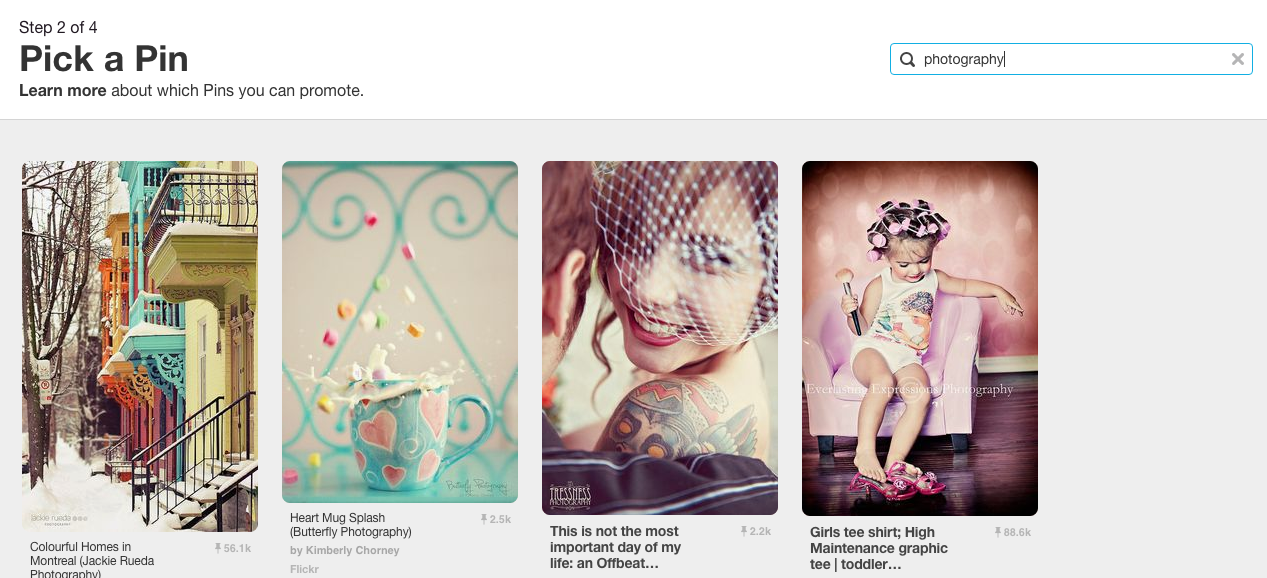
Choose the Pin you want to promote. If you’re not sure, you can use the filters on the Pick a Pin screen to find out which of your Pins have had the most engagement in the last 30 days.Image via Pinterest.
Step 3: Choose your audience

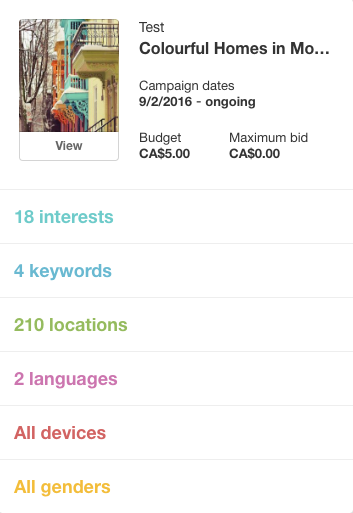
You’ll next find yourself on the Add more details screen. Here, you’ll use the targeting options to choose exactly who will see your Promoted Pin.Image via Pinterest.
Step 4: Set your budget

Still on the Add more details screen, you’ll enter your maximum bid and daily budget.


Review all the information on the right side of your screen, then click Next. This submits your Promoted Pin for review. It may take up to 24 hours for your Promoted Pin to be approved. In the meantime, set up your billing details.

Learn more about managing your Pinterest ads on Hootsuite.
LinkedIn advertisingImage via LinkedIn.
Ad types

There are five main types of LinkedIn ads:
Display ads: Share content with a targeted audience.
Sponsored InMail: Deliver sponsored content directly to LinkedIn user inboxes.
Sponsored content: Your content will appear in the LinkedIn timelines of your target audience.
Text ads: These are text-based ads that appear in the right column of the desktop.
Dynamic ads: These ads also appear in the right column, but incorporate display ad unit formats.
Audience and targeting

LinkedIn targeting, not unlike the social network itself, is very good for employee- and company-specific targeting. You can specify who you want to see the ad based on the industry they work in, their position and seniority (maybe you’re sharing a white paper for managers?), where they work, how big their employer is (think of a post targeting enterprises, not SMBs), and beyond. As a result, LinkedIn is extremely effective for B2B marketing and job-related advertising.

If the audience you choose is too big or too small it might not perform well, so test audience targeting with several ads to hone in on the right one for you.
Pricing

Like Facebook, LinkedIn lets you choose whether to pay based on the cost-per-click (CPC) model, or pay by every 1,000 impressions (CPM). However, LinkedIn has set a minimum budget of $10 per day per campaign. There are also minimum bids for CPC text ads ($2 per click) and CPM text ads ($2 per 1,000 impressions). Sponsored Content minimum bids will vary based on the audience you choose.

With these minimum bids, it’s important that you seriously consider your objective when building out LinkedIn ads. These ads should be very business-focused, as Facebook and Twitter provide much cheaper alternatives for content marketing. Test a few LinkedIn ads and see whether the price is worth it for your business.
How to buy

The process will vary a bit depending on the type of ad you want to run. Since text ads are the simplest (and least expensive) way to get started, that’s what we’ll focus on here.
Step 1: Create a new campaign

On your LinkedIn homepage, hover over the Business Services tab at the top right and choose advertise, then scroll down to the bottom and click Create Ad. Then, choose what type of ad to create. If you don’t yet have a Company or Showcase page (and you should), you’ll be limited to Text ads.


Step 2: Build your ad

Choose where to link your ad to, then add a small image along with your headline and copy. You can preview the ad in various formats on the right side of the page.


Step 3: Choose your target audience

Choose your target audience by industry, company size, job title, and so on.


Step 4: Budgeting

Set your daily budget and your bid, which will be a choice between paying for clicks or impressions.


If you’ve never built an ad before, finish by entering your payment information. Then review your order and launch your campaign.
Snapchat advertisingImage via Snapchat.
Ad types

Snapchat offers three types of advertising:
Snap ads are video ads that appear between Stories. Users can swipe up to reveal extended content such as longer video, an article, an app install ad, or a website.
Sponsored Geofilters (for larger companies) or on-demand Geofilters (for smaller brands) are overlay graphics users can select and add to their Snaps.
Sponsored lenses are custom Snapchat lenses that work just like any of the usual suspects—like the infamous rainbow barf.

For now, the only self-serve advertising option is on-demand Geofilters, so that’s what we’ll focus on here. For all other advertising options, you’ll need to contact Snapchat.
Audience and targeting

When it comes to on-demand Geofilters, your only targeting options are the dates on which to run your ad and the geographic area to cover. But you can get the geotargeting down to the hyper-local: the area in which your Geofilter is available can range from a minimum of 20,000 to a maximum of 5 million square feet.

You should keep the overall Snapchat audience in mind when thinking about advertising on this social platform: 60 percent of users are under 25.
Pricing

There’s a reason why most advertising options aren’t available on demand: Sponsored lenses run from $450,000 to $700,000 per day. On-demand Geofilters are much more affordable—but watch your catchment area. We found that a two-day Geofilter in the immediate area of our office would cost about $13, but expanding the territory of the Geofilter to the maximum 5 million square feet (about 70 square city blocks) upped the cost to nearly $3,000. One city block was about $45.
How to buy
Step 1: Create your Geofilter

Go to the Snapchat Geofilters page and log in to your Snapchat account. Decide whether you want to upload a Geofilter you create using design tools like Photoshop or Illustrator or select the online design tool. Uploading a custom Geofilter gives you greater customization in order to match your company branding. To explore the tools available, we’ll use the online design tool for the rest of this example.


Step 2: Choose an occasion and design

Celebrations offers the most options, and will likely be the most applicable for brands. Use the design tools to create a Geofilter appropriate to your brand.


Step 3: Choose your dates

Choose the dates on which your Geofilter will be available. You can also choose to keep your Geofilter available for the long term and pay yearly.


Step 4: Choose your area

You’ll draw a virtual fence on a map to set the target area for your Geofilter. Remember that the larger the area you choose, the more you’ll pay.


Then enter your payment details and your Geofilter is good to go!