Stephen Darori is a Social Media Expert,Author, Publicist,Finance and Marketing Whiz , Strategist ,Journalist, Editor Prolific Blogger. Editor. You can follow Stephen Darori on Twitter, Facebook, Linkedin and other Social Media Platforms.
Stephen Darori & Associates has led major Social Media and Digital Campaigns for wide ranging clients that have included Hilary for America, the Democratic Party ,Democratic Alliance ( South Africa), Fortune 1000 companies and Shabbat.com
Showing posts with label #FromZionSocialMediaMarketing. Show all posts
Showing posts with label #FromZionSocialMediaMarketing. Show all posts
The idea of emotive branding — and the creation of our agency, Emotive Brand — flowed from our desire to make a positive difference in the way people and brands interacted with each other. These were our goals
Bridge the gap between commerce and civility.
Create brands that people appreciate, respect, and actively seek out.
Help employees of brands feel better about their jobs.
Make partners and suppliers vie for the opportunity to work with our clients.
See communities welcome our clients’ brands with open arms.
As a result of all of this goodwill, our clients’ brands would thrive and prosper. Realizing the Value of Meaning Something More
We came to those goals through two major realizations:
First, as consumers ourselves, we noticed that only a handful of brands really went out of their way to mean anything to us. When they did make a connection — wow, it was love. We’d go out of our way to interact and engage these brands. We even felt disappointed when we had to settle for something less. We’d get excited when other people started talking about these brands and chime in with our most recent, “I can top that!” story. These brands had come to mean something to us because they had a clear reason for being and made us feel something good, time and time again.
On the other hand, zillions of brands never really hit our emotional radar. These brands meant almost nothing to us — even though we’d heard about them, or even bought and used dozens of the brands regularly.
A Problem in the “Brand Decks”
Second, as brand experts, we saw first hand why so many brands fell flat — lackluster and bland — in the minds of customers. As designers, copywriters, and strategists, we work on virtually every aspect of communication from identity to websites to advertising to point-of-sale to employee recruitment and beyond. Behind each piece of work there’s always a brief — and often attached to the brief there’s a two-hundred some page PDF titled “About the Brand.”
Reading through many of these so-called “brand decks,” we quickly recognized a problem. In fact, the “brand decks” were the problem.
Traditional brand thinking results from business people from branding agencies talking to business people within client organizations. The language they use is full of industry jargon, client-speak, and solely rational thinking. Everything is expounded upon, nothing is simplified, and little is made human. And after several rounds of review, the final documents show the scars of compromise.
And what do these documents lack? The brand’s meaning as defined by its reason for being (why it does what it does) and how the brand wants people to feel (how the brand connects emotionally with customers). Brand decks, on the whole, left out what matters most to us as consumers and businesses and what we admire most in the great brands out there.
So we asked the question: What if meaning was the entry point into brand thinking rather than an appendage at the end? And that, folks, is how Emotive Brand was born.
Highlights Social impressions during the 3 months of the #IWannaGo campaign in 2014 increased 23% over those from the entire 2013 year, and Twitter engagement increased 4 times over their previous highest average. 95% of visitors to the #IWannaGo landing page scrolled below the “loading” level to view more posts. Travelocity led competitors by an average of 5% in unaided brand awareness during the #IWannaGo campaign. Travelocity increased purchase consideration 11% for key consumers during the first half of the #IWannaGo campaign.
For the follow-up to their 2013 campaign, “Go and Smell the Roses,” Travelocity wanted to match the number of social impressions from 2013. That doesn’t sound like much of a stretch, except that they wanted to accomplish it in only three months.
Travelocity’s #IWannaGo campaign was the most successful social campaign in the company’s history.
The #IWannaGo campaign ran from early March to early May 2014. Two grand prize trips were given away, one in April and one in June. The campaign was so successful, Travelocity not only matched the social impressions from 2013 in three months, they exceeded them by 23%, from 158 million to 200 million. They also increased their Twitter following on @RoamingGnome by 118%.
Here’s what Travelocity did to make this campaign so successful. #1: Find Out What Your Audience Is Already Talking About
In planning for 2014 marketing, Travelocity wanted to follow up their “Go and Smell the Roses” idea to include two-way communication with their audience. “We’re telling them to go and smell the roses,” said director of brand marketing Brett Steiger. “Let’s find out where they want to go and help them get there if we can.”
They realized during the previous campaign that followers were interested in engaging with their mascot, the Roaming Gnome. So they decided with #IWannaGo to have followers tell him directly where their dream destination was.
#IWannaGo was an outgrowth of the 2013 “Go and Smell the Roses” campaign. #2: Use Appropriate Channels and a Low Barrier to Entry
All participants needed to do to enter the #IWannaGo campaign was to follow @RoamingGnome on Twitter or Instagram, and post to either platform with their dream travel destination, including the #IWannaGo hashtag. Then they would be entered into the drawing to receive one of two grand prizes of a weeklong trip to their destination.
Travelocity used only Twitter and Instagram for the contest entries because that is where the Roaming Gnome “lives” the most. “The Roaming Gnome is very much a person, a character,” said Steiger. “And like a lot of travelers, [Twitter and Instagram] are the key ways [he] engages on social media.”
Travelocity designed the #IWannaGo campaign to be very easy to enter.
Contestants did not need to go to a separate website or fill out any forms. They were not required to include any photos or videos, although they were encouraged to do so if they wished. Steiger explained that they wanted to have as low a barrier to entry as possible.
Participants did not have to go to the campaign landing page, but if they did, they found content that was more engaging than simply a link to the contest rules. Travelocity used Tint to turn the landing page into a social hub with all of the #IWannaGo posts from Twitter and Instagram.
The #IWannaGo landing page was a social hub powered by Tint. #3: Be Genuine
Turning the campaign landing page into a social hub is just one example of how Travelocity used opportunities to be genuine with their followers. “We wanted a place where we could aggregate a lot of the other entries to really inspire other consumers to participate as well,” said Steiger.
It worked. The landing page itself received over 32 million impressions, and 95% of visitors scrolled below the “loading” level of the page to see more content.
“The more we can talk with consumers about things that they care about … versus always forcing something a little too branded, we found that we get we get better engagement, better conversations and less attrition from our consumers,” said Steiger.
Travelocity’s Roaming Gnome Instagram account posts about vacations and travel.
Keith Nowak, Travelocity director of communications and brand integration, added that having a topic that people care about passionately such as travel could be a double-edged sword. “It gives us the opportunity to engage with something that people are naturally excited about, but you’d better be authentic and on-point when talking about it,” he said. #4: Partner With Traditional Media
Travelocity has a 10-year relationship with the television show The Amazing Race. This longtime association gave them a great existing platform to kick off the #IWannaGo campaign. “TV is still extremely powerful to generate larger brand awareness of any type of contest or program or new product,” said Steiger.
Travelocity used their long association with The Amazing Race to promote #IWannaGo.
Steiger was quick to add, however, that while TV provided a great launching platform for the campaign, “If we didn’t actually have something that was engaging to consumers, it would have jumpstarted and then finished very quickly.” #5: Be Strategic With Paid Promotion
In addition to paying for exposure on TV, Travelocity also bought the rights to promote the #IWannaGo hashtag on Twitter for a day. “That was big,” said Steiger, “Because then you have 70, 80 million people that may see that on any given day.”
Travelocity did not buy the hashtag on Twitter the first day of the campaign launch. They used their Amazing Race tie-in to kickstart interest, and in the first two days of the campaign after that, #IWannaGo trended organically on Twitter. The third day they used the promoted hashtag to “add more fuel to the fire,” as Steiger put it.
#IWannaGo trended organically on Twitter its first two days. #6: Look for Creative Real-time Marketing Opportunities
To keep the campaign fresh, Travelocity looked for ways to engage in real-time marketing with consumers. One of the ways they did this was using Vine videos. On April 14th, about two-thirds of the way through the entry period, Travelocity encouraged followers to tweet, and let them know that they might get a Vine response.
Travelocity picked one day to respond to followers’ tweets with Vine videos.
Then they created over 60 Vine videos in response, each within 20-30 minutes of when they were submitted.
“It was a way to show consumers that it’s not just a computer back here that’s typing for itself. The gnome and his entourage are listening to you and paying attention and wanting to get back to you—not in two days, not in a week, but 20 or 30 minutes,” said Steiger.
Travelocity responded to tweets in 20-30 minutes.
Even though they know he’s not real, people are “totally psyched” when they get a Vine or a tweet from the gnome, he added.
It’s all about the results.
The success of any campaign is measured by its results. In addition to measuring social metrics such as impressions and engagement, Travelocity uses YouGov research to track brand metrics. According to YouGov, during the first month and a half of the campaign, Travelocity increased purchase consideration by 11% for key consumers.
This means consumers said yes when asked if they would consider Travelocity if they were looking into booking travel. They also led competitors in unaided brand awareness by 5% during the campaign; for example, when survey participants were asked what travel companies they thought of, Travelocity was mentioned first.
Many factors contributed to this success, but Steiger says it boils down to one simple concept: “Letting the consumer’s voice be the main piece, and letting our consumers inspire other consumers,” he said.
What do you think? How can you create a killer hashtag campaign for your company? Include your comments and questions below.Get Social Media Exam
Imagen de Blue Fountain Media bajo licencia CC BY 2.0
Your website is the cornerstone of your business’ online presence. Alongside your website is its helpful sister, social media. Your social media and website presence should be integrated with one another in order to continuously drive traffic to your online assets. And with social media driving traffic to your site, the next step is measuring your efforts so you can improve. As always, this is where Google Analytics comes handy.
Google Analytics provides you with data to see where your website visitors come from and understand your visitors’ behavior on your site. Additionally, when you setup your Google Analytics account to track and measure your social media initiatives, you’ll then be able to adequately prove the ROI of social media for your business.
To get you started, we’ve put together this guide to tracking social media in Google Analytics in 6 easy steps.
Step 1: Create social media objectives and goals for your website
For example: To increase website traffic by 15% in Q2, 100 Tweets a month will be dedicated to driving traffic to the website.
Step 2: Sign up for Google Analytics
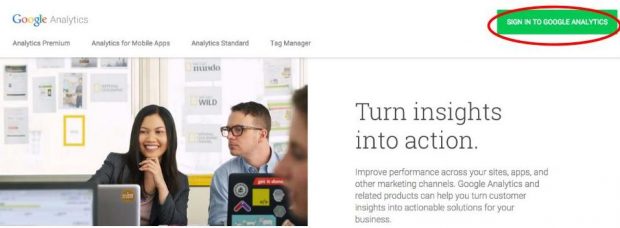
This step is extremely important if you want to track social media in Google Analytics. It’s important that you have a Google Analytics account to access your website traffic reports. Create a new Google Analytics account, if you don’t have one. Visit google.com/analytics, click Sign in to Google Analytics or Create an account button on the top right hand corner, and follow the on-screen instructions.
Step 3: Setup your Google Analytics tracking code
In order to gather website data from Google Analytics you need to first setup your tracking code. There are two ways to collect page tracking data: Google Tag Manager or by adding the tracking code directly to your site.
1) Google Tag Manager
This approach is recommended because using Google Tag Manager simplifies tag management on your site. It makes it easier to add other tags, such as AdWords Conversion Tracking and remarketing tags, to your site and configure Google Analytics tracking. Follow the steps in the video below to setup Google Tag Manager.
2) Adding the tracking code directly to your site
In order to do this you first must have access to your website’s source code and be comfortable editing HTML.
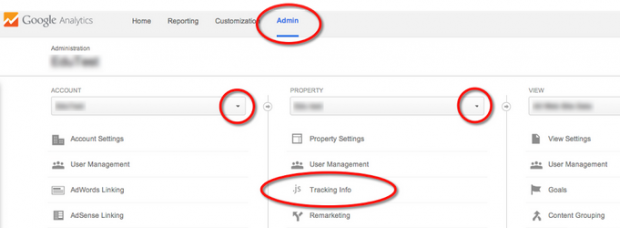
To set up the web tracking code: Sign in to your Google Analytics account, select the Admin tab. From the Account and property columns, select the property you’re working with. Click Tracking Info > Tracking code.
Copy the snippet. It starts with <script> and ends with </script>. Make sure to not reuse the same tracking code snippet on multiple domains. Paste your snippet into every webpage you want to track, and paste it before the closing </head> tag. Check your setup to make sure the code shown in Google Analytics is the same that is on your website’s source code.
Step 4: Setup Google Analytics Goals
Tracking the true effectiveness of social media for your business goes beyond pageviews and visits. Finding out if social media actually helps your business is more important if you’re trying to prove the ROI of social media. Knowing important metrics like: product sign ups, leads, downloads, and newsletter signups, will help you solidify the importance of social media for your business.
To create Goals follow these steps by Google Analytics. Step 5: Understanding Social Analytics Reports
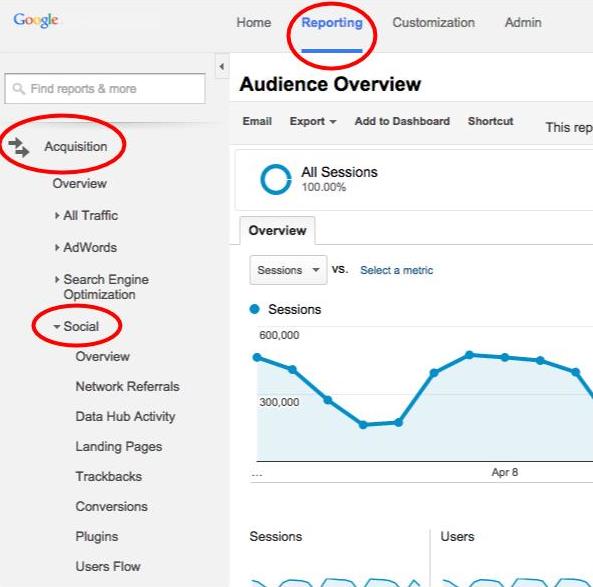
There are 8 Social Analytics reports available in Google Analytics. These reports will help you understand the impact and effectiveness of your social media initiatives. You can find these reports under the Reporting tab > Acquisition > Social.
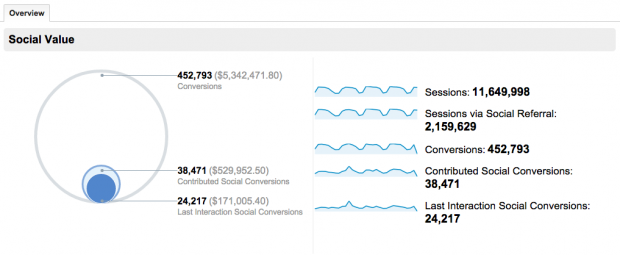
1) Overview report
This report allows you to see a glance into how much conversion value is generated from social channels. The social value graph compares the number and monetary value of all goal completions versus those that are from social referrals.
2) Network referrals
This report will provide you with engagement metrics for traffic from each social network. It will show you which social networks referred the highest quality traffic.
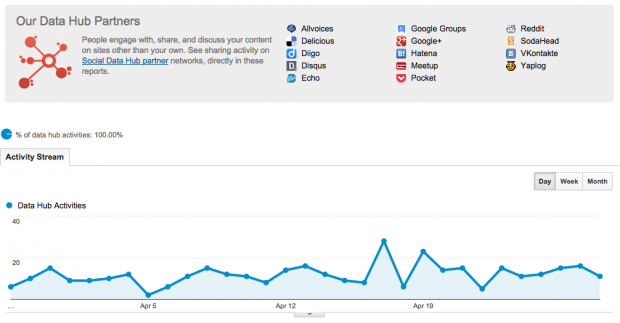
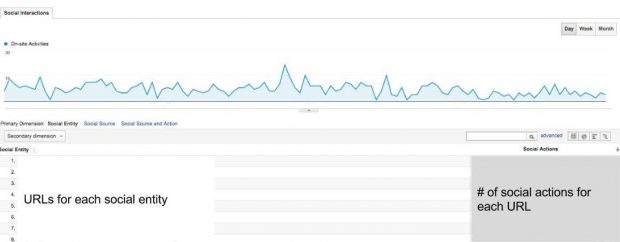
3) Data Hub Activity
The Data Hub Activity report shows you how people are talking about and engaging with your site content on social networks. You’ll be able to see the most recent URLs people shared, how they shared it, and what they said.
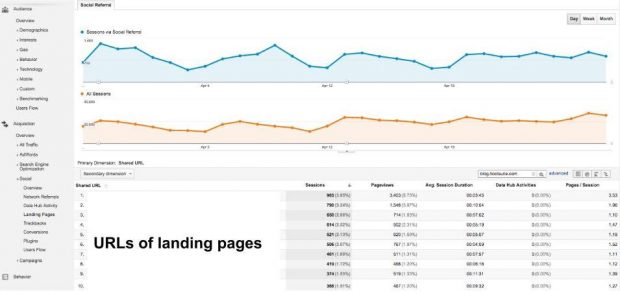
4) Landing pages
This report allows you to see engagement metrics for each URL. Each URL will show you the originating social networks for that URL.
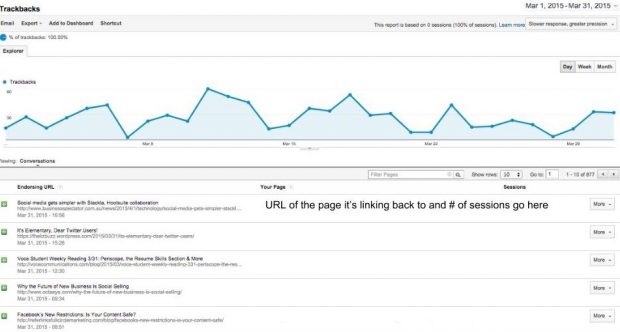
5) Trackbacks
In this report you’ll be able to know which sites are linking to your content, and in which context. You can use this data to replicate successful content and build relationships with those who frequently link to your site.
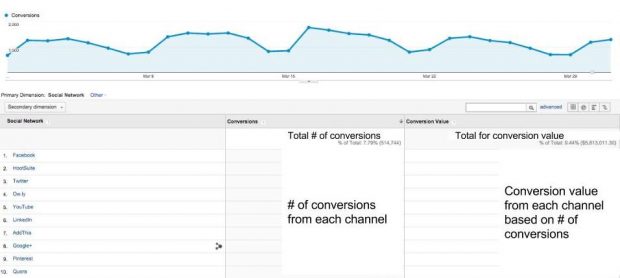
6) Conversions
This report is the report where you can really quantify the value of social media for your business. The Conversions report will show the total number of conversions and the monetary value of conversions that occurred as a result of referrals from each network. Note: Step 4 must be completed in order for this report to be populated with data.
7) Plugins
If you have social share buttons on your site it’s important to understand which buttons are being clicked on and for which content. This report provides you with the data necessary to know which articles are most commonly shared, and from which social networks they’re being shared on.
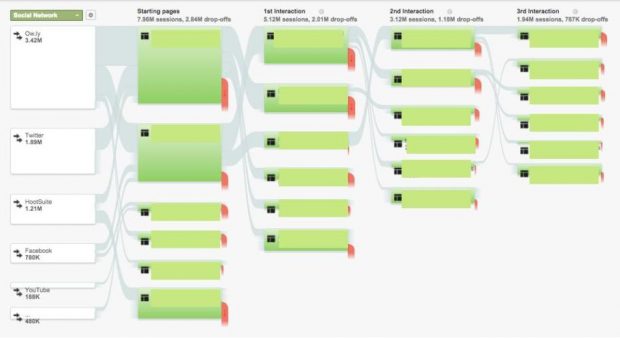
8) Users flow
The Users Flow reports shows the initial paths that users from social networks took through your site. If you run campaigns that promote specific products, you can see whether users from each social network entered your site through a product page and whether or not they continued to other parts of your website.
Step 6: Reporting on the data from these reports
Now that you have the data that you need to showcase how your social media initiatives is driving traffic to your website; compile the necessary data and present it to your boss in either a PowerPoint or Google Presentation. Make sure to only include the data that aligns back to the goals you initially created in Step 1. Your presentation should include graphs and 2-3 sentences explaining what each graph means to your business.
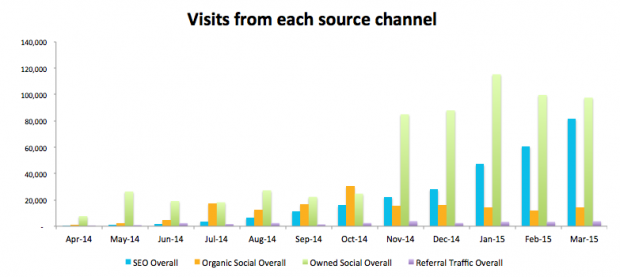
For example, if you want to show how social media is doing in driving traffic to your website you can create a graph that compares it to other source channels, like the graph below, then talk about how owned and organic social channels are driving the most traffic to your website.
We hope this 6 step guide to tracking social media in Google Analytics helps gets you started on the right track to proving social media ROI. Just remember to always be: tracking, measuring, analyzing, and improving, in order to constantly improve your business’s online assets.
If you’re using Facebook ads—or you plan to use them in the future—there’s one key tool you should start using right away to get the most out of your social ad budget: the Facebook pixel.
What is a Facebook pixel?
A Facebook pixel is code that you place on your website. It helps you track conversions from Facebook ads, optimize ads based on collected data, build targeted audiences for future ads, and remarket to qualified leads—people who have already taken some kind of action on your website.
It works by placing and triggering cookies to track users as they interact with your website and your Facebook ads.
Benefits of using a Facebook pixel
There are several ways you can use data collected from Facebook pixel tracking to refine your Facebook advertising strategy.
Track conversions
The Facebook pixel allows you to monitor how people interact with your website after viewing your Facebook ad.
You can even track customers across their devices so you know, for example, if people tend to see your ads on mobile but switch to a desktop before making a purchase—or maybe it’s the other way around. This information can help you refine your ad strategy and calculate your return on investment.
Remarket
Pixel tracking data allows you to show targeted ads to people who have already visited your site. You can choose to get really granular here—for example, you can show people an ad for the exact product that they abandoned in a shopping cart or added to a wishlist on your website.
This capability is why you should create a Facebook pixel now, even if you’re not using Facebook ads yet—so you have retargeting capabilities from your very first Facebook ad.
Create lookalike audiences
Facebook can use its targeting data to help you build a lookalike audience of people who have similar likes, interests, and demographics to people who are already interacting with your website, helping you expand your potential customer base.
Run effective ads
Using a Facebook pixel can make your ads more effective by improving the quality of the ads you run, and by improving the targeting of the people who see them.
In addition to improving your ads based on tracking their effectiveness, you can use Facebook pixel data to ensure your ads are seen by the people who are most likely to take your desired action.
You can use Facebook pixel tracking to collect data on two different kinds of events: a set of nine standard events that Facebook has predefined, or custom conversions that you set up yourself. An “event” is simply a specified action that a visitor takes on your website.
Standard events
The nine standard Facebook pixel events for which you can simply copy and paste standard Facebook event code are:
View content: Someone lands on a page on your website.
Search: Someone uses the search function to look for something on your site.
Add to cart: Someone adds a product to their shopping cart on your site.
Add to wishlist: Someone adds a product to a wishlist on your site.
Initiate checkout: Someone starts the checkout process to buy something from your site.
Add payment info: Someone enters their payment information in the purchase process on your website.
Make purchase: Someone completes a purchase on your website.
Lead: Someone signs up for a trial or otherwise identifies themselves as a lead on your site.
Complete registration: Someone completes a registration form on your site, such as for a subscription product.
Custom conversions
You can use custom conversion events in place of standard events, or to collect more details than Facebook pixel standard events can provide.
Custom conversions use URL rules based on specific URLS or URL keywords. So, for example, you could use Facebook pixel tracking to record views of a specific category of merchandise on your website, instead of tracking views of all content using the “view content” standard event—perhaps to separate dog owners from cat owners based on which sections of your pet supply website they viewed.
Before you can use Facebook pixel custom conversions, you’ll need to help Facebook understand the details of the conversion event you want to track. To do so, head to your Facebook Ads Manager, then go to Custom Conversions and click Create Custom Conversion to define your custom conversion event using URL rules.
You can also create Facebook pixel custom events by adding more details to standard events using additional bits of code called parameters. These allow you to customize the standard events based on:
How much a conversion event is worth
Product name, category, or ID
The number of items someone adds to their shopping cart
A specific search string
The status of a registration
How to create a Facebook pixel and add it your website
Now that you know what you can track, and why you would want to do so, it’s time to create your pixel and put it to work on your website.
Step 1: Create your pixel
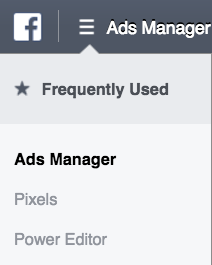
1. From your Facebook Ads Manager, click the hamburger icon (≡) and choose Pixels.
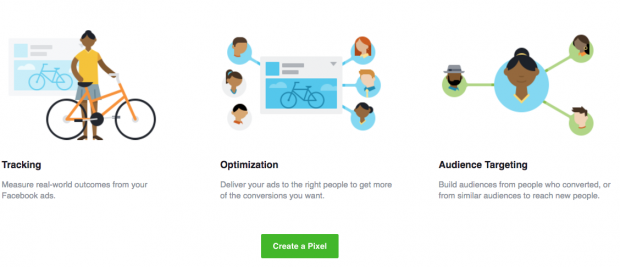
2. Click Create a Pixel.
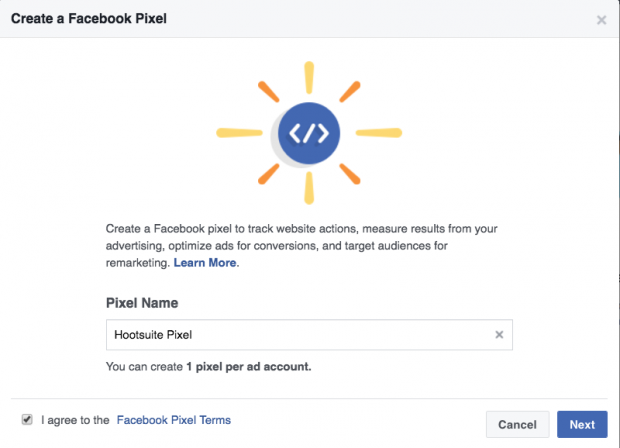
3. Name your pixel, accept the terms, and click Next. When choosing the pixel’s name, keep in mind that you only get one pixel for each ad account, so the name should represent your business, rather than a specific campaign.
Step 2: Add the pixel code to your website
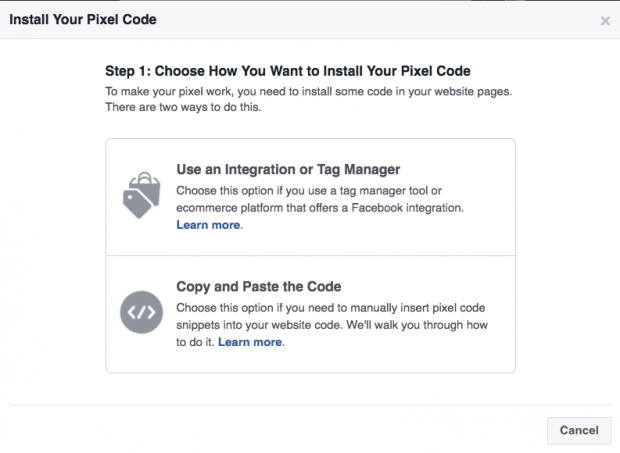
To put the pixel to work gathering information on your website, you now need to install some code on your webpages. There are two ways to do this depending on the tools you have incorporated into your website. We’ll use the copy-and-paste method here. The other option is to use an integration or tag manager.
1. Click Copy and Paste the Code.
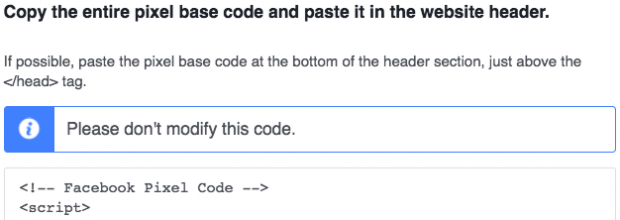
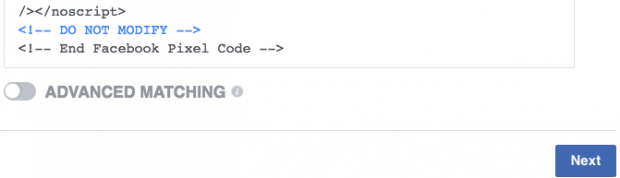
2. Copy and paste the pixel base code into the header code of your website—that is, post it after the <head> tag but before the </head> tag. You need to paste it into every single page, or into your template if you’re using one. When you’re finished, click Next.
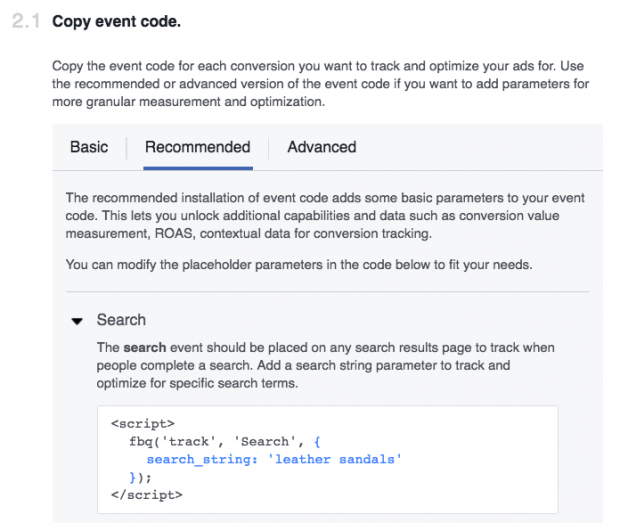
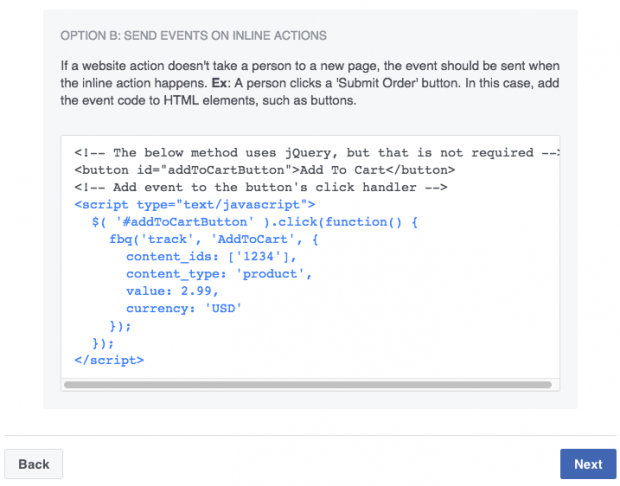
3. Copy the appropriate event code based on the actions you want to track on your website. For custom conversion code, click Custom Event. This Facebook help article can help you figure out which type of setup is best for you: basic, recommended, or advanced.
4. Paste the event code in the appropriate location on your webpage based on the action you want to track. It should go just below the </head> tag for a new page that opens as a result of the tracked action (like a thank you page). Or, you can attach the code to specific HTML elements like buttons that trigger actions within a page. When you’re done, click Next.
Step 3: Confirm your Facebook pixel is working
Before you start relying on the data from your Facebook pixel, you should confirm that it’s working properly.
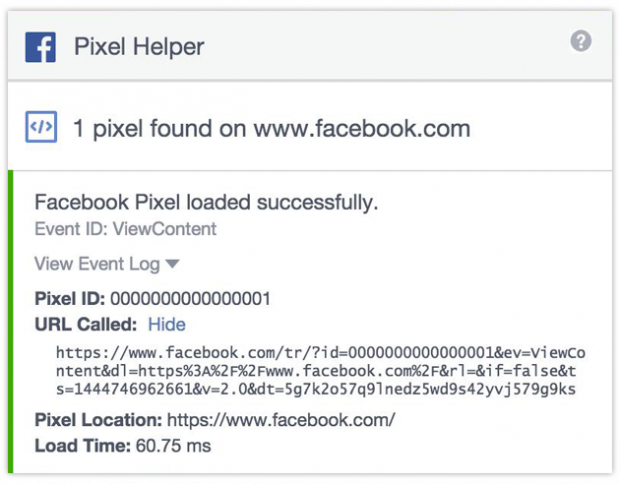
2. Visit the page where you have installed the Facebook pixel. If the extension finds the pixel, the </> icon will turn blue, and a popup will indicate how many pixels are found on the page. The popup will also tell you if your pixel is working properly. If not, it will provide error information so you can make corrections.
Note: The current Facebook pixel combines two older pixel versions: the conversion tracking pixel and custom audience pixel. Facebook discontinued the conversion tracking pixel on February 17, 2017. If you were using the Facebook conversion pixel, you’ll need to switch over to the new Facebook pixel. You can learn how to do so in this Facebook business help article. If you were using the old custom audience pixel, these instructions for Facebook pixels explain how to upgrade to the new version.
You probably know that word-of-mouth is one of the most valuable forms of marketing out there: It’s been shown to influence20 to 50 percent of all purchasing decisions. After all, potential customers are much more likely to be receptive to recommendations from a person they respect and trust than to ads or other corporate messaging.
In the new world of digital relationships, word of mouth extends well beyond recommendations from friends and family into the realm of influencer marketing.
In fact, research from Twitter shows that 49 percent of consumers seek purchase guidance from social media influencers, and 20 percent said that a Tweet from an influencer inspired them to share their own product recommendation. Even more important for marketers, nearly 40 percent of Twitter users said they had made a purchase as a direct result of an influencer’s Tweet.
In this post we’ll take you through everything you need to know about influencer marketing—from strategy and tips, to tools you can use to boost your campaign.
An influencer is quite simply someone who carries influence over others. A social media influencer is someone who wields that influence through social media. The form of influence can vary and no two influencers are the same. Celebrity endorsements were the original form of influencer marketing, but in the digital age of online connection, regular people have become online “celebrities” with powerfully engaged social media followings, especially in certain market segments.
In fact, a survey of U.S. teens conducted for Variety last year found that YouTube creators took eight of the top 10 spots in a survey of influencers, outranking traditional celebrities like musicians and movie stars.
Perhaps no one embodies the concept of the social media influencer more than DJ Khaled, whom The Washington Post dubbed “The King of Snapchat.” His 6 million Snapchat followers make him an obvious choice for brands who may not (yet) have a strong Snapchat presence of their own.
How to incorporate influencer marketing in your social media strategy
Think of influencer marketing as simply another arrow in your marketing quiver. While it’s a different approach to brand messaging, your influencer campaigns should still align with your larger content strategy and brand image so that they enhance your overall brand reputation.
Extend your reach (or laser-target your message) through influencer channels
In many cases, you will use influencer marketing to extend the reach of your brand messaging by working with social media influencers to create or support content they post on their own social media channels. This allows you to piggyback on someone else’s follower base, either to reach a broader audience or to segment your efforts in ways that would never be possible through your own branded social media accounts.
For example, the National Pork Board has partnered with Latino social media influencers in its #sabrososmomentos campaign to encourage Hispanic American families to serve more pork at family get-togethers throughout the holiday season, targeting a specific segment it would be challenging to reach through the board’s own branded channels.
This video, posted by influencers Los Pichy Boys on October 18, already has more than 340,000 views.
Boost credibility with influencer messaging on your own channels
You can also recruit influencers to participate in content that you share or cross-post on your own channels, as clothing company ThreadBeast did when it created a series of Facebook Ads with streetwear influencers like Nightwing2303 unboxing ThreadBeast packages.
Check out the views on that Facebook video: 3.4 million! Plus, it garnered another 200,000 views on Nightwing2303’s YouTube channel. The campaign targeted 18- to 24-year-old men in the U.S. with an interest in hip-hop or streetwear brands, and resulted in a 36 percent increase in clickthrough rate.
ThreadBeast’s Facebook ads influencer campaign ended in July, but the company is still working with influencers: Nightwing2303 posted a new unboxing video to YouTube earlier this month. A social media takeover, like the DJ Khaled example above, is another effective way to leverage an influencer’s following and cross-promote your own channels to build up your own follower base.
How to find the right social media influencer for your campaign
Before reaching out to a potential social media influencer, you’ll need to consider the Rs of influence:
Relevance: The influencer is sharing content and developing a following relevant to your business and the particular market segment you want to target.
Reach: The number of people you could potentially reach through the influencer’s follower base that would bring value to your business.
Resonance: The potential level of engagement the influencer can create with an audience that’s valuable and relevant to your brand.
When determining whether an influencer is a good match for your three Rs, you’ll need to ask yourself a couple of important questions.
Who are you trying to influence?
Most marketers have no trouble coming up with a high-level answer to this question: you’re trying to influence your customers, prospects, and the broader industry community. But your influencer campaign can’t be all things to all people: as in all types of marketing strategy, a meaningful answer requires greater focus and a clear understanding of your goals and your audience.
Perhaps you’re trying to influence people who work in a specific job function—social media professionals or community managers who tend to spend significant amounts of time on social media every day, for example. Or maybe your goal is to influence decision-makers in a particular vertical—maybe government or finance leaders who tend to place deep trust in recommendations from their peer network. Or, you could be trying to target a specific consumer segment, like millennials looking to buy their first home.
These are three very different groups, and an effective influencer marketing strategy requires you to speak to the right people using the right tools (and, in this case, the right influencers), just like you do in all of your other marketing work.
Looking at a very specific marketing niche, for example, a recent survey from public relations firm MWWPR found that influencer marketing is the most effective way of marketing spirits to millennials, along with earned media. According to the report, 54 percent of Millennials share branded content from spirits companies when it is posted by a social influencer, and 93 percent usually try a new liquor after someone recommends it to them. For any liquor brand looking to expand into the millennial market, those numbers should be hard to ignore.
Who do your customers, prospects, and community trust?
For marketers, the key requirement for true influence is trust. Your audience must trust and respect the opinion of the influencers you partner with. Without the trust component, any lift in results will be superficial and you’ll struggle to see a tangible business impact from your efforts.
Working from a clear idea of exactly who you’re trying to influence, take the extra step to find key opinion and thought leaders whom your audience already looks to as sources of meaningful information. These people are already influencers—and partnerships with them can drive real impact.
Keep in mind that your audience demographics play a major role in determining which influencers will be the most trusted in your marketplace. Data from Twitter shows that people aged 45 and up view more traditional household name celebrities as preferred influencers, while millennials prefer digital content creators.
Targeting that millennial market, Contiki has been using influencer marketing for five years through its #RoadTrip series, hosting groups of YouTube stars as they follow Contiki itineraries around the world. Some videos, like the one below created by influencers Jesse and Jeana (BFvsGF), racked up more than a million views (not to mention more than 125,000 likes).
Perhaps it’s no surprise, then, that after its 2015 RoadTrip to Southeast Asia, Contiki saw a 175 percent increase in owned YouTube audience and a 25 percent increase in traffic to its Asian trip packages online. Anecdotally, when Contiki’s Canadian sales managers visited various campuses across the country, they heard from at least one person each day who mentioned they had first learned about the travel brand through their favorite YouTuber. The campaign helped Contiki win the Skifties award for Best Travel Brand on YouTube and the British Youth Travel Award for Best Use of Social Media.
There are plenty of tools to help you identify people with large and engaged networks talking about topics that matter to your audience, including followerwonk, Traackr, Klout, and Hootsuite. But remember that reach alone does not indicate a powerful influencer—you also need the other two Rs: relevance and resonance. Watch for engaged followers—that means plenty of views, likes, comments, and shares, all from the precise follower segments you’re trying to reach.
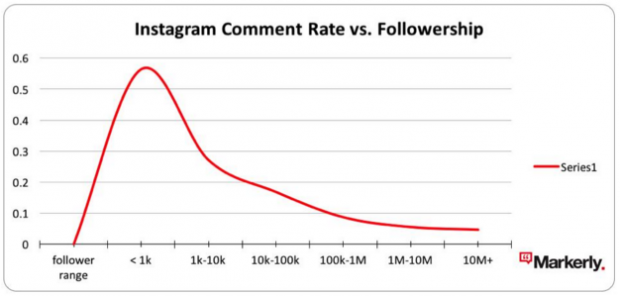
A huge follower count is meaningless without evidence that those followers are paying attention, and a smaller follower count can be very powerful if it’s a niche area and the potential influencer is a recognized leader. Markerly, a network that connects brands with influencers, recently found that partnering with “micro-influencers” can provide much better ROI than trying to snag a big celebrity. Their analysis of 800,000 Instagram users found that the influencers with 10,000 to 100,000 followers offer the best combination of resonance and reach.
Influencers are becoming increasingly important in the social media world, and they expect to be recognized for the value they bring to your brand. Here are some key ways to ensure you build influencer relationships that are beneficial over the long term.
Reach out slowly
Once you identify a social media influencer you want to engage with, start the connection process by reaching out through content they are already sharing, and conversations they are already starting or leading. Twitter chats are a great way to do this. If you know your potential social media influencer is hosting a Twitter chat, be sure to mark the date and participate. If they have a blog, comment on their blog posts to show that you are actually reading their content.
Once you’ve begun to build rapport, the relationship can bloom into a mutually beneficial one. On that note…
Create mutual value
As a marketer, you’re probably focused on the value that influencers can provide to your brand, not the other way around. But to create a meaningful and lasting relationship, influencers must also derive value from partnering with your brand—and not just in the form of cold, hard cash (although that always helps).
“Value” doesn’t only mean financial compensation; it simply means that the perceived benefit of the partnership is equally important to both you and the influencer. It could involve a content swap, an introduction to a unique community, or some kind of swag or product placement, but always keep in mind that mutual value will be the key driver of long-term influencer relationships.
Go for a consistent look, feel, and tone
When choosing an influencer, in addition to finding a fit for your niche market, you need to find someone who’s producing content with a similar look and feel to your own, and whose tone is appropriate for the way you want to present your brand to potential customers. This will make it much easier for the brand and the influencer to share, swap, and collaborate without creating a disjointed feel in either party’s social media posts.
A social media influencer who has worked hard to build a following will not accept a deal that makes their own personal brand seem inconsistent. And allowing the influencer creative freedom is much easier when you know that their content will gel with your own. Combining your efforts creates the best results—data from Twitter shows that exposure to a brand Tweet creates a 2.7 times lift in purchase intent, but exposure to both a brand Tweet and an influencer Tweet more than doubles that lift to 5.2 times.
Measure the results
Social media influencers should be able to provide analytics and detailed reports on the reach of their posts, but remember that you’re also looking to track engagement. This can be tricky, with 47 percent of respondents to a recent survey saying that proving the value of their influencer marketing campaigns is their biggest measurement challenge. Hootsuite allows you to measure campaign success by tracking mentions of the brand or campaign hashtags with social listening streams. Remember that influencer marketing is one of the hottest online marketing trends right now, but you still need to do your research, ensure your efforts align with your overall marketing strategy, and test and track your results to improve performance, just as you would with any other marketing tool.
10 influencer marketing tools
A list of influencer marketing tools to help you find influential people to partner with, and track the success of your campaigns.
Stop chasing online personalities that have little sway over your target audience. This template will help you map out your influencer marketing strategy and inform partner decisions.
This tool by Moz makes it easy to find relevant influencers on Twitter by topic and location. Use it to build a list of potential influencers to engage and partner with. Pro tip:create a Twitter list for these individuals for easy reference.
You can use Hootsuite search streams to discover social media influencers by monitoring conversations relevant to your industry. Who is your target audience engaging with? Whose content are they sharing? These people have clout that can help your brand expand it’s reach.
Once you have a set of influencers to follow, you can add them to a Twitter list and save it as a stream to easily track what they share and who they engage with—learn from the best.
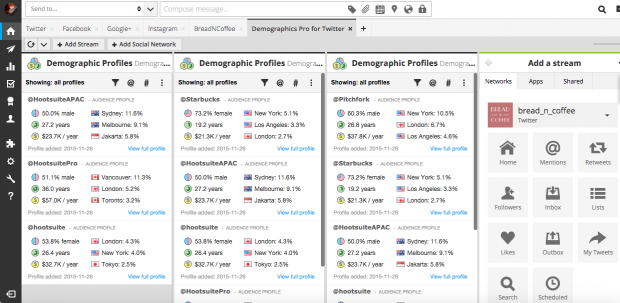
Use this tool to determine whether an influencer’s audience is right for your brand. The app will give you relevant data on a user’s following, including average age, income, location, likes, interests, and profession.
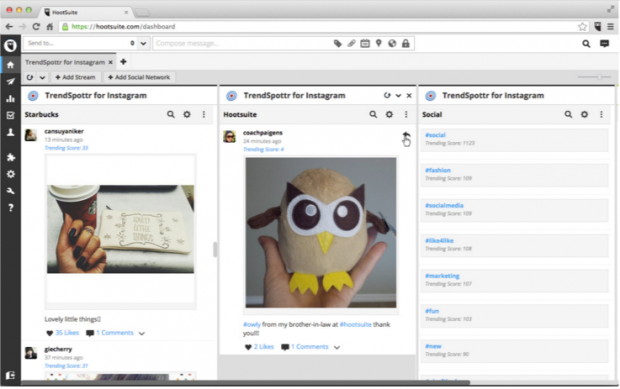
Find the top trending photos, videos, and influencers for any tag or topic with TrendSpottr for Instagram. The app also makes it easy to engage with key influencers, view trending hashtags, select from a list of popular tags, and easily share trending posts to your social networks.
Find local Instagram influencers posting in your area (or an area you choose to follow). You can monitor for locations and hashtags, or combine search terms for advanced listening.
These short text codes can be added to a URL to track important data about website visitors and traffic sources. Create them for your influencers to use when they share content on social media so you can track how much engagement the campaign is receiving.
Use the Hootsuite dashboard to create UTM parameters in a few simple steps. Then you can share the links with your social media influencer or easily add it to your posts.
As we explain in our post, The Facebook Pixel: What It Is and How to Use It, this tool makes it easy to track conversions from a Facebook ad, optimize ads based on data collected, build targeted audiences for future ads, and remarket to qualified leads (people who have already taken some kind of action on your website).
If your influencer marketing strategy includes a Facebook ad component, you can use a pixel’s remarketing capabilities to expand an influencer’s reach and connect with a new and relevant audience. Check out our step-by-step guide to learn how to put the tactic to work in your next campaign.
This app identifies and ranks industry influencers and uses their inherent trust to discover content relevant to your audience. This makes it easy for you to find and share content that will help expand your businesses’ reach on social media.
Do your busy @mention streams make it more difficult to engage with influencers? InsightPool’s single-click response interface makes it easy to cut through the noise and connect with key individuals.
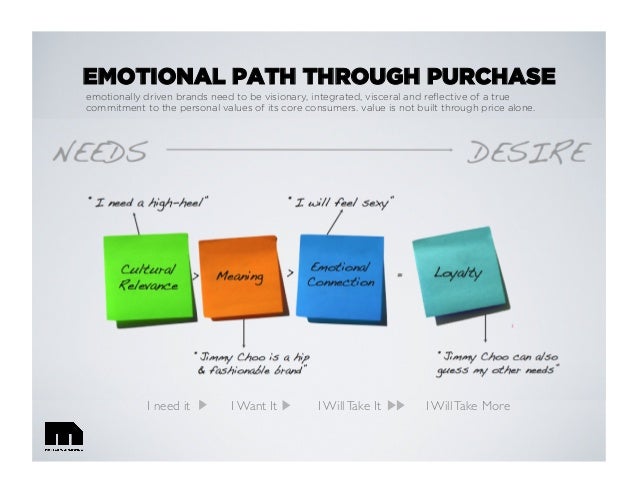


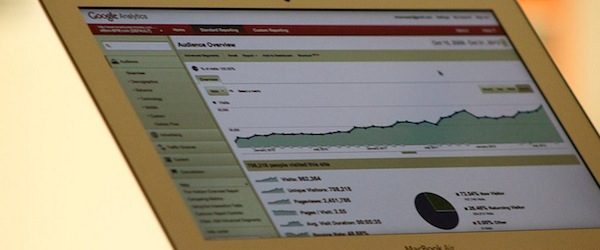 Imagen de Blue Fountain Media bajo licencia CC BY 2.0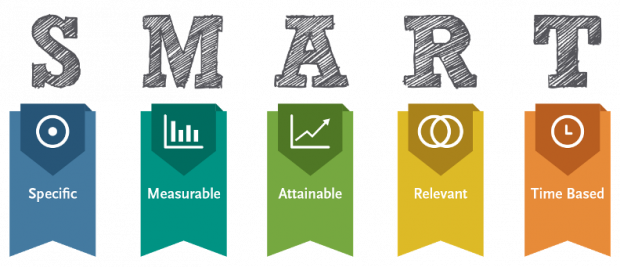


 It’s going down on Snapchat
  : VisitLasVegas