Showing posts with label Resources. Show all posts

Tuesday, December 27, 2016

Social Data Simple Techniques Anyone Can Master


Social media data can help us better understand our customers—so why don’t we use more of it?
Everyone has heard about big data and how rockstar companies like Amazon and eBay use data to better target customers.
But for most companies, this level of sophistication remains out of reach.
As many marketers know, it’s really hard to find insights. “Everybody talks about big data,” says Scott Monty, executive vice president of strategy at SHIFT Communications and Ford Motors’ former global digital and multimedia communications manager. “But what most companies need at this point are small insights.”
Last week, I published a workshop with simple ways to use social media data to uncover your customer’s hidden motivations.
These are techniques anyone can use. You don’t need to be a data analyst or an Excel pro.
The workshop shows you how to:
  • Better understand your customers by using social data to paint a human picture of your prospect.
  • Create ads and landing pages that resonate by adding actual customer language into campaign messaging.
  • Increase traffic and sales—with social content that has the right level of complexity for readers, viewers, and fans.
I’ve included the written version of the presentation below.

How to use social data to better understand your customer’s frustrations

james-dog
In this post, I’ll use a fictional dog training company to illustrate these techniques. This gives us a lot of data to analyze (people love talking about dogs online) AND gives me a chance to sneak a picture of my dog Watson into a blog post (finally!).
So let’s say you work at a large company that sells dog training products.
You have a new dog training video course that you plan to sell on social media.
But right now, your landing pages, social ads, and content are not connecting with dog owners.
How could social media data help you better understand customers and craft more compelling marketing messages?

1. Use these techniques to find humans, not spam

A key challenge with social media data is the volume of spam and sales messages on social channels.
Search phrases such as “dog training tips” or “train dog to sit” will turn up endless links to product pages, ad campaigns, sponsored content, and spam accounts.
So how can you find conversations between real customers?
I’ve found these three techniques to be helpful.

Avoid SEO keywords—instead use simple, human sentences

In my experience, noun-based SEO keywords are magnets for spam, making it hard to find genuine insights.
When searching in Google, people have been trained to formulate their problems as nouns and short phrases. “I need to train my dog to sit” becomes “dog training tips” or “basic dog training.”
But people don’t complain or talk with their friends like this on social media. Invert these noun-based keywords into simple sentences.
For example, convert “train dog to sit” into “my dog won’t sit.” That’s how a real person would talk about that problem on social media.
I used Hootsuite Analytics to test the impact of inverting SEO nouns into simple sentences.
As you can see in the preview, this type of SEO phrase—a short keyword focused phrase—returns spam, marketing messages, and products.
Those are not the results you want. Zero insights. All noise.
Watch what happens when you invert this SEO noun-based phrase into a simple human sentence. I used Hootsuite Analytics again.
As you can see, I’ve now found real dog owners with Hootsuite Analytics. This is the data you want. Real human conversations.

Find humans with -filter: links

This is one of my favorite Hootsuite search techniques. It helps you eliminate spam and sales messages.
Go to Hootsuite.com. Click “Add Stream.” Click “Search.” Use -filter:links to filter out posts with links as they are often promotional
Example: coffee -filter:links
As you can see below, this filter reveals real humans talking about their day. You won’t have to wade through links, branded content, or promotional posts.
Filter.gif

Look for F-Bombs in your social media data

Look through your results. Is it clean and professional language? You are likely looking at vendor and brand results.
Refine your searches until you find actual humans talking (and often swearing) about products and services. Humans write with horrible grammar, swear, and say offensive things.
If you are finding offensive language, you are on the right path.

2. Pinpoint customer frustrations with product reviews

One of the best ways to get inside the minds of customers is to read product reviews. By using this search operator—!Amazon + Your Keyword— in DuckDuckGo you can tap into Amazon’s rich search engine. It also works for eBay and YouTube.
Go to DuckDuckGo and enter this search: !Amazon + Keyword.
Duck Duck Go 600PX.jpg
Example: !Amazon + dog training or !eBay + dog training.
Now, you can quickly read product reviews and swipe real customer language to use in Tweets, emails, landing pages, and blog posts.
A quick review of Amazon reviews for “dog training” shows that people wished one popular book had more specific steps rather than abstract theory.
Screen Shot 2015-11-24 at 12.49.10 PM.png
Mirror this customer language on landing pages and social content—for example, you could talk about how most dog training products focus too much on theory, rather than giving specific ways to leash train and other step-by-step instructions for new dog owners.

3. Reddit is a goldmine for consumer insights

I find Reddit is incredibly useful for uncovering true conversations about brands and products. Companies and spam accounts are kicked out the front door if they try to game the community with fake discussions.
You can track conversations with the Reddit Keyword Monitor Pro app for Hootsuite. That way, you can monitor for new content and follow customer conversations without leaving your Hootsuite dashboard.
Screen Shot 2015-11-24 at 1.35.58 PM.png

4. Book time in your calendar to listen

Once you’ve found the phrases and topics you want to monitor, build a listening dashboard. I recommend booking an hour in your calendar every week to observe customers in their natural habitat. What are they sharing? What do they love or hate? What’s their daily life like?
There’re lots of different ways to build a listening dashboard.
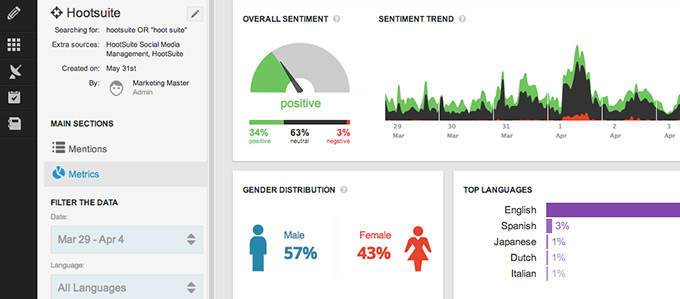
You can use a solution such as Hootsuite Analytics. Or manually pull mentions and data into a spreadsheet.
ubervu-keyadvantages

I also have my Hootsuite dashboard configured with search streams for different terms and customer social profiles.
Here’s how to build a listening dashboard for your customer personas.
  • Make a list of 10-15 social media users that represent your ideal customer. These are real people that you follow and study on social media.
  • Create search streams in Hootsuite to easily monitor and learn from these ideal customers. Add them to a list in Hootsuite.
  • Use a solution such as Hootsuite Analytics to conduct deep social media listening, pulling in broad data about your market and phrases (such as “my dog won’t sit”).
  • Book time every week to listen to your market and understand their daily struggles.

5. Add your new insights to your marketing plan

Once you’ve begun to listen, refine your marketing strategy based on this new data.
  • Make sure landing pages and ad copy mirror the language and challenges you’ve pulled directly from real customers.
  • Find new ways to position your products, using customer-centric language instead of product features and marketing jargon.
  • Build blog posts and social content that solve customer questions you’ve found on social networks.
It’s also important to add your new insights to your customer persona documents. For example, here’s what I would create.

Our ideal customer: Sarah

  • Sarah’s buying trigger is dog behavioral problems.
  • Common phrases used “my dog won’t sit next to me,” “my dog won’t cuddle,” “my dog doesn’t like me anymore.”
  • How to position: don’t focus on tricks. Instead, focus on training as a way to restore her damaged relationship with her dog.
  • Twitter is a common place where dog owners complain (invest in Twitter ads?)
  • Reddit is a popular place where owners seem to go to ask peers for advice. Could we partner with a famous dog trainer to do a Reddit AMA (ask me anything) about dog training? We could co-brand our product with the influencer so that the promotion fits into Reddit’s strict community policies.

More simple ways to use social media data

In our Social Media Data Cookbook, you’ll find more simple ways to use social media data. The SEO cluster recipe for increasing website traffic is one of my favorites.
The Cookbook shows you:
  • The No. 1 persuasive way to prove impact of your social media campaigns
  • A simple test you can run to see the exact ROI of social messages
  • Dead-practical ways to discover what your customers want
  • Why conversation clusters and social media data boost SEO traffic
  • How SXSW uses social media data to measure the success of live events
  • Extra videos, bonus resources, and step-by-step instructions

How Hootsuite’s social media analytics help

With Hootsuite, your team can analyze social conversations happening on news sites, blogs, forums, and other public places.
  • Discover customers talking about your brand, industry, and competition right now
  • Analyze social conversations around your products from 100+ million data sources in 50+ languages
  • Build live dashboards to easily monitor market terms and customer conversations about your products and competitors

Saturday, December 3, 2016

Best Google Chrome Extensions for Social Media Marketers


Image result for extensions for chrome
Yes, this is another list of the best Google Chrome Extensions. You’ve seen it all before, right? Well, we thought we had too. But new extensions are continually emerging that can drastically change the day-to-day habits of social media marketers. Plus, a few classic extensions have undergone impressive upgrades.


Check out this list of 20 of the best Google Chrome extensions for social media marketers, and start saving some valuable time and effort at work.

Useful Google Chrome extensions

1. Momentum

Sitting down at work and firing up your computer only to be faced with an overflowing inbox isn’t the best way to start your day. This extension offers a beautiful way to get in the right headspace before getting bogged down with scheduling posts, replying to followers, monitoring hashtags, creating new content, and everything else a busy social media manager is responsible for on a daily basis.
18 of the Best Google Chrome Extensions for Social Media Marketers | Hootsuite Blog
The Momentum extension replaces your “new tab” homepage with a gorgeous new photo every day along with a personalized greeting. Momentum also allows you to set one main goal for the day and keep track of a longer to-do list, helping you stay focused throughout the day. You’ll see the local weather in the top right corner, a list of links you frequently visit to the left, and a motivational quote at the bottom of the page.

2. StayFocusd

Just because social media managers get paid to be on the sites that other people use to waste time doesn’t mean they don’t suffer from bouts of intense procrastination elsewhere on the web. Thankfully, technology can be a source of discipline as much as it is a source of distraction.

18 of the Best Google Chrome Extensions for Social Media Marketers | Hootsuite Blog

StayFocusd is an extension that limits the amount of time you can spend on certain websites (a.k.a. the ones that you visit instead of doing work). Once you’ve used up your allotted time, you can’t visit the site again for the rest of the day. You can get pretty granular with what you choose to block as well, whether it’s an entire site, a specific page, or even certain types of content like videos, games, or images.  

3. Evernote Web Clipper

Social media managers typically have to switch between their creative and strategic hats throughout the day, often needing to wear them at the same time. Jumping back and forth between these two dynamics during a busy day can cause even the most organized person to feel a little frayed. Enter: Evernote.

18 of the Best Google Chrome Extensions for Social Media Marketers | Hootsuite Blog

The Evernote Web Clipper extension allows you to clip any article or web page and save it in one place. Alongside the notes and to-do lists that you can create in Evernote itself, this extension allows you to pull in key text from any website or article you find while doing research online. This is also a great way for you to collect content to share on social without having to keep 20 tabs open all day.

4. Grammarly

Publishing a post with a spelling mistake is a nightmare for social media managers—and rightly so. While the occasional error happens to everyone from time to time, consistent mistakes can damage your brand’s credibility. Grammarly can help catch them all, including the mistakes that manage to evade the usual red squiggly line: an incorrect verb tense, a missing article before a plural noun, or the misuse of a comma.

18 of the Best Google Chrome Extensions for Social Media Marketers | Hootsuite Blog

The Grammarly extension can catch over 250 types of errors, many of which aren’t typically caught by spellcheckers. Along with catching your mistakes, Grammarly can actually help you write better overall, by offering synonym suggestions in line with the context of what you’re writing.

5. Figure it Out

The biggest challenge when working globally often has nothing to do with language barriers or cultural nuances—it’s figuring out what time it is in a different region without doing the math on your fingers under your desk.
18 of the Best Google Chrome Extensions for Social Media Marketers | Hootsuite Blog
The Figure it Out extension allows you to add up to 10 time zones to your “new tab” screen, which should help make scheduling posts or setting up meetings with different regions super easy. Figure it Out also displays regional national holidays, so you can avoid posting your best social content on a day when no one will be paying attention.

6. LastPass

Update 6/15: Lastpass just got hacked. Change your master passwords!
Social media marketers often run into the problem of wanting to share access to an account, be it a social network, SEO tool, Google analytics, WordPress or any other piece of software, without actually telling team members their passwords. Rather than change the password (and have to memorize a new one or insecurely write it down), LastPass allows you to share access with your team without actually giving them your password.
That’s only the beginning for this free password manager. LastPass operates on a ‘master password’ system, where as long as you remember one key password, the extension will store all of your other login information and autofill it for you when you arrive on a login page. It can also generate secure passwords, to help you avoid reusing the same ones over and over again, or resorting to the terrible “123ABC” level of password amateurism. And, should a team member quit or change positions, you can also remove access to a password you’ve shared with them. In these ways, LastPass offers a massive boost to your online security.

7. OneTab

Many social media professionals and marketers spend a lot of time scouring the web for great content, and even more time slowly reading through it. On an average work day, I used to have anywhere between five and ten tabs open to blog posts, news articles, videos and other pieces of content. That’s on top of the seven or eight other tabs I had open. I would lose things in the mess of tabs and end up just closing a majority of the articles without ever reading them. It was slow and unsustainable, which is why finding the OneTab extension was such a godsend.
Best Google Chrome Extensions - OneTab Screenshot
When you find yourself with too many tabs open, click on the OneTab icon. All of those tabs will close, but be saved into a list of URLs within a single tab. You can restore them all individually when you feel like reading or opening something, or restore them all at once. You can also export and share that list of links with colleagues or friends. And even if you close Chrome entirely, OneTab will save all of those links for the next time you open it up.
Not only does OneTab add order to the chaos, it also can save you up to 95% of memory within Google Chrome, making your browsing experience faster.


8. Pinterest Pin It Button

I have a Pinterest problem. The problem is that I don’t spend much time on Pinterest. At the same time, I recognize how important it is for a lot of people, and I want to be active on the social network as a poster, even if I’m not a browser. That’s where the Pinterest Pin It Button comes in.
Best Google Chrome Extensions - Pinterest PinIt
The extension throws that little ‘p’ logo into the top of your browser—reminding you to pin things. Then it facilitates that process by automatically pulling up images from whatever page you’re visiting, and allowing you to pin the image of your choice to the board of your choice. You can also edit the description and add any context you feel is important.
If the tiny icon isn’t enough of a reminder, as you scroll through a page hovering over an image will bring up a tiny ‘Pin it’ button which you can click to the same effect as the extension.

9. Share to Facebook and 10. Save to Facebook

Facebook introduced two new Chrome extensions in June 2016. With the Save extension, you can easily save articles, videos, products, and other links while browsing the web. With the Share extension, you can share any link on the web to your timeline, a friend’s timeline, Groups, Events, Messenger, and on Pages you manage.

11. RiteTag Social Media Optimizer

Ever wonder which hashtag you should be using for a certain event or story? Are you unsure about whether adding a certain hashtag will add value to your messaging? Tracking and comparing hashtags or dumping them into your analytics platform can be time-consuming, especially when you’re sending out 10 or 20 Tweets in a single day. Get that time back with the RiteTag Social Media Optimizer.

 Image via RiteTag
Image via RiteTag

The RiteTag Extension provides analytics on the hashtags you use as your write your social media messaging. The six analytics categories appear right within your compose box, offering real-time insight into the hashtag’s usage within Tweets, the number of times it has been retweeted, its reach, and more. Your hashtags will also be color-coded based on their value (green is worth using, red not so much). RiteTag can even provide you with the handles of influencers who use your hashtag, so you can connect with the leading sources on that topic.

12. Search in a Giphy

As social media professionals, we probably appreciate a good gif more than most people. Gifs aren’t an “all-the-time” thing, but when opportunity strikes and you can find the perfect gif for the situation, you can increase engagement and click-through on your social media messaging.

Image via Search in a Giphy

The Search in a Giphy extension focuses in on the “finding” part of that formula, making it easy to search for gifs from within your Gmail, Facebook, Twitter and Slack accounts. Find the right gif, and either drag and drop it into your message or right click and grab the image URL. No need to leave the tab or window.

13. Rapportive

Even though social media marketers are very active on Twitter, Facebook, LinkedIn and other social networks, many of our interactions inevitably still happen within email. Though you’d like to get a conversation going on social media, you’re often stuck doing the delayed email back-and-forth, especially with new contacts.
Best Google Chrome Extensions - Rapportive Screenshot
The Rapportive extension helps to bridge that gap by providing you with valuable information about email contacts—including their social media profiles. If someone sends you an email, Rapportive will gather their information in the sidebar of your Gmail account. You can then easily add them as a contact on LinkedIn or follow them on Twitter.

14. MozBar

Search engine optimization, or SEO, is a huge part of successful content marketing. Unfortunately, it’s also one of the most misunderstood parts. People new to SEO often find the tools to be complicated or too advanced, and their content suffers as a result.

MozBar results for a search on social media advertising

The MozBar extension offers a simple alternative for people just starting out with SEO. Within Google search, this extension allows you to see the Page Authority and Domain Authority of any links. You can also click “Page Analysis” to get a list of inbound links to any piece of content. This is valuable for marketers looking to track links back to their blog posts or webpages.

15. Check My Links

You’ve just built your brand new blog post. You publish it and immediately push it out over Facebook and Twitter. Then you get your first comment: “The link in the second paragraph is broken.” Damnit.
We’ve all dealt with broken links at one time or another. They’re frustrating for you as a content creator, and for your followers who, rightly, expect better. We’re all human, we all make mistakes, which is why we sometimes need a robot that doesn’t.

Screenshot via Check My Links

The Check My Links extension for Chrome does exactly what the name says: it checks all the links on your webpage. Any broken links are highlighted in red, so you can go in and fix them before you send your content out into the world.

16. Page Analytics by Google

Every business with an online presence can benefit from knowing how customers interact with their website. Not everyone has the technical knowledge to find this information out however. If you want to know what your page visitors click and what they ignore, install Page Analytics by Google.
Best Google Chrome Extension - Page Analytics
Similar to the MozBar for SEO, Page Analytics by Google is great for people who are just starting to track the performance of their blogs or websites. The insights it provides offer a valuable analytics snapshot that can help guide your website layout and user experience. Plus, information on active page visitors, pageviews, bounce rate and more can help you shape your editorial strategy and social media promotion. This extension brings some of the best features of Google Analytics right onto the page for you.

17. Hangouts

Social media marketers tend to be chatty. We’re constantly talking with colleagues, clients and friends, often within Google Hangouts. With that in mind, Google created a Hangouts extension, so you can keep on chatting without needing to actually be in your Gmail inbox.
Reviews of the extension are mixed, with many people saying it’s buggy, so you may not want to depend on it for important business calls, for example. But as a tool to run in the background while you work, and notify you when a colleague sends you a message, the Hangouts extension is a great asset.

18. Chrome Remote Desktop

If social media marketers were Greek warriors, tech and internet problems would be our Achilles Heel. When IT problems arise, it can ruin your webinar, throw off your posting schedule, or frustrate customers who expect a timely social media response. In these moments, being able to quickly solve your tech issues is essential. Chrome’s Remote Desktop extension can be a life-saver during that process.

Image via Google
Image via Google

Chrome Remote Desktop allows you to hand over the reigns to your computer remotely, through Google Chrome. You can reach out to a trusted individual or company that you think can resolve your IT issues, and then give them control of your computer—even from across the country. Chrome ensures that this access is secured, and only the person you specifically identify can access your computer on that one occasion. No more rushing from your home office to the computer store. No annoying time delays. A huge asset for social media marketers.

19. Millennials to Snake People

If you work in social media, you are exposed to the word millennials an average of 26 times per day. That is, of course, a completely fabricated statistic, but you get the idea. With so much social media discussion and content focused on this highly overused generational moniker, sometimes we all just need a break. And now, there’s an app for that.

Image via Millennials to Snake People

The ingenious Millennials to Snake People Chrome extension replaces any text using “millennials” with “Snake People.” The results are hilarious, and result in such headlines as “Dear Snake People, We’re Sorry” and “Why Snake People Don’t Want You to Talk Like Them.” This app might not exactly help you in your job, but it will give you a much needed laugh once in a while. And, I can tell you from personal experience, it’s a lot less imposing than the Cloud to Butt Plus extension.

20. Hootlet

A time-saving social media tool like no other. We may be biased when it comes to Hootlet but that’s because we use it day in and day out for our own work. The Hootlet, at its basic level, is a social media publishing extension. It allows you to share the webpage (yes, that’s any webpage) you’re on across your social networks.
It saves you time, not only by removing the need to switch between tabs or windows and copy and paste information, but also by pre-populating your social media message with the page title and URL. From the extension you can edit social media messages, attach images, and schedule them or send them right away.
Learn how to get even more out of Hootsuite with free social media training from Hootsuite Academy.
On top of all that, Hootlet integrates itself seamlessly into the rest of your web surfing experience. On Google search, the extension allows you to bring up social conversations about your specific search topic. On Google maps, Hootlet can bring up Tweets from people within a short distance of any location you choose. On content networks like Google image search, YouTube, Flickr, Twitter, Facebook, and more, a Hootlet button will appear so you can easily share that content to your own social channels.

Sochi-hootlet
Google Maps search for Sochi, Russia, with Hootlet results

We use the hell out of the Hootlet every single day. You don’t have to trust us though. Try it out free.