Monday, April 10, 2017

The Social Video Metrics that Really Matter


Tracking your metrics is an important part of developing, measuring, and refining your social media strategy and your social ads. The same principle applies to social video.

With videos on various social networks racking up billions of views per day and more than 70 percent of U.S. marketers planning to use social video ads, you need to measure and refine your social video strategy based on solid, numbers-based intelligence.

Making good use of video metrics will allow you to understand what connects with viewers, and achieve the kind of user engagement that boosts your video posts in the ranking algorithms.

Not all networks offer all metrics, but at a minimum you can track views and video engagement metrics on all of your social videos on all social media platforms. Here, we look at 15 key metrics to help you understand how to measure video success on social networks.

1. View count

Your video’s view count is the simplest of the video metrics to track—after all, it’s just a simple count of how many people saw your video. Or is it? Actually, the definition of a “video view” varies by network, but in all cases it’s based on someone viewing a very short portion of your video, not the whole thing.

Here’s a quick breakdown of what counts as a video view on the main social networks:
Facebook: 3 seconds
Twitter: 3 seconds
Instagram: 3 seconds
Periscope: Immediately on pressing play, or after 3 seconds for autoplay
Snapchat: Immediately upon opening
Youtube: 30 seconds

Why it matters

Based on the very short length of time a viewer is exposed to your video before being counted as a view, does this number really matter? The simple answer is yes.

Data from Facebook and Nielsen shows that 47 percent of the value of a video campaign actually comes from the first three seconds of a video, so even this very quick exposure is worth tracking.

2. 10-second views

Facebook recently introduced a 10-second views metric that measures, well, how many times your video is viewed for at least 10 seconds. If your video is shorter than 10 seconds, this number reports how many times it was watched to 97 percent completion.
Why it matters

This more substantial of the Facebook video views metrics indicates how well you’ve accomplished the goal of creating a video engaging enough to persuade viewers to stick around past the initial few seconds they’re exposed to by autoplay.

The same data from Facebook and Nielsen mentioned above shows that 75 percent of the value of a video campaign is achieved in those first 10 seconds, so it’s worth including this figure when planning how to measure video.

3. Watch time

Watch time is the total amount of time all viewers have spent watching your video, combined. On Facebook, this metric is known as “minutes viewed,” and on Periscope, it’s “time watched.”

Why it matters

When Facebook introduced this metric recently, they called it “one of the most requested video metrics from publishers.” Why? It gives an overall picture of the success of a video, measuring how much time your combined audience has spent taking in your message.

The platforms themselves view this as an important indicator of video quality: YouTube prioritizes videos with high watch times in its viewing suggestion algorithm.

You can also use this metric to compare paid and organic videos to get a sense of which format is racking up more viewer time.

4. Average view duration

Unlike watch time, which indicates the total amount of time all users have spent watching your video, average view duration indicates the amount of time the average viewer spends watching the video.

While YouTube still uses this term, Facebook recently replaced its troubled average view duration metric with a new metric called video average watch time. This new metric is calculated as the total watch time of your video divided by the total number of video plays.
Why it matters

Average view duration (or average watch time) can help tell you how much of your video users are watching, so you can compare viewer interest among the various videos you produce and learn how to adapt your strategy to better give them what they want.

Are you consistently making 45-second videos that have a 30-second view duration? Maybe it’s time to start condensing your message into that 30-second sweet spot.

5. Average percent completion

This one is simple: what percentage of your video does the average viewer watch?
Why it matters

For your own marketing intelligence, this metric gives a sense of how well your video is connecting with your intended audience. A higher percent completion indicates a more engaged audience getting the maximum exposure to your message.

But it’s also important for making sure your videos get seen in the first place, since Facebook uses percent completion as a signal to prioritize video in the News Feed. Percentage completion is weighted particularly heavily for longer videos.

6. Audience retention

This metric is presented as a graph showing views at each point of your video as a percentage of total views—that is, how well your audience is retained. Drops in the line of the curve indicate when users drop off from watching your video.
Why it matters

This is a key metric for helping your refine your video strategy. Is there a sudden drop-off at one point in your video? If so, take a long, hard look at what’s happening in the video at that point to see what might be turning viewers off.

7. Sound on vs. sound off

Tracking whether your videos are watched with the sound on or sound off is exactly what it sounds like—how many viewers are actually listening to, as well as watching, your video?
Why it matters

Video sound is a bit of a touchy issue among social media networks. While YouTube has noted that 96 percent of the videos of the network are watched with the sound on, and Snapchat’s chief strategy officer, Imran Khan, has derided video ads without sound as simply “moving banner ad[s],” as much as 85 percent of Facebook videos are watched with the sound turned off as a function of autoplay.

That means turning sound on is a point of engagement, indicating viewer interest in your video. It also provides critical learning for your future video development efforts. If the metrics tell you that viewers don’t tend to turn the sound on for your videos, you may want to focus on creating videos that specifically convey their message without sound.

8. Engagement

While only some networks provide specific video engagement metrics or engagement rate through their analytics, you can measure video engagement for all social networks in the form of likes and comments (most networks) or screenshots (Snapchat) on your video post.
Why it matters

When it comes down to it, engagement is what every marketer is after with every action they take, and engagement rate is the most important metric for many social media marketers. An organic video with high engagement is a good candidate for a sponsored post.

9. Impressions and reach

Impressions indicates the number of times viewers are exposed to posts that contain your video, including both your own posts and shares by others. Reach is also a measure of how often the post containing your video is displayed.

While impressions indicates the total number of times the post is displayed, reach indicates the number of people who see the post. The reach will usually be lower than the number of impressions, since each individual viewer might be exposed to the same post more than once, which would count as multiple impressions but only one viewer for reach.
Why they matter

These numbers show you how broadly the posts containing your video reached into your potential audience.

Comparing them to the number of video views gives you a sense of whether your video is eye-catching enough for readers to pause in their scrolling to watch the first three seconds or more.

10. Social sharing

Social sharing is a measure of how often people share your video, by linking to it, or retweeting, sharing your Facebook post, and so on.
Why it matters

Social sharing not only indicates a high level of user engagement, but also extends the reach of your video, getting it in front of more eyeballs than you could access on your own. According to Facebook, 48 percent of video watch time on the network comes from shares
.
11. Click-through rate and conversions

Click-through rate (CTR) is a ratio of the number of people who click through to your website compared to the number of people exposed to your video, and conversions indicates the number of people who take a desired action after watching your video.
Why they matter

These are key goals for most marketers, and you can learn more about why they matter, and how to track them, in our post on social media ad metrics.

12. Feedback

Negative feedback is a measure of how often people take actions like hiding your video from their News Feed, reporting your video as inappropriate, or unliking your Page after watching your video.

Why it matters

The last thing you want your video to do is cause people to unlike your Page. If your video is getting high negative feedback, you need to rethink your video strategy—immediately.
13. Interaction rate

This metric for 360-degree video measures how many users engage with the 360-degree functions of the video—that is, moving the viewpoint using their mouse or by tilting their phone.

Why it matters

Use this metric to get a sense of how viewers interact with your 360-degree video functionality. If they’re watching the video but not changing the point of view, you may need to provide more of a nudge to explore the video.

Along with interaction rate, keep an eye on how the other metrics for 360-degree video compare to your other video formats to see which type ultimately performs best for your brand.

14. Live viewers

This metric for live video varies somewhat by network.

Periscope and YouTube use this stat to count the total number of viewers who watched your video live, rather than watching it on replay or on-demand.

Facebook uses a similar-sounding metric, “viewers during live broadcast,” to graph the number of viewers during each moment of the live broadcast, rather than providing a total count.

Why it matters

This number allows you to track your live viewership from the additional views your video picks up over time.
15. Peak concurrent viewers

This metric for live video indicates the highest number of viewers at any one point during your live broadcast.

Why it matters

In combination with the live viewers metric, this figure gives you a picture of how well your video connected with viewers in the moment. Keeping an eye on this number can help you plan the best times of day to go live in future.

Wednesday, April 5, 2017

Six of the best for Social Media Video Formats Marketers


There’s no question that social video has become a critical part of online marketing. After all, Facebook alone has 8 billion video views per day, and Bloomberg reported that Snapchat had 10 billion video views per day as of April 2016. That’s not even counting all the other social media video formats on channels like Instagram, Twitter, and YouTube.
And if you think you’re seeing a lot of video in your social feeds now, hold onto your hat: Cisco predicts that online video traffic will increase three times from 2015 levels by 2020, so that video traffic will represent 82 percent of all consumer internet traffic within the next three years.
Perhaps it’s not surprising, then, that more than 70 percent of U.S. marketers planned to use social video ads within the 12 months starting May 2016.
Of course when we talk about social video, we’re actually talking about several different things at once. While some types of video are designed to have a long shelf life, others are much more ephemeral, disappearing after only a day. Let’s look at the different social media video options beyond the standard native social video, and explore how to use them on the various social media platforms.

6 types of video for social media

Here’s a primer on each of the social media video formats, including the key technical details you need to create one for each network.

1. Live video

According to eMarketer, more than a third of internet viewers say they watch live video online, with Facebook Live as the most popular channel, followed by YouTube live streaming. Live video is also available on Twitter and Instagram.

Facebook Live Video

You can start a Facebook Live broadcast spontaneously, or schedule one for later. The commenting feature on Facebook Live Video makes it a great way to interact directly and authentically with your clients and fans.
Technical requirements:
  • Resolution: Maximum 720p (1280 x 720), 30 frames per second
  • Maximum bit rate: 4 mbps
  • Minimum video length: None, but Facebook recommends 10 minutes
  • Maximum video length: 4 hours
  • Title length: Maximum 255 characters
Find the step-by-step instruction and some best practices for maximizing your audience, in our guide to Facebook Live video.

YouTube live video

Most technical requirements for YouTube live video are managed through a YouTube verified encoder. You’ll need to download one before you can post live video on YouTube.
The video below explains how to start your first stream.
You can also use Live Chat to interact with viewers—or allow them to interact with each other—during your stream, as explained in the video below.
Keep in mind that while the live video is archived after you finish broadcasting, the live chat is not.

Twitter live video

Twitter has owned the live-broadcasting app Periscope since before the latter even launched. But only in December 2016 did Twitter make Periscope’s live video functionality available to all Twitter users, without downloading the Periscope app.
Technical requirements:
For now, you can only live stream directly on Twitter from your smartphone. For more options—like the ability to stream from a professional camera or GoPro—you can send your stream to Twitter from the Periscope app, as we explain in our Periscope marketing guide.
To launch your live social video straight from Twitter, tap the compose icon, then Live. When you’re ready, tap Go Live to start broadcasting.

Instagram live video

Unlike live videos on the other social networks, Instagram live videos cannot be archived. Once the broadcast is over, the video is gone, so make sure you’re also recording to another source if you want to have something more permanent.
Technical requirements:
It’s pretty simple: you can share live video on Instagram from your smartphone with the latest version of the Instagram app. The maximum live video length is one hour.
To launch your live Instagram video, tap the camera icon in the top left corner of your screen or swipe right from your feed, then tap Start Live Video. The broadcast will appear in your Instagram Story.

2. 360 video

Think of 360 video as an entry point to virtual reality: it’s a social media video format that lets viewers virtually rotate the camera to change their point of view, allowing them to immerse themselves in the content you present, as in this National Geographic 360 video on Facebook.
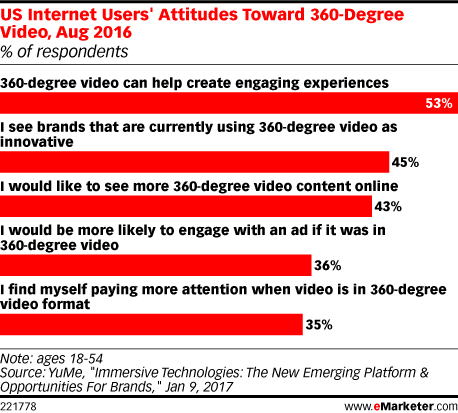
The format of 360 video is still new enough that it stands out from regular old 2D video. According to eMarketer, more than half of users find 360 video engaging, and more than one-third say they’re more likely to engage with 360 video than with other social media video formats.
6 Social Media Video Formats Marketers Need to Try | Hootsuite Blog
Image via eMarketer.
You can post pre-recorded 360 videos on Facebook and YouTube. To create these videos, you’ll need a 360-degree camera—a small device that records from all angles, mimicking a multi-camera set-up.

Facebook 360 video

If you record your video with a 360-degree camera, it should automatically add metadata to the file that will allow Facebook to recognize the file as a 360 video, so you can upload it to your page as you would any other video. If not, you can add the metadata yourself.
Technical requirements:
  • Video with 360 metadata embedded
  • Maximum length: 30 minutes
  • Maximum file size: 5 GB
Before publishing the video, click the Advanced tab, then check the box next to This video was recorded in 360° format. Click the 360 Controls tab and set the default point of view.
For inspiration, check out these great examples of how brands are using Facebook 360.

YouTube 360 video

YouTube has more specific metadata requirements than Facebook, so you may wish to follow their guide to adding metadata using an app or script.
Technical requirements:
  • Video with 360 metadata enabled
  • Recommended resolution: 7168 x 3584 up to 8192 x 4096
  • Recommended 360 cameras: Ricoh Theta, Kodak SP360, IC Real Tech Allie
Then, you can upload the file like a normal video, but be aware that it can take up to an hour for the 360 effect to become available.

3. Live 360 video

Blend live video with 360 video, and what do you get? That’s right: live 360 video, combining the interactivity and virtual reality elements of 360 video with the immediacy of live streaming.
Facebook and Twitter have both launched live 360 platforms, but they are only available to select publishers for now. Facebook’s program should roll out more broadly later this year, and Twitter is taking a waitlist for its live Periscope360 program. Periscope360 will roll out to iOS users first, and for now only supports integration with the Insta360 Nano camera.
Here’s how live 360 video looks on Facebook:
And on Twitter:
Don’t feel like waiting? YouTube already offers live 360 video broadcasting to everyone.

YouTube Live 360 video

For live 360 video on YouTube, you’ll need to set your broadcast up as a Live Scheduled Event rather than just clicking Stream Now, as described for YouTube live video above. Here’s how to set up your Live Event:
Technical requirements:
  • Device broadcasting in 360 degrees
  • Recommended resolution: 2160p or 1440p
  • Aspect ratio: 16:9
There’s just one extra step for Live 360 videos. Under Advanced Settings, check the box next to This live stream is 360°.

4. Looping video

Ah, remember Vine? The original looping social video network is no more, but its legacy is alive in the looping video functionality available on Twitter and Instagram today.

Twitter looping video

When Twitter shut down Vine in January, it announced that all Vine-length videos posted to Twitter would loop—regardless of what tools were used to create them. So, post any video less than 6.5 seconds long to Twitter and watch it loop away.
Technical requirements:
  • Minimum video length: 1 second
  • Maximum video length: 6.5 seconds for looping
  • Maximum file size: 512 MB
  • Minimum resolution: 32 x 32
  • Maximum resolution: 1920 x 1200 (or 1200 x 1920)
  • Maximum bitrate: 25 Mbps
Learn more about creating social video for Twitter and get the step-by-step instructions for posting video Tweets in our post, How to Make a Blockbuster Twitter Video for Business.

Instagram looping video

Technically, all videos loop on Instagram. But for short, fun, looping videos, you’ll want to investigate Boomerang, the Instagram app that takes a burst of up to 20 photos and turns them into a video that loops forward and backward.
Once again, Instagram keeps the technical requirements simple. You can create and share Boomerang videos from any smartphone with both Instagram and Boomerang installed. You can find step-by-step instructions for creating a Boomerang looping video for Instagram, along with best practices and examples, in our post on Instagram apps.
Boomerang’s looping functionality is also available in Instagram Stories.

Facebook looping video

Similar to Twitter, Facebook automatically loops short videos. But there are a few differences. While Twitter loops any video up to 6.5 seconds long indefinitely, Facebook loops videos shorter than 30 seconds for a total of approximately 90 seconds.
So, if you upload a six-second video to Twitter, it will loop forever, but if you upload that same video to Facebook, it will loop 15 times. If you upload a 10-second video to Twitter, it won’t loop at all, but if you upload that same video to Facebook, it will loop nine times.
That means Facebook will automatically show you this video of a shirtless firefighter running toward the camera 13 times (you’re welcome).
Technical requirements:
  • Maximum video length: 30 seconds for looping
  • Maximum file size: 4 GB

5. Disappearing video

Not every video needs to stick around forever. Sometimes it’s all about creating timely, in-the-moment content that will disappear soon after it’s posted. If you’re feeling particularly ephemeral, you can head to Snapchat or Instagram Stories. For the best social video experience, keep in mind that since these videos are intended to be watched exclusively on mobile, they’re best filmed vertically.
Technical requirements:
The technical requirements are the same for Snapchat and Instagram: a smartphone with the appropriate app installed, and a maximum video length of 10 seconds.

Snapchat Stories

Snapchat is the originator of the disappearing social content concept. Like anything posted to a Snapchat Story, Snapchat videos disappear after 24 hours. Of course, if you want them to last longer, you can always save them and post them to other social networks as well. Don’t forget to try out Snapchat lenses—even if you look ridiculous, it will only be for 24 hours.
You can find step-by-step instructions for posting disappearing social videos to Snapchat in our Snapchat Beginners Guide.

Instagram Stories

Like Snapchat Stories, Instagram Stories disappear after 24 hours. While Instagram doesn’t offer lenses, it does allow you to add text or stickers, or draw on your video before posting, like in Snapchat.
Followers can see your Instagram Story by tapping on your profile photo in the bar at the top of their feed.
To share a disappearing video on Instagram, tap the camera icon in the top left corner of your screen or swipe right from your feed. Tap and hold the circle at the bottom of your screen, or swipe left and then tap Hands-Free to start filming. Tap Your Story to post the video.

6. High-production video

If you’re creating high-quality, high-definition social video, especially in longer formats, you will probably want to post to YouTube or Vimeo, as both support full HD videos (1080p) and Ultra HD 4K.
Each of these social media video platforms has its own strengths and weaknesses, of course, and it would take a whole other post to help you decide which is best for your business. Fortunately, we’ve already written that other post.
We’ve also got posts where you can find step-by-step instructions for creating a YouTube account and learn how to get more YouTube video views.