Showing posts with label StephenDrus. Show all posts

Sunday, September 17, 2017

Dark Social Cannot be Ignored


Why Your Business Can’t Ignore Dark Social

Imagine this scenario: You’re at work, hitting the 3 o’clock wall. To revive yourself from the slump, you navigate over to BarkPost, angling your monitor slightly more towards you to avoid being seen by your boss.
You find an amusing listicle—18 Signs Your Dog Has A Secret Second Family—and, wishing to confer with your dog co-parent, you copy the URL in the browser and paste it into an email message. Congratulations, you’ve just engaged in “dark social.”
We’ve all shared articles one-on-one through a means other than social media. Whether it was done to sidestep the no-social-media-for-personal-use policy at work, or because you don’t want the whole world to know you enjoy an article titled An Open Letter From a Corgi to the People Who Laugh at His Butt.
Thanks to the universality of the act, dark social has been reported to be responsible for 84 percent of outbound sharing. So what is this mysterious power, where does it come from, and—most importantly—how can your business harness it? Here’s everything you need to know.

Table of contents

What is dark social?

5 reasons why your company can’t ignore dark social

Why you should start measuring dark social (and how to do it)


What is dark social?
The term “dark social” was coined in an article written in 2012 by former deputy editor of The Atlantic, Alexis Madrigal. Dark social is when people share content through private channels such as instant messaging programs, messaging apps, and email.
This private sharing is harder to track than content shared on public platforms such as Facebook and Twitter, so many social media marketers don’t realize how big of a slice dark social has of the social media sharing pie.
Some of the most common dark social traffic channels are:
  • Messaging apps—such as WhatsApp, WeChat, and Facebook Messenger
  • Email—to protect users’ privacy, referrers aren’t shared)
  • Native mobile apps—Facebook, Instagram
  • Secure browsing—If you click from HTTPS to HTTP the referrer won’t be passed on
In other words, dark social describes any web traffic that’s not attributed to a known source, such as a social network or a Google search. Referral traffic is usually identified by certain “tags” attached to the link whenever it’s shared.
For example, if I want to share this blog post on Twitter using the “Tweet This” button on the side, an action window will open, with the following tag attached to the end of the URL: “percent2F&source=Shareaholic&related=shareaholic”. This tag signals that the referrer of the article was a social sharing tool directly from the post’s page.
If you’re curious about a headline in a Tweet and click on the link, you will often be directed to a link with the following tag “&utm_medium=social&utm_source=twitter”, signalling that this referral originated on Twitter. This is a more common referral tag that you have probably seen in the past, it’s called a UTM code or parameter.


View image on Twitter


 Follow
Hootsuite 
@hootsuite
See how URL shorteners are the unsung hero of social media marketing: http://ow.ly/G06eF 
Twitter Ads info and privacy

Dark social links, however, don’t contain referrer data. Common examples of dark social include links copied and pasted into emails or instant messages, or shared via text message. These methods don’t automatically attach any tracking tags, unless the shared link was copied with the tag included (for example, if I were to copy the URL of an article that I originally found on Twitter, including the UTM parameters attached to it).

If you’re watching your website’s analytics closely, you’ve probably wondered what all that “direct” traffic is. Well, at Hootsuite, we’re pretty sure thousands of people didn’t type “https://blog.hootsuite.com/quick-tips-for-creating-social-videos/” into a browser window. It’s labelled “direct” in Google Analytics, but it’s really traffic from dark social.

5 reasons your company can’t ignore dark social

Aside from the fact that The Atlantic article is a highly interesting and relatively easy read, no matter your level of familiarity with different engagement metrics, it also makes two very important points about dark social.
The first is the fact that the most important shareability factor in a piece of content is the content itself. No good content = no sharing, however sophisticated your optimization efforts may be.
The second point Madrigal makes is that the emergence of social networks didn’t create the social web, but only structured the existing channels by the act of publishing—and tracking—our social interactions.
If you’ve got the great content piece covered, read on for why you need dark social marketing to maximize its reach.

1. Dark social is everywhere

For the past year-and-a-half, the majority of responses (clickbacks) to dark social shares have come from mobile devices. Clickbacks on dark social shares coming from mobile devices are up from 53 percent in August 2014 to 62 percent in February 2016. The other 38 percent of clickbacks on dark social shares come from desktops.

2. Dark social has a huge impact on traffic

According to marketing firm RadiumOne, in the last year-and-a-half, dark social shares as a percent of on-site shares jumped from 69 to 84 percent globally.
Compare those numbers to Facebook traffic. RadiumOne’s research in February 2016 found that only 11 percent of site-originated mobile shares and 21 percent of mobile clickbacks happened worldwide via Facebook. In the same month, seven times the number of site-originated mobile shares and more than three times the number of mobile clickbacks happened via dark social.

3. Dark social is a spectacular marketing opportunity

Dark social data gives a detailed representation of consumers’ real interests. Familiarizing yourself with this information will allow your business to access a targeted audience of connections.

4. Dark social reaches unique demographics

According to RadiumOne’s research, 46 percent of consumers age 55 and older share only via dark social, as opposed to those in the 16 to 34 age group, where only 19 percent do so.

5. Dark social sharing is prevalent in many industries


For example, if your business is in personal finance, food and drink, travel, or executive search, more than 70 percent of social sharing is done through dark social.

Why you should start measuring dark social (and how to do it)

For anyone who publishes content online, it’s important to know where the majority of their readers come from. Whether dark social accounts for 60 or 16 percent of web traffic, marketers need to be able to track it.
Indeed, measuring dark social should be an essential part of your social media ROIframework. In this section we’ll look at some of the tactics and tools you can use to do it.

Shorten URLs

Use shortened URLs for outbound links in your content to get a deeper analysis of the engagement rates. Shorter links also look cleaner on platforms like Twitter.
Hootsuite’s built-in URL shortener ow.ly can be accessed via the Hootsuite dashboard or on the ow.ly site. This link shortener allows you to upload images, track real-time clicks (not including clicks from bots), and have the ability to post to your various social networks like Facebook, LinkedIn, and Twitter.

Why You Can’t Ignore Dark Social | Hootsuite Blog
Image via ow.ly.

You can also use the shortened URL in emails or on your website and use Hootsuite’s URL click stats to track how many clicks those links receive.

Make sharing easy

Thoughtfully arrange the share buttons on your website so that they are easy for visitors to spot. On some sites, users have to scroll to find the share buttons. Other sites don’t quite distinguish which are “follow” buttons and which are “share” buttons.
The sophistication of your share buttons should match the quality of your content.

Use dark social tools

There are many tools that allow marketing professionals to track dark social traffic origins and analyze their outcomes.
Po.st is a product of RadiumOne. The tool allows users to share content and provides publishers with revenue opportunities and unique dark social analytics tools.
ShareThis is an excellent tool that enables people to share any piece of content on the web through e-mail, direct message, or text message. The tool can be customized to measure copy and shares of your website’s URL.
GetSocial.io is a social media app store. You can create an account through their website or download their WordPress plugin or Shopify App. After you’ve created an account, paste the snippet of code provided into your HTML <head> section (the code is highlighted in red on top of the page). Once you’ve successfully inserted the snippet of code in your website, you’ll be one click away from tracking dark social shares. Find the Address Bar Tracking app, click Activate and you’re good to go.

Watch other social platforms

One of the things you can do to unmask the origin of dark social traffic is to check for a simultaneous spike in link traffic coming from Facebook or Reddit.
Major websites have also reported digging into user agent data, which includes a line of code users leave after visiting a website, which identifies their operating system and browser type. User agent information, while not always translated correctly by analytics software, can provide more details about the referrer.
Finally, as Madrigal pointed out, “There’s no way to game email or people’s instant messages. There’s no power users you can contact. There’s no algorithms to understand.”
The best way to ensure your content gets shared is to create interesting, informative, original material.

Tuesday, August 8, 2017

Social Media Advertising: The Complete Guide


It’s no secret that digital advertising has become a key part of most marketing campaigns. Internet advertising spend overtook newspaper ad spending way back in 2013, and eMarketer predicts that it will overtake TV ad spending for the first time by the end of this year. The numbers are huge: an anticipated $72.09 billion spent on digital ads in the United States alone in 2016, a number expected to rise to more than $82 billion next year and more than $113 billion by 2020.

It probably comes as no surprise that Facebook is one of the biggest players in digital advertising, indicating that social media advertising is front and center in the digital ad world. In fact, Facebook blows all other digital properties out of the water when it comes to display ad spending, capturing 35.4 percent of total display advertising spending in the U.S.—a whopping $11.93 billion (second-place Google, by comparison, will take in just $4.79 billion).

And that’s just display ads. Facebook’s total social ads revenue was more than $6.8 billion in Q3 2016 alone. But the other social networks are nothing to sneeze at, with Twitter bringing in $545 million in social media advertising revenue in the same period. Snapchat will sell $367 million in social ads in 2016, after launching its ad platform just over a year ago. Total social ad spending in 2016 is expected to reach $32.97 billion. By 2018, Facebook alone will top that number.

Based on the social media advertising statistics, it’s clear your competitors are investing in social advertising platforms. In terms of ROI, more than 95 percent of social media managers say Facebook offers the best return, followed by Twitter and Instagram.Image via eMarketer

With so many choices, it can be a challenge to develop a social media advertising strategy that works for your unique business. In this beginner’s social media advertising guide, we dig into everything you need to know about launching a social ad campaign, then give you the nitty-gritty details on how (and why) to create ads on six of the most popular social networks.


Bonus: Download a free guide that teaches you how to turn Facebook traffic into sales in four simple steps using Hootsuite.


Table of contents
What is social media advertising?
Social media advertising tips
Facebook advertising
Twitter advertising
Instagram advertising
Pinterest advertising
LinkedIn advertising
Snapchat advertising
Social media advertising with Hootsuite


What is social media advertising?

Before you start developing your social media advertising strategy, it’s important to understand exactly what social media ads are. Quite simply, a social media ad is any kind of paid content on a social media network. The options run from a one-off promoted Tweet or Facebook post to a full-scale campaign with major budgets attached. Each social network offers different options, and we’ll explore them in detail below.
Social media advertising tips

Hootsuite has been using social ads since 2012—a lifetime in the digital world. While the social ads tools and networks available are constantly evolving, the key principles of effective social media advertising are much more stable. After a couple of years of refining Hootsuite’s own social ad strategy, CEO Ryan Holmes laid out six ways to use social media ads to grow your business in an article that stands the test of time. Here are his tips.
1. Use free social media to beta-test your paid social ads

You’re likely already posting content on Twitter, Facebook, and Instagram every day—and maybe LinkedIn and SnapChat, too. Some of these posts will resonate with followers; others won’t. Track which ones are being clicked, liked, shared, and commented on. These high-performing messages make the best candidates for social ads.
2. Take advantage of targeting features

Traditional ads are inefficient. One of many social media advertising benefits is that social platforms offer very effective targeting capabilities to address that problem. From targeting social media managers on LinkedIn to Stranger Things fans on Facebook, take advantage of this very useful targeting for more efficiency in advertising.
3. Rotate ads frequently

Though it’s annoying to see the same TV ad in every commercial break, repetition is an effective way of hammering home the message using one-way communication. But on advertising channels where engagement is key, and ads appear directly in users’ feeds, fresh content is the name of the game. Overly repetitive messaging may end up losing you more business than you gain. Hootsuite has found the best practice is to rotate ads every three to five days.
4. Use small samples to test the text and images used in your ads

One of the great virtues of social ads is instant feedback. You can gauge the effectiveness of a sponsored post in minutes and follow up with advanced analytics reports. The best practice is to test several ads with small audiences to determine what works best, then use the winning ad in the primary campaign.
5. Understand how ads are sold on different networks

You’ll learn the details below, but keep in mind that keeping your social media advertising budget under control means thinking about whether you’re designing an ad campaign based on impressions or engagements. If you’re paying every time someone sees your ad (impressions), your message can cast a wide net. But if you’re paying for engagement, you only want people who are really interested in doing business with you to engage. The wording of your ad should help people self-qualify.
6. Design ads with mobile in mind

More than 80 percent of social network users are accessing social media on a mobile device in 2016. This means most social media ads are being viewed on mobile devices as well. Your mobile ads should be specifically designed for the small screen, incorporating images that are easy to view on a pocket-sized device. You can also take advantage of “geofencing” to target mobile users when they are in a specific zip code, so they only see your ads when they are close enough to walk in your front door.

Now that you understand some basic social media advertising guidelines, let’s dive into the specifics of advertising with each of the main social networks.
Facebook advertising


Ad types

Facebook offers several different ad formats.
Photo ads

The technical specifications for photo ads vary depending on the ad objectives, so you should check the details on Facebook Business. For clicks to your website, for example, photo ads offer a headline of 25 characters, 90 characters of test, and a link description of up to 30 characters. Depending on the ad objective, you may also be able to add a call to action button with actions like Shop Now, Learn More, and See Menu.
Video ads

Video ads generally have the same call to action options and character counts as photo ads. The aspect ratio required depends on the campaign objective, but 16:9 or 1:1 will usually work.
Carousel

A carousel ad lets you include up to 10 images and links in one ad. You get 90 characters of text, a 40 character headline, and a 20 character link description. Images should be have a 1:1 image ratio.
Slideshow

A slideshow is an ad that creates a video from several static images. All images should have the same size and aspect ratio.
Canvas

Canvas is a full-screen mobile ad type that combines videos, photos, and call to action buttons. It allows users to tilt and zoom to interact with the imagery.
Audience and targeting

Facebook offers extensive targeting options, and choosing the best target audience will maximize the value of your ad spend.

Start by targeting your ad based on location, age, gender, and language. Then, you can dive into Facebook’s detailed targeting options:
Demographics allows you to filter for nine demographic categories: education, ethnic affinity, generation, household composition, life events, parenting, politics (U.S. only), relationship, and work.
Interests breaks the many interests Facebook users indicate through their social media activity down into nine broad categories: business and industry, entertainment, family and relationships, fitness and wellness, food and drink, hobbies and activities, shopping and fashion, sports and outdoors, and technology. Each of these has multiple subcategories, so you can drill down quite deep in your targeting.
Behaviors allow you to filter users based on their behaviors on Facebook and information Facebook gathers from partners.

You can also choose to target or exclude people who already have a connection with you on Facebook, as well as those people’s friends.

Facebook also lets you create a custom audience by uploading a list of email addresses, phone numbers, Facebook user IDs, or app user IDs. You can then use lookalike audiences to find other people on Facebook that are similar to that audience.

Once you’ve created your target audience, you can narrow your focus even further based on type of device, and even whether the Facebook user is connected via data or Wi-Fi.
Pricing

Facebook ad pricing varies based on quite a few factors, including the time of year, the country you’re targeting, and even the quality of your ad. For link clicks and conversions, on average the cost per click in the United States in Q3 2016 was 27.29 cents, and the CPM was $7.19. But the average CPC in Australia was nearly 80 cents—a huge difference.Image via AdEspresso

The cost per click varies by placement, with ads in the desktop news feed costing $0.29 per click compared to $0.18 for mobile in Q3 2016.
How to buy

Before you buy your first Facebook ad, you’ll need to set up a Facebook business page. Once your page is ready to go, you can head over to the Facebook Ads managerto create your first ad.
Step 1: Choose your campaign objective

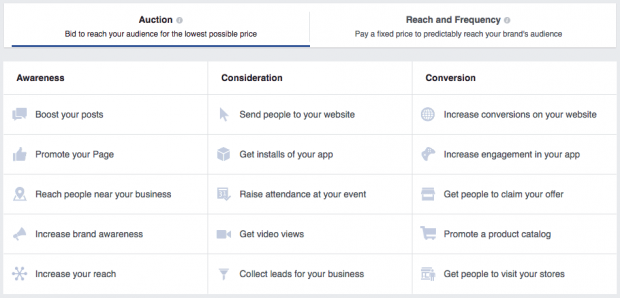
Facebook offers 15 different campaign objectives, broken down into the three broad categories of awareness (boost posts, increase brand awareness), consideration (app installs, lead collection), and conversion (website conversions, visits to your offline store).


Choose the objective that best aligns with your goals for this particular Facebook ad. For some help narrowing down the best goal for your ad, check out our guide to Facebook advertising strategies.
Step 2: Choose your target audience and placement

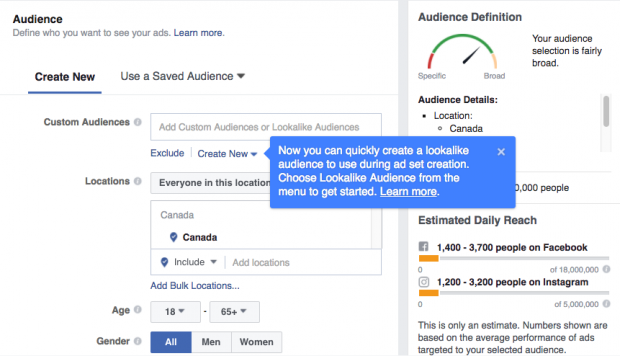
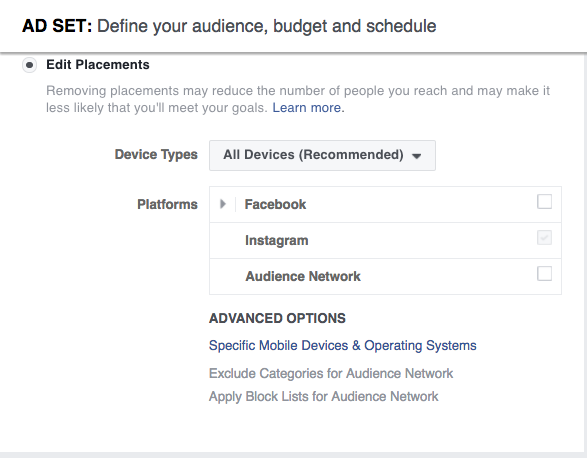
Keep an eye on the meter on the right side of the page that indicates the breadth of your audience selection, along with the estimated daily reach chart on the bottom right. Notice that Instagram is among the placement options. (We’ll delve further into advertising on Instagram below.)


Step 3: Set your budget and schedule

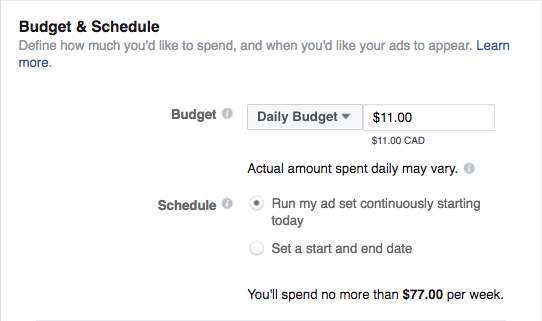
You can choose a daily or lifetime budget, then set start and end dates for your ad or set it to start running right away.


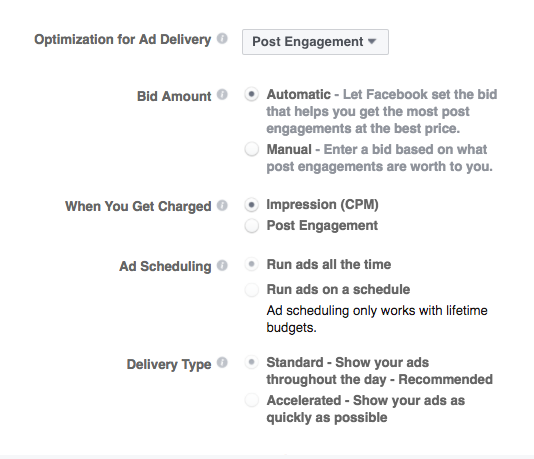
The advanced budget options allow you to really control what you spend by choosing whether to optimize your ad delivery for engagement, impressions, or unique daily reach, and whether you pay by impression or engagement (for engagement ads only).


Step 4: Create your ad

You can choose to create a new ad or use an existing post. If creating a new ad, you first choose whether to use a single image, a single video, or a slideshow, then enter the text of your ad. On the right side of the page, you can preview what the ad will look like in various formats.


Once you’re happy with how your ad looks, click the Place Order button, then wait to get an email from Facebook telling you that your ad has been approved. To learn more about Facebook ad best practices, check out our complete guide to advertising on Facebook.
Twitter advertising


Ad types

There are three different kinds of Twitter Ads: Promoted Accounts, Promoted Trends, and Promoted Tweets.
Promoted Tweets are messages that will appear directly in the timelines of the Twitter users you target at a specific time.
A Promoted Account is an ad that invites targeted Twitter users to follow your brand.
Trending topics on Twitter are the most talked about subjects on the social network, appearing on the left side of the page. Promoted Trends allow you to put your story at the top of that list.

Twitter ads are also categorized by your campaign objective:
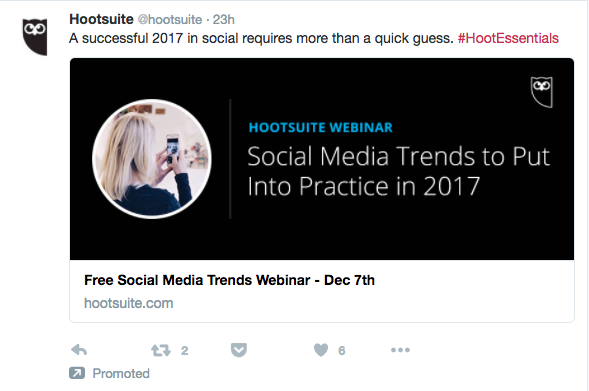
For website clicks or conversions campaigns, you promote Tweets to people who you want to visit and take action on your website. You’re charged per click.
For Tweet engagements campaigns, you promote Tweets with the goal of starting conversations about your brand. You pay for the initial engagement.
For followers campaigns, you promote your Twitter account and pay per follower gained.
For awareness campaigns, you promote your Tweets to a broad audience and pay for impressions (CPM).
For video views campaigns, you promote your videos to a targeted audience and pay per video view.
For app installs or re-engagement campaigns, you promote your Tweets and pay per app install.
For lead generation campaigns, you promote Tweets and pay per lead collected.
Audience and targeting

Twitter allows high-level targeting based on location (country, state, region, metro area, or postal code), gender, languages, device, platform, and even carrier.

More detailed targeting options allow you to target your audience by the keywords they Tweet, their interests (by category or based on usernames of Twitter users who embody the interests of your desired audience), the specific TV shows they Tweet about, behaviors, and their interest in specific events.

You can also upload specific lists of people (your email list, for example) to target with ads, or target people who are similar to your follower base.
Pricing

The cost of Twitter ads depends on the ad type. Promoted Tweets and accounts might cost you anywhere from 50 cents to $10 or more per engagement (video view, link click, follow, etc.) based on how targeted your ad is. Promoted Trends, on the other hand, have been reported to cost $200,000 a day.

The key here is testing your ads. Run a few short campaigns with a small budget to find out which objective is right for your audience and your budget. For engagement campaigns, Twitter only charges you when a user completes the action set out in your campaign objective, so all of these campaigns will provide some value. It’s always a good idea to look at what other advertisers are bidding for similar ads, which is information Twitter provides.
How to buy

Once you sign into the Twitter ads platform (and add your payment information), buying Twitter ads is a simple four-step process.
Step 1: Set up your campaign

Choose your objective and click Create Campaign to reach the ad campaign screen. Once there, name your campaign, choose whether to start the campaign right away or schedule start and end dates, and decide whether to add third-party tracking with DoubleClick.


Step 2: Choose your audience

Choose from among Twitter’s targeting options. They provide an estimated audience size to help guide you.


Step 3: Set your budget

You can set daily maximum and total campaign budgets. Twitter stops showing your ads once your budget has been reached, so you don’t have to manually end campaigns to avoid being charged.


Step 4: Choose your creative

Twitter will show you an existing list of eligible Tweets to promote, or you can create new ones. You’ll see a preview on the right side of the page.


Click Publish Tweet to launch your ad.

Learn more about managing your Twitter ads on Hootsuite.
Instagram advertisingImage via Instagram.
Ad types

Since Facebook owns Instagram, it’s not surprising that Instagram ad types mirror three of the Facebook ads types: photo, video, and carousel. Also like Facebook, the ads support a number of different objectives.

For Instagram, the available objectives are: website clicks, website conversions, mobile app installs, mobile app engagement, video views, reach and frequency, page post engagement, mass awareness, and local awareness.
Audience and targeting

Instagram ads offer the same audience targeting option as Facebook ads, described earlier in this post. Keep in mind, though, that the demographics of Instagram users in general differ from those of Facebook users. The largest demographic of Instagram users is young urban women (aged 18 to 29).
Pricing

Like Facebook ads, Instagram ads offer options to pay per engagement or by impression (CPM). The average cost per click for an Instagram ad in Q3 2016 was $0.72.
How to buy

Follow the steps outlined in the Facebook section above. In step 2, make sure to choose Instagram as your placement of choice.


Learn more about managing your Instagram ads on Hootsuite.
Pinterest advertisingImage via Pinterest.
Ad types

Ads on Pinterest are called Promoted Pins. They are essentially the same as regular Pins, except that you pay to promote them to a wider audience. There are three main types of campaigns:
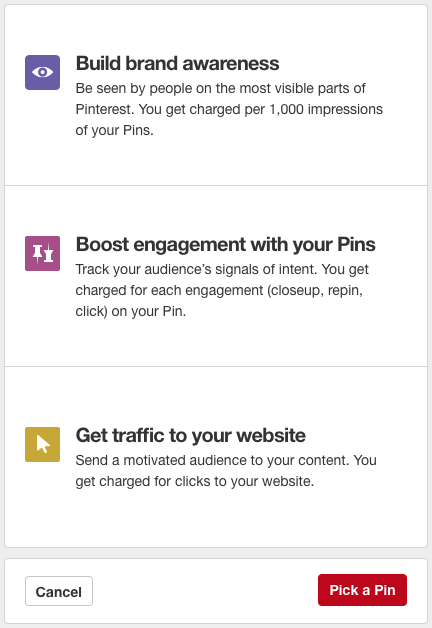
Awareness campaigns aim to get your Pins in front of people who have not heard of your business before or are not already interacting with your brand.
Engagement campaigns encourage Pinners to engage with your content by repining or clicking your Promoted Pins.
Traffic campaigns funnel visitors from your Promoted Pins directly to your website.
Audience and targeting

Pinterest allows you to target your audience in a few different ways:
Interest targeting allows you to target Pinners based on 420 different interestsincluding, for example, street style and sustainable architecture.
Keyword targeting targets Pinners based on search terms.
Business data targeting lets you target existing customers, Pinners who have visited your site, or a “lookalike” audience that looks and acts similar to your existing audience.

You can also target by location, language, type of device, and gender.
Pricing

How you’re charged for Pinterest ads depends on the type of campaign you run. Awareness campaigns are charged by CPM, engagement campaigns by engagement, and traffic campaigns by click.

Pinterest uses a “second-price auction model” for ad bids. That means you set a maximum bid you’re willing to pay, but you are only charged the amount needed to top the next-highest bidder. You might be charged your maximum bid, but you could pay less. Pinterest’s ad interface provides bid guidance that will let you know if your bid is too low. The minimum CPM bid is $5.
How to buy

Before you can create a Pinterest ad, you’ll need to set up a Pinterest business account. And since you can only promote Pins you’ve already posted, you’ll actually need to post the Pin you want to promote before you start the process of buying your ad. Confused? You can get more details in our Complete Pinterest Ads Guide for Business.

Once you have a business account with some Pins posted, you’re ready to buy your first ad.
Step 1: Choose your goal

From your Pinterest profile, click on the + button and select Create ad—or just go straight to ads.pinterest.com. Select what type of campaign you want to create: awareness, engagement, or traffic, then name your campaign, select the start and (optional) end dates, and set your daily budget.Image via Pinterest.
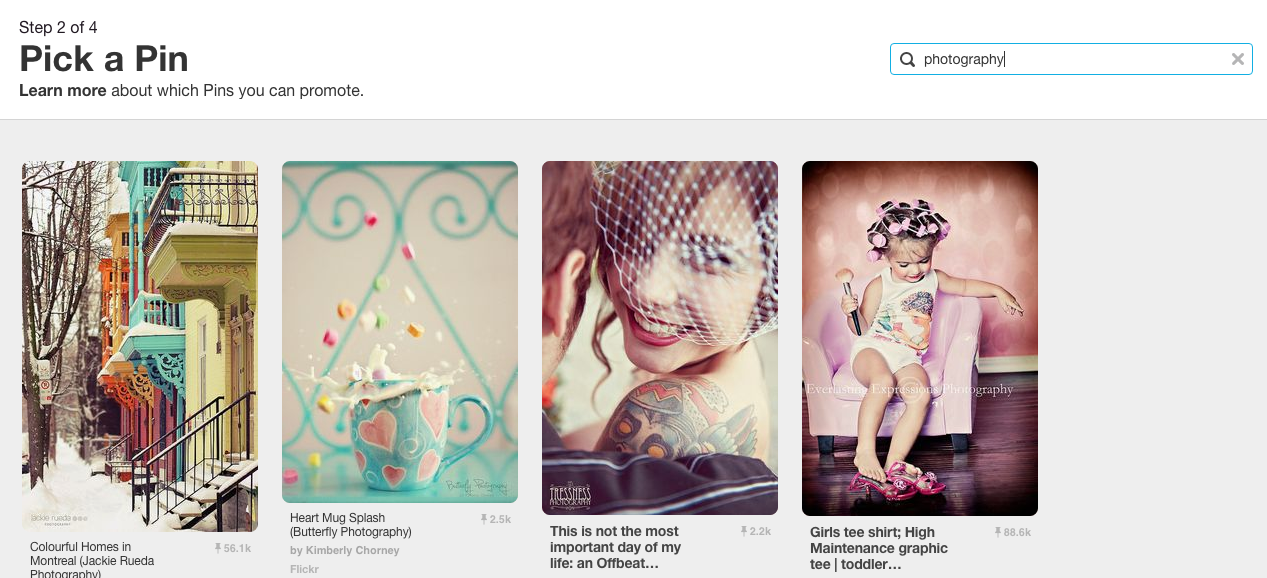
Step 2: Pick your Promoted Pin

Choose the Pin you want to promote. If you’re not sure, you can use the filters on the Pick a Pin screen to find out which of your Pins have had the most engagement in the last 30 days.Image via Pinterest.
Step 3: Choose your audience

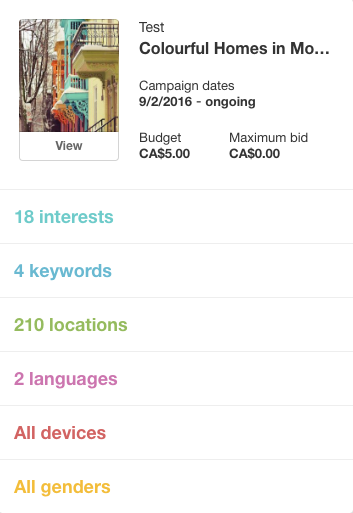
You’ll next find yourself on the Add more details screen. Here, you’ll use the targeting options to choose exactly who will see your Promoted Pin.Image via Pinterest.
Step 4: Set your budget

Still on the Add more details screen, you’ll enter your maximum bid and daily budget.


Review all the information on the right side of your screen, then click Next. This submits your Promoted Pin for review. It may take up to 24 hours for your Promoted Pin to be approved. In the meantime, set up your billing details.

Learn more about managing your Pinterest ads on Hootsuite.
LinkedIn advertisingImage via LinkedIn.
Ad types

There are five main types of LinkedIn ads:
Display ads: Share content with a targeted audience.
Sponsored InMail: Deliver sponsored content directly to LinkedIn user inboxes.
Sponsored content: Your content will appear in the LinkedIn timelines of your target audience.
Text ads: These are text-based ads that appear in the right column of the desktop.
Dynamic ads: These ads also appear in the right column, but incorporate display ad unit formats.
Audience and targeting

LinkedIn targeting, not unlike the social network itself, is very good for employee- and company-specific targeting. You can specify who you want to see the ad based on the industry they work in, their position and seniority (maybe you’re sharing a white paper for managers?), where they work, how big their employer is (think of a post targeting enterprises, not SMBs), and beyond. As a result, LinkedIn is extremely effective for B2B marketing and job-related advertising.

If the audience you choose is too big or too small it might not perform well, so test audience targeting with several ads to hone in on the right one for you.
Pricing

Like Facebook, LinkedIn lets you choose whether to pay based on the cost-per-click (CPC) model, or pay by every 1,000 impressions (CPM). However, LinkedIn has set a minimum budget of $10 per day per campaign. There are also minimum bids for CPC text ads ($2 per click) and CPM text ads ($2 per 1,000 impressions). Sponsored Content minimum bids will vary based on the audience you choose.

With these minimum bids, it’s important that you seriously consider your objective when building out LinkedIn ads. These ads should be very business-focused, as Facebook and Twitter provide much cheaper alternatives for content marketing. Test a few LinkedIn ads and see whether the price is worth it for your business.
How to buy

The process will vary a bit depending on the type of ad you want to run. Since text ads are the simplest (and least expensive) way to get started, that’s what we’ll focus on here.
Step 1: Create a new campaign

On your LinkedIn homepage, hover over the Business Services tab at the top right and choose advertise, then scroll down to the bottom and click Create Ad. Then, choose what type of ad to create. If you don’t yet have a Company or Showcase page (and you should), you’ll be limited to Text ads.


Step 2: Build your ad

Choose where to link your ad to, then add a small image along with your headline and copy. You can preview the ad in various formats on the right side of the page.


Step 3: Choose your target audience

Choose your target audience by industry, company size, job title, and so on.


Step 4: Budgeting

Set your daily budget and your bid, which will be a choice between paying for clicks or impressions.


If you’ve never built an ad before, finish by entering your payment information. Then review your order and launch your campaign.
Snapchat advertisingImage via Snapchat.
Ad types

Snapchat offers three types of advertising:
Snap ads are video ads that appear between Stories. Users can swipe up to reveal extended content such as longer video, an article, an app install ad, or a website.
Sponsored Geofilters (for larger companies) or on-demand Geofilters (for smaller brands) are overlay graphics users can select and add to their Snaps.
Sponsored lenses are custom Snapchat lenses that work just like any of the usual suspects—like the infamous rainbow barf.

For now, the only self-serve advertising option is on-demand Geofilters, so that’s what we’ll focus on here. For all other advertising options, you’ll need to contact Snapchat.
Audience and targeting

When it comes to on-demand Geofilters, your only targeting options are the dates on which to run your ad and the geographic area to cover. But you can get the geotargeting down to the hyper-local: the area in which your Geofilter is available can range from a minimum of 20,000 to a maximum of 5 million square feet.

You should keep the overall Snapchat audience in mind when thinking about advertising on this social platform: 60 percent of users are under 25.
Pricing

There’s a reason why most advertising options aren’t available on demand: Sponsored lenses run from $450,000 to $700,000 per day. On-demand Geofilters are much more affordable—but watch your catchment area. We found that a two-day Geofilter in the immediate area of our office would cost about $13, but expanding the territory of the Geofilter to the maximum 5 million square feet (about 70 square city blocks) upped the cost to nearly $3,000. One city block was about $45.
How to buy
Step 1: Create your Geofilter

Go to the Snapchat Geofilters page and log in to your Snapchat account. Decide whether you want to upload a Geofilter you create using design tools like Photoshop or Illustrator or select the online design tool. Uploading a custom Geofilter gives you greater customization in order to match your company branding. To explore the tools available, we’ll use the online design tool for the rest of this example.


Step 2: Choose an occasion and design

Celebrations offers the most options, and will likely be the most applicable for brands. Use the design tools to create a Geofilter appropriate to your brand.


Step 3: Choose your dates

Choose the dates on which your Geofilter will be available. You can also choose to keep your Geofilter available for the long term and pay yearly.


Step 4: Choose your area

You’ll draw a virtual fence on a map to set the target area for your Geofilter. Remember that the larger the area you choose, the more you’ll pay.


Then enter your payment details and your Geofilter is good to go!


Thursday, April 27, 2017

Sex and business among medieval Cairo’s Jews go on display at Cambridge New exhibit showcases dozens of fragments, some newly translated, that tell the story of ordinary folks living under Islam in the Middle Ages


A child’s alphabet and doodles, circa 1000 years old, from the Cairo Geniza, part of the Discarded History: The Genizah of Medieval Cairo exhibit on display from April 27, 2017 (Cambridge University)

‘Long pepper, galanga, ginger and aristolochia, an ounce of each, cinnamon and anise, two ounces of each, clove, mace and nutmeg, one quarter ounce of each.” These exotic ingredients are not only intended to spice up a dish, but also a man’s sex life.

The aphrodisiac recipe, intended for the nephew of Saladin, the Sultan Omar, was part of Judeo-Arabic draft scrawled by Maimonides in the 12th century that was found in Cairo. It’s one of several dozen fragments of texts from the Cairo Geniza featured in an exhibit opening Thursday at Cambridge University.


The university is home to the bulk of thousands of fragments found in the geniza — a depository of discarded sacred texts — at the end of the 19th century that document a millennium of Jewish life in the Egyptian metropolis. “Discarded History: The Genizah of Medieval Cairo” is one of the largest collections of fragments to ever go on display, Cambridge University said, and sets out to tell the “lost history” of ordinary Jews.

The 50 or 60 fragments going on display for the next six months offer visitors a personal and first-hand glimpse of history through the lives of Jews — ordinary folks — in medieval Cairo. They deal with marriage, death, love, business, and sex.


A prenuptial contract from the Cairo Geniza, part of the Discarded History: The Genizah of Medieval Cairo exhibit on display from April 27, 2017 (Cambridge University)

The collection known as the Cairo Geniza comprises an estimated 320,000 fragments of parchment and paper that were discarded over the centuries by the Jewish community, including religious texts, contracts, recipes, magic amulets, and letters. Some were translated into English for the exhibit for the first time.

According to Jewish law, documents that bear the name of God cannot be destroyed. Instead, the Jewish community stuffed papers and parchments through a hole in the wall of the women’s section of the Ben Ezra synagogue in the Fustat district. Egypt’s arid climate helped preserve the trove of documents in the small room on the other side of the hole until they came to the attention of European scholars at the turn of the 20th century.


Among the highlights of the exhibit are the scratchings of a young student first learning the Hebrew alphabet, with doodles in the margin; an 11th-century prenuptial agreement requiring an unruly would-be groom to curtail his future behavior; letters and treatises written in Maimonides’ hand; and one of the earliest known examples of an engagement deed, from the 12th century, ensuring brides-to-be wouldn’t be locked into a dormant marriage if their husband disappeared while traveling overseas.


The oldest dated medieval Hebrew manuscript, from Iran at the beginning of the 10th century, part of the Discarded History: The Genizah of Medieval Cairo exhibit on display from April 27, 2017 (Cambridge University)

The aim of the exhibit was to show visitors the rich tapestry of Jewish life in the Middle Ages, when the vast majority of the world’s Jewish population lived under Islam, Ben Outhwaite, head of the Genizah Research Unit and co-curator of the exhibition, told The Times of Israel.

He said it was a challenge to select items from the “colossal material” at the university’s disposal and present it in a compelling way to a general audience.

“We didn’t want to paint either a picture of a happy interfaith utopia, where Jews lived happily under Islam and there were no problems; on the other hand we don’t want to paint the picture that is popular with some of the right wing press in this country, for instance, of dhimmi suffering under the oppression of the cruel Muslim government,” he said.

“It would be a mistake to impose a simple narrative,” Outhwaite said.

Both instances might have been true at different periods and places, but it was up to visitors to decide by seeing the life of Cairene Jews in their own words.

Discarded History: The Genizah of Medieval Cairo is open to the public at Cambridge University Library through October 28, 2017.

Friday, April 14, 2017

Ways to Catapult Your Business Success 101


Something that has always deeply fascinated me is learning about the journey that has helped in the development of a majorly successful company get to where they are now. I absolutely love hearing about all of the strategies and tactics that have drastically helped in their growth as an organization, but also all of the obstacles that they had to overcome along the way.

The one thing that I have learned over the years having the great fortune of sitting down with executives from major organizations as well as successful startup founders is that there is a learning opportunity within their success for all of us to benefit from regardless of what industry one is in.

Recently, I had the great opportunity to sit down with the founders and Managing Directors Dick King and Mark Timmerman, along with Vice President David Modiano of City Capital Advisors (“City Capital”) based in Chicago, IL. City Capital is a uniquely positioned investment bank whose sole mission is to provide senior level expert advice and execution services to leading middle market companies and their owners.

In its relatively short 10 year history since Dick and Mark left 20 year careers at William Blair & Company, City Capital has successfully completed over 50 transactions aggregating over $4.0 billion in value. They advise owners and management of private and publicly held middle market companies, typically valued between $25 million and $500 million with merger and acquisition advisory, capital formation for executing leveraged buyouts and ownership recapitalizations, as well as executing corporate financial restructurings.

City Capital’s biggest and most notable merger assignment to date concluded just two weeks ago when they advised Indiana’s family-owned Jayco Corporation in a successful merger with publicly-traded Thor Industries Inc. for $576 million.

When sitting down with Dick, Mark, and David, we discussed how City Capital went from a small two-man show to becoming a leading deal broker and investment banking firm in the middle market space. Here are three things that City Capital credits to their success as well as help you to implement into your own business.

1. Find your niche market and grow there.

Whatever industry you are in, it’s absolutely vital that you find your niche market and then develop a laser like focus to direct all of your time and energy in servicing that space. When Dick and Mark started City Capital, they admit that they didn’t have a concise business plan, but the one thing that they did know was their niche market of middle-market companies and how they were going to bring extreme value there. You may be tempted to explore different, more potentially lucrative markets such as larger companies in City Capital’s case, but don’t give in. The leading companies that are dominating their markets make it a major priority to find their niche and then operate solely within the confines of that space.

Related: Find Your Niche in 60 Minutes or Less With These 4 Questions

2. Relationships matter most.

Co-founder and Managing Director, Dick King said, “We knew from the beginning that the one way we were going to differentiate ourselves was to build thriving business referral relationships. Everything in our business revolves around people and relationships, and that is one key area that we take very serious.” I personally talk a lot about the importance of relationships, and when analyzing and digging beneath the surface to see what truly makes City Capital stand out from the rest of the competition, it’s clear to see the strength of their professional relationships is at the top of the list.

One of the best things that you can do right now whether you are a startup or an established company is to place an enormous value on your relationships and always striving to give more than you take. This type of mentality will always serve your future success more than you can ever begin to imagine.

Related: If You Don't Build Relationships, Nothing Else Matters

3. Create a culture where everyone feels important.

Culture is and will forever always be a critical component in determining the health and success of any organization. The best organizations all the way from Fortune 500 companies down to small family-owned businesses with five employees create a culture where everyone feels important and wants to do everything possible to carry out the organization’s overall mission. When discussing culture, Mark Timmerman said, “We wanted to create a culture where not only everyone feels important, but is also part of a tangible contributing factor to the future of our success.” One of the ways that City Capital has created this culture is to not appoint a CEO. Even though Dick King and Mark Timmerman founded City Capital, they pride themselves in having developed a culture where other senior team members don’t view them as bosses.

As a leader, it’s your job to instill and demand a culture that makes everyone feel accountable mainly to themselves and of course to their customers. By creating a collaborative atmosphere and attracting highly-productive and talented senior investment bankers, it’s truly amazing what can happen. City Capital is another example of just how important culture truly is, regardless of how big an organization is.

It’s my hope that these three things that have greatly impacted the success and growth of City Capital Advisors can serve as a springboard in creating more success in your own business.

Creating a Strong Company Culture 101


In his book Fueled by Failure, entrepreneur and philanthropist Jeremy Bloom shows readers how rebound and reprogram themselves after defeat and how to use the lessons from those failures to achieve winning results. In this edited excerpt, the author reveals the five things you can include in your company culture to help create a thriving business.


Building a strong culture within a team is at the core of business success. You want a culture that recognizes and embraces shared values, attitudes, standards, and beliefs that characterize the goals of the organization. And it’s a good idea to make sure it suits the best people who work at the company while making a positive impression on customers and anyone else associated with the business.


Establishing a culture you believe in means having a clear and consistent vision and knowing how you'd like everyone, inside and outside, to view the company. Many old-school CEOs and leaders were often “business operations first and people second.” But it's the people that make a business successful. The greater inclusion of people in the operation of the business has led to far more significant contributions by employees, which spill over to more appreciation from customers. So unless you are alone with nothing but technology, your business is built around people producing products and providing services for other people.


It’s a good idea to start by sitting down with your board of directors or co-founders to write down what your core values are and how you want to weave them into the DNA of your team. It’s important that the founders uphold the culture from the very beginning. To do so, the culture has to be more than just a shared vision. If you have a vision without a strategy, it will never be more than a vision.


Following are some things I believe to be the cornerstones of a solid business culture.


1. Transparency.


At my company, we go over all the key metrics of the business with the entire company. The goal is for all employees to feel they know the thinking, responsibilities, and strategy at various levels of the company and can share ideas and feedback no matter who they are.


Another thing we do to help bring more transparency into the organization is what we call a TGIF (I got this idea from Google). Our TGIF calls take place every other Friday and are all-hands calls. Everyone in the company can participate and ask questions. Since people often feel intimidated or uncomfortable in an any-question-welcome situation, we built a private forum on the Integrate server where employees can ask anonymous questions.


2. Time to disconnect.


We all need to hit the reset button once in a while -- people can't come in early and leave late every single day without getting burnt out at some level. While you want employees to have a work-hard founder’s mentality, you need to recognize the work-life integration that exists and how significant it is to make sure you have personally fulfilled, clear-thinking people. It’s important to understand that sometimes life will get in the way of business and everyone should be allowed to take care of pressing personal matters.

3. Empowerment and a sense of freedom.


You empower people by not micromanaging, erring on the side of giving people general guidelines rather than explicit, detailed directions. Informed employees are more involved and empowered in a company. And the more freedom people have to take on tasks, manage them, find solutions, and execute them, the more they feel connected to and woven into the company’s culture.
4. Physical space.


If you haven’t watched Susan Cane’s TED Talk on introverts, I highly recommend it. She opened my mind to the idea that American businesses are built for extroverts, down to the floor plans of our office spaces. Although open spaces are great for some, other people need to be able to close the door to be at their most productive. It’s important to consider the comfort level of your employees before you decide how to lay out space or what type of office space to lease.

5. Talking to customers and employees.

At different points in a company’s maturation process, you're almost guaranteed to go through weeks or even months where you feel lost. When you haven’t nailed a product market fit or you’re having challenges relating to your product or corporate vision, the natural tendency is to turn your attention to where you or your team went wrong. Another way to try to solve these problems is by talking to your customers.


“I go out to talk to customers to understand what works and what doesn’t work in the product," says David Tomizuka, CFO at Integrate. "It [also] helps you refine your approach and know how you're going to market it. And probably the most important thing is it fires you up. You get a lot of enthusiasm from being out there with customers and talking to people about your product.”


It's also important to touch base with your employees. “As an executive, it’s easy to get wrapped up in the minutia and the day-to-day operations that you're not out on the front lines as a leader,” Tomizuka adds. “So many leaders I know never go out and talk to their employees without an agenda. I used to schedule time just to walk the halls and get a pulse on how the culture is doing, how the employees are doing, and build and develop relationships. Making personal connections makes such a difference.”

6. Your organizational design.


Simply put, organizational design is the processes, structure, and hierarchy you put into place that allow you to put your culture into practice. It’s “how you do things.” This will include your communication, company policies, team building, performance indicators, performance evaluations, division of responsibilities, and even how you schedule, and run, meetings. For example, do you have a weekly meeting at the same time and in the same place, or do you hold meetings only when there's something worthy of discussing at a meeting? Are meetings for all employees, division heads, or certain team members? Do you always meet in conference rooms, in a specific area of the office, or by conference calls, or does the setting change?


If designed well, everyone in the business can do his or her job more effectively. Your business culture will significantly be enhanced if the organizational design you put into place clarifies authority, responsibility, and accountability.