Tuesday, August 1, 2017

Advertising on Facebook : The Complete Guide

How to Advertise on Facebook: The Complete Guide

Facebook advertising is a big and growing business: companies spent more than $9 billion on Facebook ads in the second quarter of 2017 alone. That’s an increase of 47 percent (Nearly $3 billion) from the same period in 2016.

Table of contents

Why advertise on Facebook?

Types of Facebook ads

Facebook ads: Guidelines and examples

How to advertise on Facebook: Placing your ad

Facebook advertising tools

Facebook ads best practices

Facebook advertising campaign ideas


Why advertise on Facebook?

At last count, more than two billion people were using Facebook. And those users are highly engaged with the content posted on the network: More than 800 million people like something on Facebook every single day.
Of course, when it comes to getting the biggest bang for your advertising buck, too large an audience can actually be a bad thing. After all, you only want to pay to expose your brand to people who might be interested in doing business with you. Fortunately, Facebook offers multiple layers of targeting, so you can focus your Facebook ads on exactly the right audience for your business to maximize ROI.
We’ll get into the specifics of targeting Facebook ads later on in this post, but for now keep in mind that Facebook’s huge, global audience combined with the ability to target your ad by demographics, location, interests, and behaviors allows you to access the exact people who are most likely to want to buy your products or services.
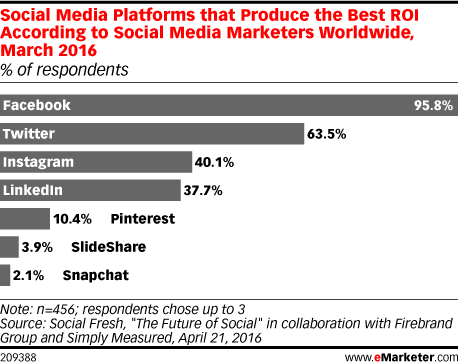
Need more convincing? Consider this: 95.8 percent of social media marketers worldwide said Facebook provides the best ROI of all social platforms.
Facebook advertising
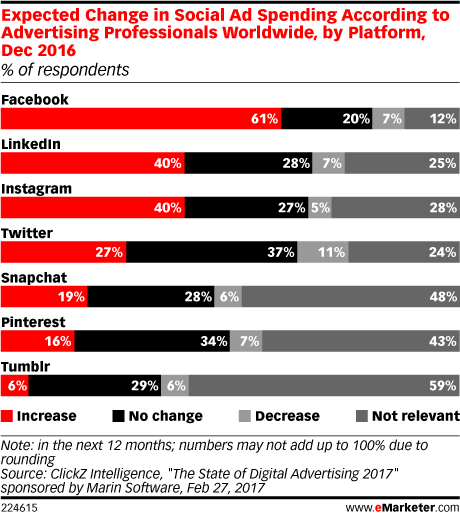
Perhaps it’s no surprise, then, that close to two-thirds of advertisers worldwide plan to increase their Facebook advertising spend in 2017.
Facebook ads
With your competitors already seeing meaningful results from Facebook ads and increasing their spend, it’s high time to develop a Facebook advertising strategy of your own.

Types of Facebook ads

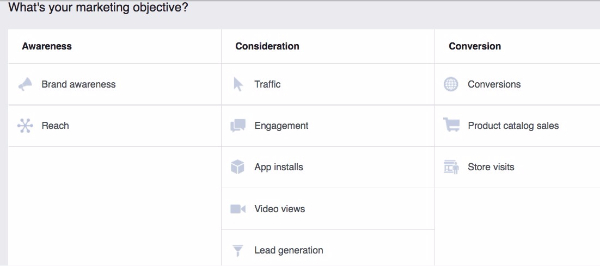
Facebook offers 10 campaign objectives based on what you want your ad to accomplish. For each of those objectives, you can choose various ad formats based on your chosen goal and target audience.
Before we dig into some specific Facebook ad examples and the technical requirements for each format, let’s take a quick look at how the different types of Facebook campaigns align with business goals:
  • App installs: Encourage installations of your mobile or desktop app.
  • Brand awareness: Introduce your brand to a new audience.
  • Conversions: Get people to take a specific action on your website (like subscribe to your list or buy your product).
  • Engagement: Expose a post to a wide audience to increase the number of Likes, comments, shares, or photo views; increase your number of Page Likes; promote an event.
  • Lead generation: Get new prospects into your sales funnel.
  • Reach: Expose your ad to as many people in your audience as possible.
  • Product catalog sales: Connect your Facebook ads to your product catalog to show people ads for the products they are most likely to want to buy
  • Store visits: Drive customers to brick-and-mortar stores.
  • Traffic: Drive traffic to a specific webpage.
  • Video views: Show your video to a large audience to increase brand awareness.
This video provides more details about the campaign objectives.

Facebook ads: Guidelines and examples

Now that you understand the various Facebook campaign objectives, let’s explore the various Facebook advertising formats.

Photo Facebook ads

  • Facebook ad specs: One image plus text
  • Campaign types: All except video views
  • Facebook ad image sizes: 1200 x 628 pixels
  • Text limit: 90 characters
  • Headline text limit: 25 characters
Note: Since Facebook doesn’t want people’s newsfeeds to be filled with text-heavy images screaming for attention, you need to keep your text overlays to less than 20 percent of your image. (This also applies to video thumbnails.) In fact, the less text there is on your image, the more widely it will be distributed. Use this tool by Facebook to check if your images contain less than 20 percent text.
Simple photo ads don’t have to be boring. Dallas bookstore The Wild Detectives used photos ads with clickbait-style headlines to trick people into reading classic literature.
The strategy worked like gangbusters: the bookstore saw a 14,000 percent increase in site traffic, and the campaign won a 2017 Facebook Award.

Video Facebook ads

  • Facebook ad specs: One video plus text
  • Campaign types: All
  • Facebook ad image sizes (thumbnail): Minimum width 600 pixels; match length to video aspect ratio
  • Text limit: 90 characters
  • Headline text limit: 25 characters
  • Facebook ad dimensions: Video aspect ratio of 16:9 (full landscape) or 1:1 (square) for all objectives; other aspect ratios available for specific campaign types
  • Maximum video length: 120 minutes
Video ads can create massive engagement—if they’re done right. A video about bread could be, well, a little boring. Not this one! At the time of writing, this Facebook video ad for Dave’s Killer Bread had more than 2,500 shares and more than 1,200 comments.

Slideshow Facebook ads

  • Facebook ad specs: A video automatically created from up to 10 still images
  • Campaign types: All except post engagement and product catalog sales
  • Facebook ad image sizes: 1280 x 720 pixels
  • Text limit: 90 characters
Activewear company Carbon38 found that compared to Facebook photo ads, Slideshow ads saw an 85 percent increase in return on ad spend and had a 40 percent higher click-through rate.

Facebook Carousel ads

  • Facebook ad specs: Up to 10 photos or videos plus text
  • Campaign types: All except post engagement and product catalog sales
  • Facebook ad image sizes: 600 x 600 pixels
  • Text limit: 90 characters
  • Headline text limit: 40 characters (for images) or 25 characters (for video)
  • Maximum video length: Two minutes combined
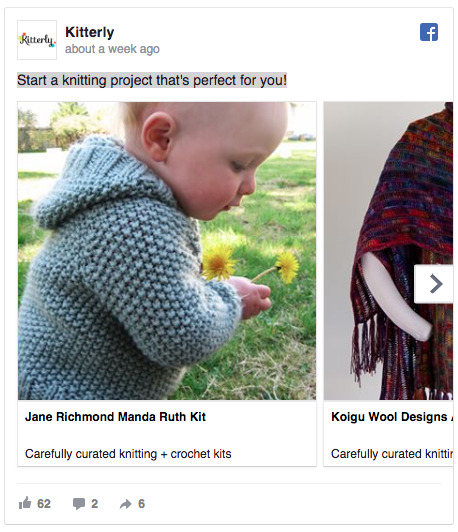
The knitting and crochet supply site Kitterly uses Carousel ads to retarget potential customers with products they have already viewed on the Kitterly website, resulting in a 3.4 times return on ad spend.
Facebook advertising

Facebook Collection ads

  • Facebook ad specs: A mobile-only ad format that showcases multiple products or features
  • Campaign types: Conversions, traffic
  • Facebook ad image sizes: 1200 x 628 pixels
  • Facebook ad dimensions: Video aspect ratio of 16:9 (full landscape) or 1:1 (square)
  • Headline text limit: 25 characters
  • Maximum video length: 120 minutes
When MeUndies launched a Collection ad, it increased its conversion rate by 40 percent.

Facebook ads

Facebook Canvas ads

  • Facebook ad specs: An immersive ad format incorporating text, up to 20 photos, and video
  • Campaign types: Brand awareness, conversions, engagement
  • Facebook ad size: Full screen
  • Facebook ad image sizes: 66 x 882 pixels (header); 1080 x 1920 pixels (full-screen image)
  • Text limit: 500-character text bock
The Montana Office of Tourism Development used Canvas to highlight the region’s stunning scenery and ski destinations and increased their click-through rate by 7.5 times.

Facebook Lead ads

  • Facebook ad specs: A pre-filled lead form that makes it easy to connect people with your business
  • Campaign types: Lead generation
  • Facebook ad image sizes: 1200 x 628 pixels
  • Headline text limit: 45 characters
  • Button text limit: 25 characters
Maserati USA used lead ads to collect 21,000 leads, resulting in sales of 127 vehicles.

Facebook ads

For more great example of Lead Ads in action, check out our blog post on seven smart ideas to grow your business with Facebook Lead ads.

How to advertise on Facebook: Placing your ad

If you already have a Facebook business page (and you should), you can head straight to the Facebook Ads Manager to create your Facebook ad campaign. If you don’t yet have a business page, you’ll need to create one first.

Step 1: Choose your campaign objective

Choose your campaign objective based on the most important metrics for your business and your goals for this particular ad.
Keep in mind that for conversion-oriented objectives you can pay per action, but for exposure objectives you will pay for impressions.
Facebook ads guide

Step 2: Target your audience

Remember: Effective targeting is key to maximizing ROI—and there’s no shortage of ways to target your audience on Facebook. In addition to targeting by location, gender, and online behaviors, you can hone your audience based on the following:
Connections: You can target people who are either connected or not connected to your Facebook Page. If you want to reach a new audience, under Detailed Targeting, choose select “Exclude people who like your Page.” If you want to promote an offer or new product, select “People who like your Facebook Page” to reach people who already know your brand.
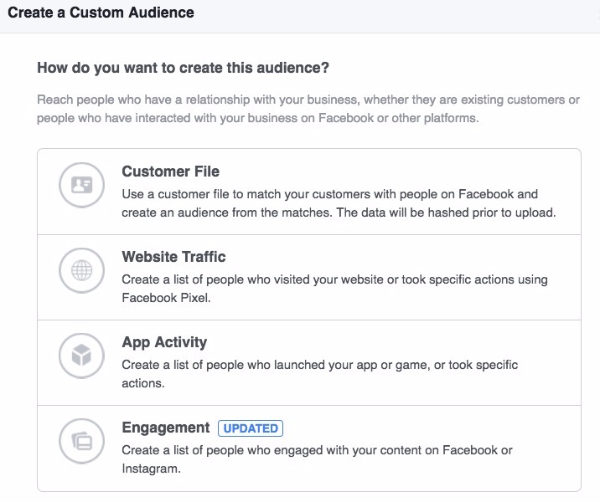
Custom Audiences: You can build your own audience of people who have already interacted with your business on or off Facebook. Facebook has a good step-by-step guide on how to do this.
Facebook advertising
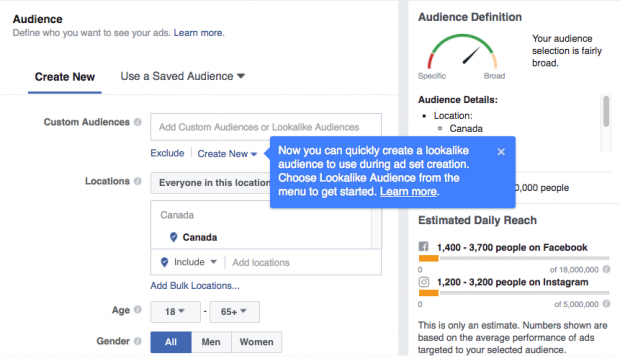
Lookalike Audiences: This lets you target people who are similar to your existing most valuable audiences. Here’s how to set-up a Lookalike Audience.
For advanced Facebook ads audience research and targeting tactics, check out this video:
As you make your selections, keep an eye on the meter on the right side of the page, which indicates the breadth of your audience selection, and the estimated daily reach chart.
Facebook ads

Step 3: Set your budget and schedule

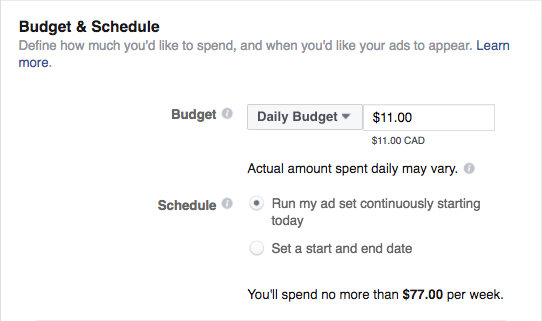
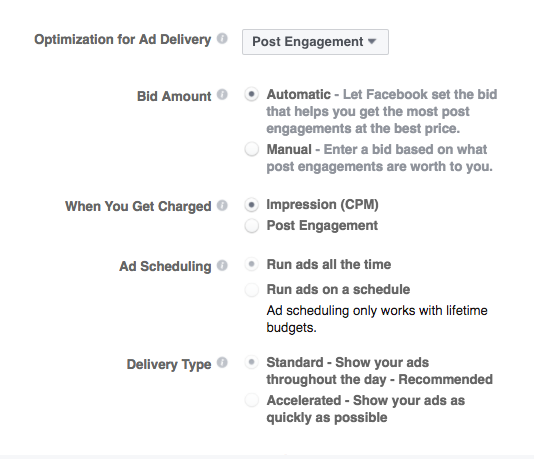
Next, you decide how much money you want to spend on your Facebook ad. You can choose a daily or lifetime budget, then set the start and end dates if you want to schedule your ad in the future, or choose to place it live right away.
Facebook ads guide
You can get into pretty fine detail about how you want to spend your money using the advanced budget options.
Facebook advertising guide
Keep in mind that running your ad on a schedule may be the most efficient way to spend your ad budget, since you can choose only to serve your ad when your target audience is most likely to be on Facebook.

Step 4: Create your Facebook ads

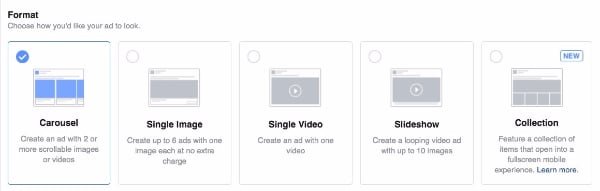
One option is to promote an existing post. If you would prefer instead to create a new ad, first choose your ad format, then enter the text and media components for your ad. Making sure you conform to the Facebook ad image sizes mentioned above for each format.
Facebook advertising
Use the preview tool at the bottom of the page to make sure your ad looks good for all potential placements (mobile, desktop news feed, right column, and so on). When you’re happy with your choices, click the green Confirm button to submit your order, then wait to get an email from Facebook notifying you that your ad has been approved.
Bonus: Download a free guide that teaches you how to turn Facebook traffic into sales in four simple steps using Hootsuite.

Facebook advertising tools

Hootsuite Ads

Rather than placing each ad manually, with Hootsuite Ads, you can create and test hundreds of ads in minutes, automatically boost budgets based on performance triggers, and control who can create and edit campaigns.
You can also choose organic posts to promote directly within the Hootsuite dashboard, so you can extend the reach of your best-performing content.

AdEspresso

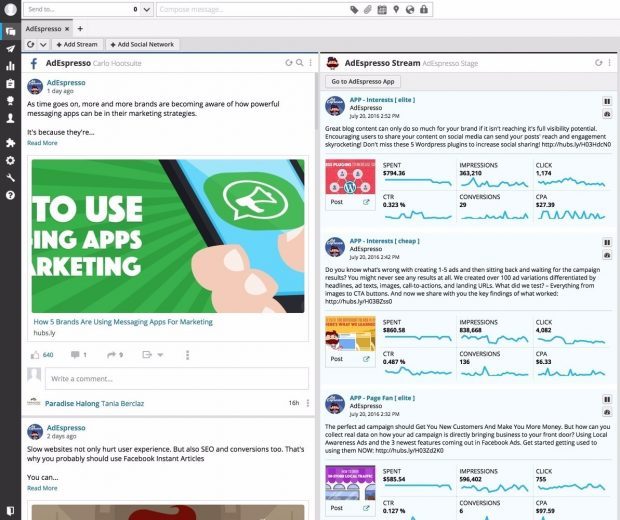
While Hootsuite Ads is an enterprise-grade solution, AdEspresso by Hootsuite is a self-serve social ad management solution designed specifically for small and mid-sized organizations. It also allows you to create ads and monitor the results directly from the Hootsuite dashboard.
Facebook ads guide

Facebook ads best practices

Keep these important strategies in mind to make the most of your Facebook advertising efforts.

Experiment with audience targeting

Start with a narrow audience and then broaden it slowly by adding one interest category at a time. For example, you could start with an audience specifically interested in “Napa Valley wine tours” and then broaden after a few weeks, adding “wine tasting,” “food and wine,” and so on. That way, you’ll have a good idea of what’s moving the needle.
If you have a local business, you can target your audience by zip or postal code. This is also helpful if you know a particular city or neighborhood converts well.
PRO TIP: Mikie Basi, a digital marketing strategist at Hootsuite, offers this advice: “Always test different types of targeting to find the best audience for your products. Experiment with interest categories, friends of followers, and website audience lookalikes. Run them in separate ad sets to determine which is the top performer.”

Rotate your ads regularly

“Ad fatigue”—or reduced engagement—can occur when people see the same ad too many times. Rather than bombarding your audience with the same ad over and over, switch it up so they are exposed to different elements of your brand offering. Facebook recommends switching your ad once every one to two weeks.

Test everything

Facebook ads are a perfect venue for learning what resonates best with your audience, from ad format to image style to hashtags to length of copy and tone of voice. Since testing is such an important topic, we’ve got a whole guide on how to do it.

Use a Facebook Pixel

A Facebook pixel is a small piece of code that can have a big impact on your Facebook advertising campaigns. Once you place the code on your website, it will allow you to track conversions, remarket to people who have viewed a product on your website, and create lookalike audiences.
We’ve got a blog post to help you get set up with the Facebook pixel: The Facebook Pixel: What It Is and How to Use It.

Include a call to action

You know what the goal of your Facebook ad is—but do your viewers? Including a call to action (CTA) ensures that the people who see your ad understand what the next step is in developing a relationship with your company. Check out our guide on how to create effective CTAs.

Use top-notch photos and video

You know what’s a turnoff? Blurry photos. Or pixelated photos. Or jumpy videos that make you feel motion sick. Your words are important, sure, but your visuals are what will first grab viewers’ attention and create the first impression.
Make sure you comply with the Facebook ad image sizes for each format, specified above, for the best results. These free stock photo websites can help you source high-quality images to use in your ads.

If you sell a product, Facebook recommends that you try using photos showing people using and benefitting from your product, rather than an image of the product all by its lonesome.

Facebook advertising campaign ideas

Raring to go but not sure what you should promote with your Facebook ads? We’ve put together three campaign strategies to get your started.

Facebook advertising strategy 1: Collect an email

Unless you’re a marketing magician, it’s pretty hard to get people to buy from you the first time you wave to them in a Facebook ad.
For products that take longer to sell, email is your best friend. Facebook makes it pretty simple to collect new email leads. With software such as MailChimp, you can send out automatic emails (say, one email every few days). This helps you build trust and introduce people to your brand before you pitch your product.
STEP 1: In Facebook Ads Manager, choose “Lead Generation” as your campaign objective.
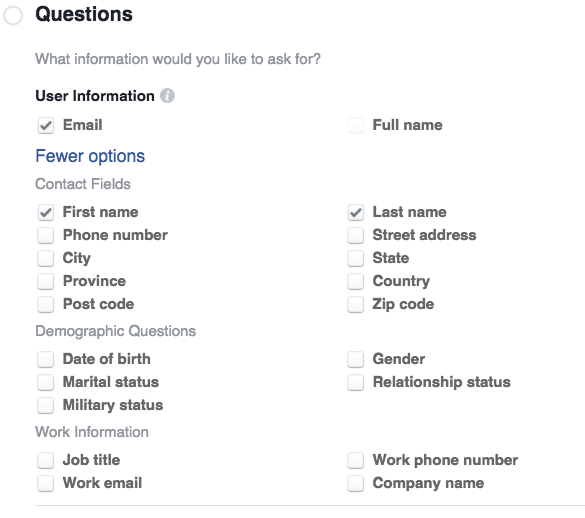
STEP 2: When you create your lead form, choose fields that align with the fields on your email list. Keep it simple: first name, last name, and email address.
Guide to Facebook advertising
STEP 3: Use the tool Zapier to automatically send email sign-ups from your Facebook campaigns to your email provider, such as MailChimp. You’ll need to sign up for a Zapier account and connect Facebook to Zapier. Here’s a step-by-step guide for MailChimp users.
STEP 4: Do a quick test to make sure data is passing between Facebook and MailChimp.
STEP 5: Launch your ad campaign and watch the emails come rolling in. If you want to get more sophisticated, you can set up a custom automated email sequence in your email provider for Facebook leads. Below is a quick email strategy to use. You can sequence these emails a few days apart:
Automated Email No. 1—Share something really valuable that connects to the problem your product solves (example: a food truck could share a map of all the best restaurants in the city). No product pitch. Just value. You’re training prospects to open your emails.
Automated Email No. 2—Tell an interesting story that connects to your product. For example, the food truck could talk about how they couldn’t find a good Pho/Italian fusion restaurant and so quit their corporate jobs and created their food truck, Pho Get About It.
Automated Email No. 3—Share another valuable resource (such as five mistakes people make when cooking spicy chicken at home). No product pitch.
Automated Email No. 4—Make an offer such as a discount for their first visit.
Automated Email No. 5—Make the same offer again but tell an interesting and useful story as the lead.
The goal is always the same: train people to open your emails by offering valuable content and then make the occasional product pitch.
The Milwaukee Bucks NBA team used this strategy to boost its season ticket sales. The team ran lead ads targeted to Custom Audiences of past season ticket holders, fans of their Facebook Page, and other existing leads.
They also used lookalike audiences modeled on current season ticket holders, while excluding current ticket holders so they would not waste ad exposure on people who had already purchased their tickets.
Finally, they used interest targeting (sports fans) and location targeting to make sure people who saw the ads would be interested in the team and able to make it to the games if they bought tickets.
The collected leads went directly into the team’s CRM and kicked off a series of emails. After the email series, sales reps followed up in person with those who had not bought tickets.
The results? The team saw a 25 percent higher email open rate than usual and more than double their usual email click-through rate, with 33 percent of leads buying the advertised ticket packages and 20 buying upgraded tickets.

Facebook advertising strategy 2: Convert a proven piece of content into a video ad

Every brand has a few killer pieces of content that drive the lion’s share of traffic each month. Adapting that content into a short video aimed at Facebook audiences can be a great way to repackage top content for Facebook ads.
STEP 1: Distill the key ideas from your content piece into a few key points you can express in a few words each, or think about ways to convey the same key messages through your visuals. Make sure your call to action matches your video content.
STEP 2: Use one of these social video tools to create your video, or create a slideshow video ad in Facebook Ads Manager.
STEP 3: In Facebook Ads Manager, select “Video Views” as your campaign objective. Upload your video directly to Facebook and push the campaign live.
Repurposing great blog content as social video is a favorite strategy at Hootsuite, so you can see lots of great examples on the Hootsuite Facebook Page. For instance, our video team repurposed this blog post on how to optimize Facebook video to play without sound into the following Facebook video:
PRO TIP: What types of videos work best on Facebook? How can you take someone from a video view to a lead or sale? We created a video strategy kit for marketers, showing what types of videos work best on social media and what to measure.

Facebook advertising strategy 3: Drive a direct sale

If you have a good product, there’s no reason why Facebook can’t generate direct sales. But when asking for a direct sale, you need trust—so if you’re an unknown brand with an untested product, it’s probably best to test the first two Facebook advertising strategies first.
If you’re confident that people will buy your product directly from a Facebook ad and you have a proven product with sales, test this strategy and be sue to measure your results.
STEP 1: In Facebook Ads Manager, select “Conversions” as your campaign objective.
STEP 2: Next, Facebook will ask you which type of conversion event you want to track, such as adding products to a shopping cart or adding payment information. Since you’re trying to drive a direct sale, select “Purchase.” You’ll need to install a Facebook Pixel to track a visitor from your Facebook ad all the way through your shopping cart process to purchase.
STEP 3: Create your ad with simple and clear copy. What do you offer and how is it different? Give people a reason to buy from this specific ad. For example, maybe you bundle another product as a freebie, or include a training webinar. You want people to stop what they are doing and click from your ad to your shopping cart.
STEP 4: Wait and track. Give your campaign at least two weeks before making any changes to copy or creative. Depending on your traffic volume, this should give you enough data to make an educated decision about what’s working, or what changes you might want to test.
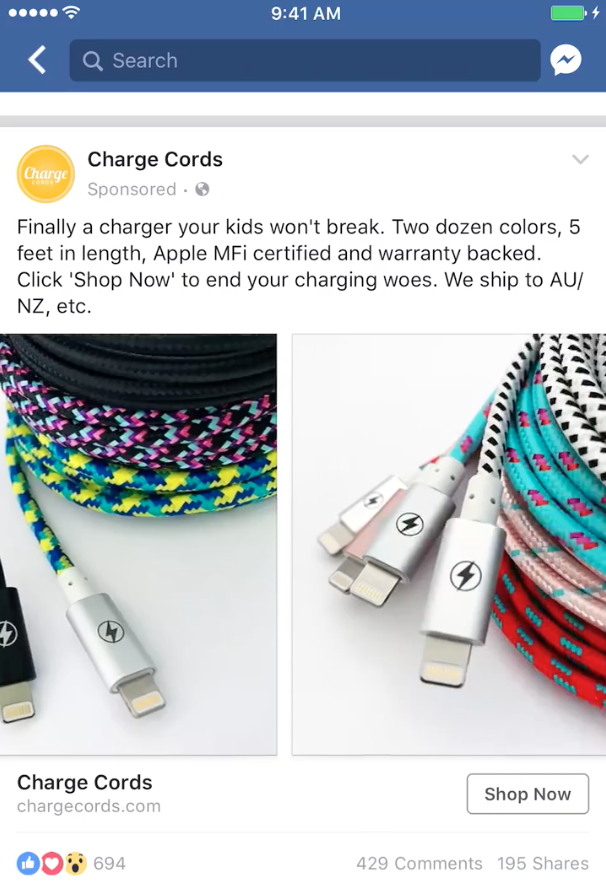
Charge Cords used Facebook ads to drive direct sales from new customers, using Custom Audiences to exclude people who had already bought from them in the last six months. They used Carousel ads with eye-catching product shots and compelling ad copy, along with a Shop Now call-to-action button. As the campaign continued, they updated the Custom Audience to target people who had visited the Charge Cords website.
Facebook ads guide
The campaign resulted in a four times increase in sales from the targeted countries, and a four times return on ad spend.
PRO TIP: With remarketing, you can serve Facebook ads to people who have already visited your website. Your ads could include enticing offers, product recommendations, or funny reminders to complete their purchase. We cover remarketing with the Facebook pixel in our blog post on surprising ways to optimize your Facebook ads.

The Top Social Media KPIs Marketers Can’t Ignore

The Top 26 Social Media KPIs Marketers Can’t Ignore

How do you measure social? If you’re a social media marketer, it’s pretty much guaranteed that your boss has asked you to provide results showcasing your efforts. You might have initially been baffled as to how you would measure values such as awareness, what your customers think of your brand, or how your efforts are impacting the bottom line, but thankfully this is where KPIs, or “key performance indicators,” come to the rescue. In recognizing valuable KPIs, you are able to track not only your successes, but campaigns that perhaps missed the mark.

Key Social Media KPIs to Track

In monitoring and measuring your KPIs, you are able to focus your attention and efforts in order to optimize all of your resources to those most valuable to your organization. However, it can be difficult to know where to start when wanting to zero in on your social media measurement strategy, so to help you know what to look for, we’ve rounded up a list of suggested KPIs you can tailor to suit your business goals.

Social Media Presence

The first area you want to examine and measure is your brand or organization’s social media presence. How prominently does your company appear on social? How many people are talking about your organization, product, or service? These questions can all be answered by taking a look at the following KPIs.

1. Followers and fans

These are the easily measurable numbers of social media users who have subscribed to your account so they can see your content on their feed. Instagram and Twitter see followers, where Facebook business pages will have fans.

2. Number of mentions

A mention is “the act of tagging another user’s handle or account name in a social media message.” In measuring the number of mentions your brand is getting on social media, you are able to not only monitor conversations surrounding your company, but get a good indication of your company’s overall reach.

3. Reach

As our 2015 Social Media Glossary explains, “Reach is a data metric that determines the potential size of audience any given message could reach. It does not mean that that entire audience will see your social media post, but rather tells you the maximum amount of people your post could potentially reach. Reach is determined by a fairly complex calculation, that includes number of followers, shares, and impressions as well as net follower increase over time. Reach should not be confused with Impressions or Engagement.”

4. Inbound links

This is in reference to the number of links back to your blog or website you are getting from quality references. As Vital explains, “Link building should be a cornerstone of your SEO strategy. When someone links to your website it means you’re building your street cred within your given industry.” Hubspot echoes these sentiments, explaining that marketers must “keep track of your average inbound links so you can keep tabs on the quality of your content (more important than ever in the eyes of Google) and thus, your inbound links’ impact on your search authority.”

5. Blog subscribers

As a key component of your content marketing strategy that goes hand in hand with your social media efforts, your brand’s blog offers a great way to track overall success. As Hubspot describes, “There’s a direct correlation between the number of email subscribers you have and the amount of email traffic you generate to your blog. If you haven’t put a lot of effort into generating email subscribers, you’re sitting on a gold mine of opportunity.”

Social Media Engagement

While numbers reflecting your social media presence are valuable, knowing how engaged your audience actually is usually says a lot more about the success of your social media campaign. The following KPIs offer insight into your engagement levels and will also reveal areas where you could possibly improve.

6. Retweets

Retweets are “your Tweets forwarded by people who follow you to their own network of followers. This gives you the opportunity to reach more people who may think your content is valuable. That new network of Twitter users who are exposed to your Tweets have the potential to become a part of your primary network if they come back and follow you.”

7. Social shares

Like retweets, shares “take your content to the next level by spreading it across networks that you are not directly connected to. This allows you to increase social media engagement and brand awareness.”

8. Comments

While pretty self-explanatory, comments are messages and feedback left by other users, and a great way of tracking your audience’s general sentiment and feedback.

9. Referral traffic

Measuring referral traffic is a way of monitoring the amount of traffic going to your website or blog from your social media channels.

Social Media Reach and Influence

If a social media post doesn’t get a single like, does it still exist? Your message could be the most beautifully crafted piece of content on the face of the planet, but if nobody’s there to witness or engage with it, you are missing out on great opportunities for growth and reach. The following important KPIs will help you measure these areas, and ensure that your content doesn’t go unnoticed.

10. Share of voice

Share of voice is a metric for understanding how many social media mentions a particular brand is receiving in relation to its competition. Usually measured as a percentage of total mentions within an industry or among a defined group of competitors.”

11. Net promoter

As our 2015 Social Media Glossary explains, “A customer loyalty metric that is based on the following question: “On a scale of zero to 10, how likely is it that you would recommend our company, product, or service to a friend or colleague?” People who respond with a nine or 10 are designated as “promoters”; a seven or eight as “passives”; and a six or lower as “detractors”. The percentage of customers that are detractors is then subtracted from the percentage that are promoters to arrive at the company’s NPS.”

12. Sentiment

“An attempt to understand how an audience feels about a brand, company, or product based on data collected from social media. It typically involves the use of natural language processing or another computational method to identify the attitude contained in a social media message. Different analytics platforms classify sentiment in a variety of ways; for example, some use ‘polar’ classification (positive or negative sentiment), while others sort messages by emotion or tone (Contentment/Gratitude, Fear/Uneasiness, etc).”

13. Number of social influencers

With a social media influencer being “a user who can reach a significant audience and drive awareness about a trend, topic, company, or product,” the number of influencers your brand has working with you is a good indicator of popularity and overall success. If people want to work with you and represent your product or service, there’s a good chance you’re doing something right.

14. Post reach

This is the number of users who see a specific social media post.

15. Potential reach

As defined by Facebook, potential reach is those who “match the audience you defined through your audience targeting selections.”

16. Video views

Thanks to the inherent qualities in many video hosting platforms, video views are an easy-to-measure KPI and usually can be seen and monitored by anyone. However, as Rocky Walls at Convince and Convert explains, “If you have a CTA in your video and its purpose extends past a viewer simply watching the video, then judging the successfulness of the video should involve more than simply checking the number of views you have.”

Action and ROI

Once your content is out there, it’s important to measure whether your social media efforts are resulting in your desired outcomes. What are the actions you want your audience to complete, upon seeing your message? What are your business goals and objectives? While having users see your message in the first place is half the battle, it’s imperative that you’re seeing tangible results from your strategy. These KPIs offer ways to measure whether your messages are making their mark.

17. Conversions

As our Social Media Glossary defines, “In social media marketing, a conversion is a positive action that is taken on a website by a visitor from social media. The action demonstrates that the visitor is “converting” into a customer. Sales aren’t the only type of conversion; many websites measure webinar registrations, newsletter signups, content downloads, and other important outcomes that ultimately lead to a sale. Tracking conversions is crucial to properly attributing revenue to social media.”

18. Sales revenue

It’s probably safe to say that one of your business objectives is to increase revenue, and it goes without saying that sales revenue is the way to measure this. It’s important to know how your social media efforts are affecting your bottom line, and sales revenue is a way to pinpoint this. Dylan Kissane at Doz suggests, “When you close a sale, find out how the customer found out about you: a TV commercial, a Facebook interaction, word of mouth, or some other way.”

19. Issues resolved

If one of your business objectives is to improve customer service through social media, a great way to measure the progress here is through the number of issues your organization resolves. As Visually explains, “More people are turning to social media channels for issue resolution than ever before. In fact, 72 percent of customers expect complaints made on Twitter to be answered in an hour. Collect data on how people come to you for help or troubleshooting to make sure the busiest channels are monitored and staffed appropriately.”

20. Cost per lead

With your business depending heavily on leads, it’s important to know how much each one is costing you. Klipfolio provides a thorough definition of the term, explaining that “the purpose of this metric is to provide your marketing team with a tangible dollar figure so they understand how much money is appropriate to spend on acquiring new leads.”

21. Lead conversion rate

Once your business has the leads, the natural focus is to turn these leads into actual customers. The lead conversion rate measures the number of leads who actually convert to executing the action you desired of them. Kissmetrics offers a great guide to optimal lead conversion , including the easiest way to track this metric in Google Analytics.

22. Customer lifetime value

Earning the trust and loyalty of customers can be one of the trickiest things for an organization to conquer. It also seems like perhaps one of the more difficult KPIs to measure. However, it’s important when evaluating your business to have a general idea of the revenue a customer will generate for your business in their lifetime. , Kissmetrics has an article that explains how to do calculate your customer lifetime value (CLV) in the simplest way possible.

Internal KPIs

While it may be tempting to concentrate on the KPIs determined by your customers and audience, your organization’s internal measurement tactics are just as important. Recognizing the output of your employees and business overall makes it easier to leverage your resources and keep track of where time and energy is being devoted. In having an overall perspective of what your content team is producing, you have a much better chance of streamlining the process and offering your audience both quality and consistency.

23. Blog posts

If a blog is a part of your content strategy, take a look at how many blog posts you or your team is producing per week. It’s important to take into account how many hours go into the creation of a single blog post, and how many of these your brand is posting per week. What are the returns being seen on each blog post? Consider all of these factors when determining whether your team is concentrating on the most effective strategies.

24. Videos

With video the social media trend to watch in 2016, and with “the number of video posts per person increasing 75 percent globally and 94 percent in the U.S,” it’s a smart idea to dedicate time and resources to making video a top priority in your social media strategy. However, the creation and editing of video can easily become a timely endeavor, so it’s especially important to track how many hours your team is dedicating to this. How many videos are you sharing through your social media channels per day? Is the ROI worth it?

25. Social media posts

The number of social media posts your brand is posting per day is probably one of your key internal KPIs. You want to keep this consistent so that you remain top of mind for your audience, but you definitely don’t want to overwhelm them with a barrage of constant posts. Finding the best number of posts for your organization may take some trial and error, but through keeping track of what works, and what doesn’t, you will quickly find a number that works for you.

26. Social media budget

This is probably one of the KPIs most important to your manager. You will obviously want to set goals and keep a close eye on how much budget you are setting aside for social media. If you find that you are spending more than you or your boss would like, our blog post on how to decrease your social media budget can provide some guidance.

Friday, July 7, 2017

101 The Definitive Guide to Content Curation: Strategies, Tips, and Tools

Image result for The Definitive Guide to Content Curation: Strategies, Tips, and Tools


Many of us are curating content without even thinking about it.

We’re sharing that quirky New York Times article on Facebook. We’re quoting celebrity tweets and making funny (well, funny to us) quips on Twitter.

What is content curation?

Content curation is all about mining the internet for material that can be shared on your social networks. It’s about finding great content and presenting it to your social media followers in a way that’s organized and meaningful.
The thing is, you’re probably not thinking strategically when you’re scrolling through your phone and posting from bed in the morning.
Content curation strategy is what makes the difference between mediocre and exceptional content curation in business.
Strategy is a must when it comes to content marketing, which includes content curation.

Content marketing vs. content curation

Content marketing is all about getting material out into the world that helps strengthen your brand in one way or another. That could mean writing blog posts, making YouTube videos, or Snapchatting Stories.
But it takes a lot of creative juice to constantly make new things while still keeping up with the demands of a business.
And that’s where content curation comes in.
It’s all about finding something that stands out online instead of creating something new.

Why should brands curate content?

1. It alleviates the pressure to create

You might not have the time to make enough fresh content to keep the conversation going on social. Content curation helps fill that need.

2. You lessen the ‘me, me, me’ factor

When someone’s talking about themselves all the time, it gets old real quick. Curated content helps with that.

3. Online networking opportunities

UpContent’s Marissa Burdett says that sharing curated content can help you make connections with leaders in your industry. She also explains that it could spark conversation with your social media audience in general.

4. You become seen as thought leader

If you’re sharing posts about the latest trends in your field, it shows that you’re engaged on a deeper level.

5. Grow your business

Braveen Kumar writes all about this in a Shopify blog post on using content curation to grow your ecommerce business. This can happen through things like strengthening your email list and defining your brand online.

How to curate content

If you’re worried about this whole mining-the-web thing, there’s no need to be. You’re not in the dark with one headlamp. You have a whole mining crew, thanks to a variety of content curation tools, which we will get to later.
The steps in this article will help you master content curation like a ninja.
First you’ll need to figure out what topics you want to search through using these tools. Once you find material, you’ll have to decide what to share.
Here’s a list of questions to help you with that:
  • Is this content on brand? Is there a reason why my company would share this? You’ll need to know your target audience to decide on this.
  • Can I trust the source?
  • Is it offering something unique to my readers?
  • Is it entertaining or useful in some way?
You also need to schedule these posts in an appropriate way so that you’re offering variety to your readers.
When you’re doing this, you should think about the so-called Social Media Rule of Thirds:
  • One third of what you share should be about personal brand promotion.
  • One third should be curated content.
  • One third should be about the conversations that are happening on social.

Content curation best practices

Read, watch, listen

There are so many services that help you find material, but you need to check it all out before you share it.

Ensure it’s relevant

If it’s not relevant to your business in some way, quash it. An article from Search Engine Journal says you should ask yourself the intent behind each of your posts.

Make sure it’s trustworthy

Find things that are come from reputable sources that you can trust.

Personalize

You need to bring a piece of you to what you’re sharing. You could tell readers why they might be interested, or add some sort of value to the piece.

Provide value

What you share must be interesting or entertaining to your audience.

Mix up what you post

Share different perspectives from your niche.

Schedule your content

Use a content calendar to map out what you’re going to post. You can also use a program such as Hootsuite to schedule your posts so you don’t have to remember to post throughout the day.
Cathy Habas, the managing editor for Coquí Content Marketing, advises: don’t schedule too far in advance because you want curated material that’s topical.

Give credit

You need to credit the creator of the content you are sharing wherever possible. That could mean using an @mention in a tweet, or tagging them in a Facebook post, for example.

Engage in social listening

You should be looking to see what’s working and not working when it comes to your content curation. Christina Newberry wrote a Hootsuite blog post about social listeningthat could help you figure this out.
For more on content curation best practices, check out this video from Hootsuite Academy.

Learn how to get even more out of Hootsuite with free social media training from Hootsuite Academy.

Content curation tools

Here are some of the tools that are out there to help businesses with social media content curation.

BuzzSumo

BuzzSumo lets you search the most shared content on a specific topic in the last few hours, or months. You can see the top 10 influencers for a topic and what they’re sharing.
Buzzsumo ranges in price from $79 monthly to $559 monthly, with cheaper rates if you purchase by the year.

Right Relevance

This service finds relevant content and influencers in a field, and gives them a score and a rank… So if you’re into numbers, it could help you decide what to share—and who to share it from.
Right Relevance starts at $500 per month.

RSS readers (like Feedly)

With programs like Feedly, you can follow your favorite feeds and organize articles in one spot. You can also keep track of internal information, and when your business is mentioned online.
The cost ranges from free to $18 monthly.
If you use Hootsuite to manage your social media presence, you can add an RSS feed to save yourself time curating content.

Hootsuite

Beyond RSS integrations, Hootsuite is a great tool for content curation as it allows you to keep track of and organize your social media feeds by network, topic, keywords, hashtags, Twitter lists, and more.

Reddit

Reddit is an online community where posts get upvoted or downvoted. You can follow specific interests, called subreddits. People also comment on these posts, which could help you understand your niche—and what posts resonate with that audience—better.

UpContent

UpContent uses an algorithm that pulls news articles and blog posts for you based on things like social influence and recency. Then you can curate that content on your site by using the UpContent Gallery tool.
UpContent ranges from free to $10 per month.

Pocket

Pocket is a place to put things you find on social. So you can stop texting and emailing stuff to yourself to keep track of it (and losing it anyway).
Plans range from $4.99 a month to $49.99 a year.

Scoop.it

Scoop.it lets you find things and put them together in a topic hub page that can be shared. You could also publish this curated content elsewhere, such as your blog. For individuals, this service ranges from free to $67 yearly.

Sniply

Sniply is all about what’s called a call to action (CTA). When you use Sniply to reshare something that directs followers to another site, a little box pops up on that webpage with a message from you. That message could include your web address.
Sniply ranges from $29 to $299 a month.

Curata

Curata listens to what you’re interested in and provides you with sources based on that. You can also crowdsource material from across your business.
Then you can use Curata to publish on your website.
You can call Curata to get a quote on the service: 617-229-5529.

PublishThis

This content curation tool “indexes, tags [and] centralizes content from the web’s best sources,” according to its website.
There’s no price listed, but there’s a forum on the website to get in touch.

Trapit

Companies can put their own social marketing content on Trapit, and pull in other content to curate. This can be sent to employees to share with customers. There’s also an analytics system that measures how well it does.
You will need to contact the company to get a cost quote.

Saturday, July 1, 2017

101 Social Media Audit Template and Guide for Marketers

Image result for Social Media Audit

Conducting a social media audit is a key part of a social media marketing plan. This assesses how well your current social media use works for you.

There are a number of different steps involved in this process, so we have put together a social media audit template to help you conduct your first (or second, or third…) one more efficiently.

What is a social media audit?

A social media audit is a regular examination of social channels that represent your brand—including both your business’ owned profiles and imposter accounts.
The purpose is to ensure that each of your profiles are on brand and functioning correctly, identify and shut down any rogue or abandoned accounts, and ensure that you’re using the channels that make the most sense for your brand.

A 6-step guide to conducting a social media audit

Step 1: Create a social media audit spreadsheet

Your social media audit needs a home, which is why you need a spreadsheet. As you go through these six steps, you’ll see that the spreadsheet will start automatically adding new columns.
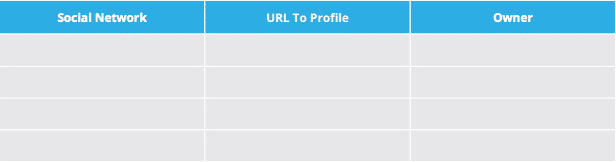
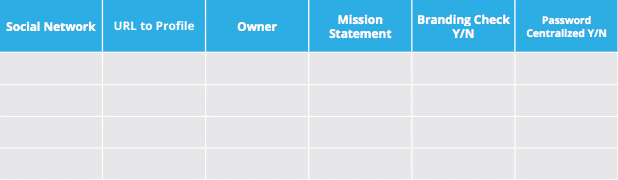
To start, create a column for each social network, URL to your profile on that social network, and owner. The “Owner” field may seem superfluous, but it’s actually really important to keep track of this information—it allows you to know who owns the password and who is in charge of posting and engaging with followers on that social profile.
A Social Media Audit Template and Guide for Marketers | Hootsuite Blog

Step 2: Go on a search for your social presence on Google

Go to Google and search your company name to see which social media profiles show up. This will allow you to see if there are any rogue accounts or imposters using your company name. It also gives you the opportunity to find out if the right social media profiles are appearing on in search results.
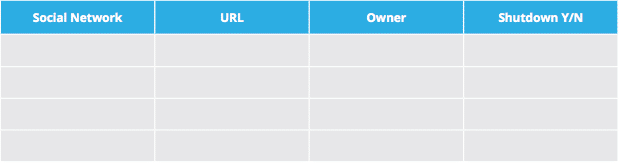
You can either create a separate spreadsheet to track the results of this search, or add a new column—labelled “Shutdown Y/N”—in the original spreadsheet. The purpose of this is to keep track of whether you need to track down an imposter to tell them to shut down their account, or contact the social network to ask them to intervene in the matter.
A Social Media Audit Template and Guide for Marketers | Hootsuite Blog

Step 3: Evaluate your social media profiles

This is an important part of your social media audit. As with your social media marketing plan, you need to constantly be evaluating your social media profiles.
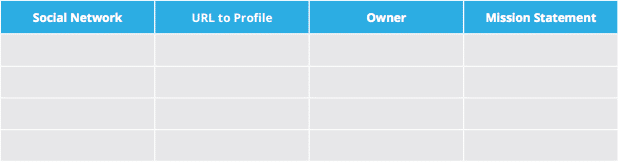
During the evaluation process, create a mission statement for each profile. Make sure each profile aligns with your business goals and objectives. This will help you decide whether being present on that social network contributes to your overall strategy and whether or not it makes sense for your business to keep that profile.
A Social Media Audit Template and Guide for Marketers | Hootsuite Blog

Step 4: Make sure your social media profiles are on brand

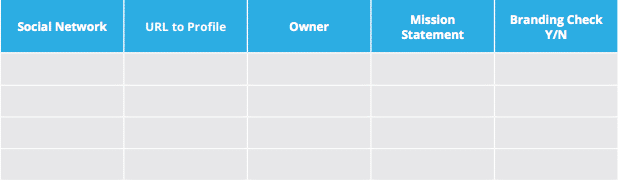
Now that you know which social media profiles you’re going to keep, it’s time to check that each of these profiles meet your brand standards for imagery, style, etc.
This means making sure you have a proper profile photo, cover image, icons, bios and descriptions, correct URL, etc.
A Social Media Audit Template and Guide for Marketers | Hootsuite Blog

Step 5: Centralize the ownership of your passwords

The process of doing a social media audit can help you make sure that all your social media profiles are secure. One way to test this is by centralizing the ownership of the passwords for each profile. For example: you can have your IT department own the key to all the passwords for the social media profiles. Then use a password managing tool like LastPass to share access on a need-to-use basis.
A Social Media Audit Template and Guide for Marketers | Hootsuite Blog

Step 6: Create a process

Once you’re done your social media audit, it’s time to take what you learned and create an internal process when it comes to creating new social profiles going forward. Create a criteria and take note of who will approve the requests.
For example, take note of:
  • The requester
  • Who the target audience is
  • What type of content will be posted to this profile
  • Who is responsible for posting and engagement
Use the information you’ve discovered through your social media marketing audit to build a more robust social media strategy. Then, put it to work using Hootsuite to schedule posts, engage with followers, and monitor your efforts.